
Call us: 262-657-5500
GigaTrak
  • Solutions
    • Tool Tracking System
    • Asset Tracking System
    • Package Tracking System
    • Document Tracking System
    • Hardware
      • Scanners
      • Printers
      • Barcodes
  • Industries
    • Contractors
    • Manufacturing
    • Business
    • Healthcare
    • Government
    • Aerospace
    • Education
  • Resources
    • Blog
    • Videos
    • Cloud Login
    • Support
    • Training
    • Sales
  • About
  • Login
    • Cloud Login
    • Client Center
  • Book  a  Demo
  • Menu Menu
Call us: 262-657-5500

Tool Tracking System: 10 Signs Your Business Needs One
in Blog

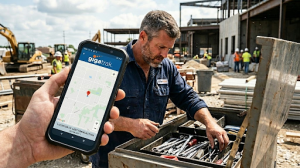
Person finds their lost tool using GigaTrak's state-of-the-art tool and asset tracking system. Shows last barcode transaction (check-in/check-out).

Discover the 10 warning signs your company needs a tool tracking system. Learn how GigaTrak stops tool loss and saves you money.
Process & Technology Solutions at GigaTrak • Reading Time: 8 mins

10 Signs Your Company Needs a Tool Tracking System

A construction crew shows up at a jobsite. The specific hammer drill they need is missing from the truck. Nobody signed it out. Nobody knows who had it last. This exact scenario plays out across jobsites every morning. It drains productivity, stalls project timelines, and destroys corporate profit margins. This is the precise moment companies realize their manual tracking methods have failed.

When your team keeps losing equipment, missing compliance dates, or digging through spreadsheets to find basic answers, your operational foundation is cracked. GigaTrak has solved these exact physical tracking issues for more than 30 years. Organizations like FDNY, Lockheed Martin, the US Army, and Virginia Public Schools rely on our tool management software solutions to maintain absolute operational control.

Why Manual Tracking Fails Growing Companies

Paper logs and basic spreadsheets work fine when you have five tools and one truck. They break down completely when you scale to multiple crews, yards, and jobsites. A worker forgets to write a name down on a clipboard. A supervisor borrows a tool from a van and forgets to mention it to the office. Nobody notices the error until an audit or an immediate jobsite need exposes the gap.

A barcode-based tool tracking system removes human error from the equation. It establishes a uniform process where every employee updates the record the exact same way. A simple scan logs the asset instantly. This structure builds an accurate tracking culture across your entire workforce.

The 10 Warning Signs Your Company Needs a Tool Tracking System

1. Tools Go Missing From Jobsites and Work Vans

When high-value equipment disappears without an active record, you have zero asset accountability. Workers leave tools behind in personal trucks, work vans, or exposed jobsites. A tool tracking system stops these phantom losses. Every item receives a durable asset tag or barcode label. Before any tool leaves the warehouse yard, a quick scan assigns financial responsibility to a specific person or project location.

2. Capital Budgets Explode Due to Duplicate Purchases

Are you buying another circular saw or generator because nobody can find the three you already own? Duplicate purchasing is a direct symptom of broken tracking. Employees assume a tool is broken or lost when it is actually sitting idle at another jobsite. Shared tracking software provides a centralized database. Your purchasing team can check corporate inventory across all locations before spending money on unnecessary equipment.

3. Crews Waste Paid Hours Searching for Hidden Equipment

When workers cannot trust that a tool will be available when they need it, they hoard equipment. They hide tools in their work vans, personal trucks, or jobsite tool cribs to secure them for the next day. This hoarding creates an artificial shortage. Other crews then spend hours tracking down specialized tools. Real-time software visibility eliminates the urge to hoard by showing exact tool availability instantly.

4. Administrative Teams Spend Days Digging Through Paper Logs

Clipboard logs have no auditable history. Pages get torn, handwriting is unreadable, and entries get skipped entirely. When a tool goes missing, managers must manually flip through weeks of paper files to find the last user. A digital tool tracking system handles this work automatically. It logs the exact time, date, and user during every barcode scan, creating a clean audit trail.

5. Incoming Deliveries and Internal Packages Vanish

Operations move more than just field tools. They handle a steady flow of supply materials, replacement parts, and critical corporate documents. Without proper tracking software, items get misplaced between the loading dock and the final internal recipient. Using your tool tracking system to scan incoming packages keeps shipments documented from the moment they arrive at reception until final handoff.

6. You Miss Maintenance, Calibration, and Compliance Deadlines

Safety compliance requires flawless record-keeping. Relying on memory or spreadsheets to track service intervals leads to skipped calibrations. This creates massive safety risks and liability issues for your business. Dedicated tool software automates compliance tracking. The system monitors usage or time thresholds and triggers alerts before a deadline passes, keeping your fleet safe.

7. You Cannot Calculate Total Cost of Ownership

Do you know the true financial return on your equipment investments? If you lack historic data on tool lifespans, repair frequencies, and maintenance costs, you are guessing. Tool tracking software collects comprehensive data on every asset over its entire lifecycle. Management can run quick analytics reports to see exactly when it makes financial sense to repair an asset versus replacing it entirely.

8. Jobsite Transfers Result in Finger-Pointing and Arguments

Moving equipment between different project sites often sparks conflict between superintendents. If a tool arrives damaged or fails to show up at all, teams blame each other. A barcode scan at the point of transfer eliminates this friction. It instantly shifts responsibility from one project manager to the next, documenting the exact handoff.

9. Your Office Processes Prevent Physical Scaling

A spreadsheet tracking system that functions for one central warehouse breaks down when you add a second or third location. Administrative workloads multiply, and communication gaps widen. A dedicated tracking system provides the stable infrastructure needed for expansion. It connects multiple warehouses and mobile crews into one system without adding massive administrative overhead.

10. Your Tracking Process Locks You Into One Label Format

Different jobsites require different hardware solutions. Delicate indoor equipment needs a standard asset tag. Heavy equipment exposed to harsh outdoor environments requires a rugged, high-durability barcode label. If your tracking software only supports one format, your operational agility is limited. A modern system accommodates hybrid hardware setups, letting you match the tag to the tool environment.

What a Tracking System Actually Fixes

Every warning sign stems from a single vulnerability: your business lacks a clear answer to where your equipment is right now. A barcode tool tracking system eliminates the mystery. It gives every asset a scannable identity.

The benefits are entirely practical. You know your tools are on the truck before it leaves the yard. You catch a maintenance issue before it causes an accident. You settle tracking disputes in seconds.

Why Organizations Choose GigaTrak

GigaTrak has engineered practical tool tracking software solutions since 1995. We do not overcomplicate your operations with useless features. We focus entirely on core execution: rapid barcode scanning, reliable check-in workflows, and clean data synchronization.

We provide both cloud-based and on-premise deployment options to match your IT infrastructure requirements. Our customer support team is entirely US-based. We help construction companies, government entities, and manufacturers move away from chaotic paperwork into a highly secure tracking database.

If your operation is ready to build real accountability and protect its capital investments, request a consultation with our team today. We will analyze your current workflow and show you exactly how our tracking software closes your operational gaps.

Frequently Asked Questions

What is a tool tracking system?

A tool tracking system is software that monitors who has an asset, where it is located, and when it must be returned. It uses barcode scans to update records automatically.

How does barcode tracking prevent tool loss?

Every tool receives a unique barcode label. Workers scan the tag during check-out, which attaches the item to their name. This process builds individual accountability.

Does the software support multiple jobsites?

Yes. GigaTrak connects multiple locations, warehouses, and mobile crews into a single database accessible from anywhere.

Can GigaTrak run on our internal servers?

Yes. GigaTrak offers on-premise deployment for strict corporate IT security guidelines, as well as cloud deployment for mobile access.

How long does onboarding take?

Onboarding depends on inventory size. Most organizations start scanning their first tools within days of receiving their tracking hardware.

Take Control of Your Assets Today

Missing equipment, broken compliance records, and duplicate tool purchases destroy your bottom line. GigaTrak provides the software, rugged hardware, and US-based support to fix these operational headaches. Request a consultation today to see our tool tracking system in action.

The Psychology Behind the “Beep” of a Barcode

in Blog

GigaTrak's high-end tool tracking software scanning a tool, giving the construction worker further accountability.How Barcode Asset Tracking Software Changes Crew Behavior With a Single Beep

Eliminate tool loss and build crew accountability with GigaTrak’s barcode asset tracking software. Request a consultation with our US-based team today.
Process & Technology Solutions at GigaTrak • Reading Time: 8 mins

Every project manager knows the feeling. A $400 tool goes missing, and nobody remembers who last had it. It did not get stolen. It got left in a truck bed, buried under materials, or tucked into a work van just in case.

Now picture a different scenario. An employee walks into the tool room, taps a badge, and scans a drill.

Beep.

That single sound changes how your crew treats company property. GigaTrak builds barcode asset tracking software to automate this accountability. For over 30 years, we have helped construction crews, government agencies, and school districts protect their inventory. Clients like the FDNY, Lockheed Martin, the US Army, and Virginia Public Schools rely on our US-based team to keep their operations accurate.

What is Barcode Asset Tracking Software?

Barcode asset tracking software is a digital inventory system that uses printed labels, handheld scanners, and centralized databases to monitor company equipment. The software assigns a unique identification number to every item in your fleet.

When an operator scans a tool, the software creates a permanent record of the transaction. The system logs three primary data points:

  • The identity of the person checking out the item

  • The exact date and time of the transfer

  • The specific location or job site where the tool will be used

This system replaces guesswork with instant data. For tool tracking, this means every wrench, drill, and electrical tester has a verifiable digital history. Your office has full visibility, and your crew has clear boundaries.

The Financial Drain of Lost Equipment

Tool loss costs your business more than the cash required to replace a single drill. The true financial impact shows up in your daily operational costs.

When a technician arrives at a job site and finds an essential testing device is missing, the entire project stops. Labor costs accumulate while workers wait. Supervisors must stop their actual work to call around, search trucks, or drive to a supplier to rent a replacement tool.

Manual tracking systems hide these costs in administrative waste. Organizations that switch to automated software typically reduce replacement purchases immediately. They also spend far less time on quarterly inventory audits because every asset has a clear history. [Link to GigaTrak Tool Tracking Software]

Clipboard Tracking vs. Barcode Asset Tracking Software

Many operations still use a paper sign-out sheet on a clipboard. This approach creates an illusion of control while allowing inventory to disappear.

Tracking Feature Paper Clipboard System Barcode Asset Tracking Software
Data Entry Speed Slow manual writing Instant scan under one second
Data Accuracy Poor due to illegible handwriting Perfect digital matching
Crew Accountability Low personal responsibility High individual accountability
Real-Time Visibility None until paper is collected Immediate updates across the network
Audit Preparation Days of manual paper sorting Minutes to generate a digital report

A clipboard gives people an easy excuse. An employee grabs a tool and assumes someone else will return it. Because the tracking system is loose, personal responsibility drops.

The scan eliminates that ambiguity. That brief audio cue confirms that the tool stopped being anonymous corporate property. It is now that specific worker’s responsibility. They know their name is tied to that serial number until they clear it from the system.

Hardened Hardware for Harsh Environments

Software is only as good as the data it receives. A tool tracking system requires hardware that survives daily field use.

Standard paper labels from an office printer tear, smudge, and peel off when exposed to field conditions. GigaTrak utilizes industrial barcode labels designed for durability. These labels feature specialized adhesives and topcoats that resist grease, moisture, chemical exposure, and heavy abrasion.

The handheld scanners match this durability. Mobile scanning devices can survive repeated drops onto concrete surfaces. They operate reliably in extreme heat, freezing temperatures, and dusty environments, ensuring your tracking data remains unbroken.

Deployment Choices: Cloud or On-Premise Servers

Different organizations have different IT requirements. GigaTrak offers two specific deployment models to fit your operational structure.

Cloud-Hosted Subscription

This model allows your team to get started quickly. The software runs on secure remote servers, and your managers can access inventory records from any computer or mobile device with an internet connection. GigaTrak handles all software updates and server maintenance automatically.

On-Premise Installation

This option allows you to host the tracking database on your own local servers. This model is critical for organizations with strict data privacy mandates, national defense contracts, or remote facilities that operate without stable internet connections. Several GigaTrak defense and government clients utilize this setup to maintain absolute data control.

How Different Industries Protect Their Inventory

Asset tracking needs vary across sectors, but the core requirement for accountability remains identical. [Link to GigaTrak Asset Tracking Systems]

Construction Contractors

Crews check specialized tools out at the main yard each morning and return them before heading home. This practice prevents expensive gear from sitting in the wrong truck bed over the weekend.

Government and Defense Agencies

Organizations like the US Army use barcode tracking to satisfy strict federal audit requirements. This system helps military units maintain absolute material readiness.

Public Safety Departments

The FDNY tracks critical life-safety equipment. Every item must be fully accounted for and functional during emergency responses.

Educational Institutions

School districts like Virginia Public Schools track shared assets across dozens of separate buildings. This includes laptops, maintenance gear, and AV tools.

Aerospace Manufacturers

Organizations like Lockheed Martin track calibrated tools to ensure production quality compliance.

Frequently Asked Questions

What is barcode technology used for in tool tracking?

Barcode technology links physical equipment to digital databases. Scanners read unique labels to record who has a tool, where they are using it, and when they must return it.

How does barcode asset tracking software reduce tool loss?

The software removes individual anonymity. Because every checkout links a specific employee to a precise serial number, workers take better care of the gear in their possession.

Is barcode technology reliable on a job site?

Yes. GigaTrak uses industrial-grade barcode labels that resist oil, dirt, and moisture. The hardware scanners are ruggedized to survive drops and rough handling.

Can barcode asset tracking software run without an internet connection?

Yes. GigaTrak provides an on-premise deployment option. This allows you to run the software locally on your own internal servers without an external internet connection.

How long has GigaTrak been building asset tracking systems?

GigaTrak has developed barcode inventory solutions since 1995. The company supports major clients like the US Army and FDNY with a support team located entirely in the United States.

Request a Consultation

If tools continue to vanish from your job sites, a stricter memo will not solve the issue. You need an automated process that makes responsibility clear.

Request a Consultation with the GigaTrak team today to review your inventory needs. Contact the team at +1(262)657-5500 or sales@gigatrak.com, or visit gigatrak.com to speak with a tracking specialist.

10

in Blog

Person finds their lost tool using GigaTrak's state-of-the-art tool and asset tracking system. Shows last barcode transaction (check-in/check-out).

See the 10 warning signs your company needs a tool tracking system, and how GigaTrak has solved this since 1995. Request a consultation today.
Process & Technology Solutions at GigaTrak • Reading Time: 8 mins

A crew shows up at a jobsite, and the drill they need is not on the truck. Nobody signed it out. Nobody knows where it went. This is the moment most companies realize they need a tool tracking system.

If your team keeps losing tools, missing compliance tracking deadlines, or digging through spreadsheets to find basic answers, the signs below will look familiar.

Why Manual Tracking Breaks Down

Spreadsheets and paper logs work fine for a handful of tools. They fall apart once a company grows past one site or one crew. Someone forgets to update a log. A tool gets borrowed and never returned. Nobody catches the gap until an audit or a lost asset forces the issue.

A tool tracking system replaces that guesswork with a record every employee updates the same way, every time, with a barcode scan.

The 10 Warning Signs

  1. Tools go missing from job sites. If equipment routinely disappears without a trace, nobody is accountable for it. A barcode scan at checkout assigns every tool to a person and a location before it leaves the yard.
  2. You keep buying tools you already own. Duplicate purchases usually mean nobody can find the existing inventory. A shared, searchable record stops that spending before it happens.
  3. Workers waste time searching for equipment. When a crew hoards tools in a truck because they can’t trust the tools will be there next time, productivity drops. Real-time availability fixes the hoarding problem at the source.
  4. Your team still relies on paper logs. A clipboard log has no audit trail. Entries get skipped. Handwriting gets misread. A digital record updates the moment a scan happens and stores the full history automatically.
  5. Packages and deliveries get lost internally. Tools are not the only things that go missing. Incoming materials and packages get lost between the loading dock and the person who needs them. The same tracking system that manages tools can log deliveries from receipt to handoff.
  6. You miss maintenance and compliance tracking deadlines. When service records live in someone’s memory, calibrations get missed, and safety risks go up. A tool tracking system automates compliance tracking with alerts based on time or usage, so nothing slips through.
  7. You can’t tell when to repair or replace equipment. Without usage history, you’re guessing at the total cost of ownership. A system that logs every checkout, repair, and service date gives you the data to make that call with confidence.
  8. Jobsite transfers cause arguments over accountability. Moving equipment between sites creates disputes over who’s responsible for it. A scan at transfer settles the question instantly and removes the guesswork.
  9. Your current system can’t handle growth. A spreadsheet that works for one warehouse breaks down at three. A tool tracking system is built to scale across new sites without adding administrative work.
  10. Your tracking method locks you into one barcode format. Some jobs call for standard barcodes. Others need rugged, high-durability tags built for outdoor conditions. Your system should support both, not force a single format on every site.

What a Tool Tracking System Actually Fixes

The signs above point to one root problem: nobody has a reliable answer to “where is this tool right now.” A barcode-based tool tracking system fixes that by giving every item a scannable identity and a checkout record tied to a person and a site.

The result is practical, not abstract. You’ll know where every tool is before the truck leaves the yard. You’ll catch a missed calibration before it becomes a safety incident. You’ll settle a jobsite transfer dispute in seconds instead of an afternoon.

Why Companies Choose GigaTrak

GigaTrak has tracked tools, assets, and inventory for organizations for more than 30 years. We work with government agencies, construction firms, manufacturers, and public institutions, including FDNY, Lockheed Martin, the US Army, and Virginia Public Schools. Support is US-based, and the system runs on cloud or on-premise deployment, depending on what your IT policy requires.

Instead of a long list of features, here’s what that means day to day: your team checks tools in and out with a barcode scan, your compliance tracking records update automatically, and your managers can see every asset’s location and status without a phone call.

If your company is ready to move past spreadsheets and paper logs, request a consultation with our team. We’ll walk through your current workflow and show you exactly where a tool tracking system closes the gap.

Frequently Asked Questions

What is a tool tracking system?

A tool tracking system is software that records who has a tool, where it is, and when it was checked out or returned, typically using barcode scans to log each transaction automatically.

How does barcode tool tracking work?

Each tool gets a barcode label. When an employee checks a tool out or in, they scan the barcode with a handheld scanner or mobile device, and the system updates the tool’s status and location in real time.

Can a tool tracking system help with compliance tracking?

Yes. A tool tracking system logs service dates, calibration schedules, and usage history, then sends alerts before a compliance tracking deadline is missed.

Does GigaTrak offer cloud or on-premise deployment?

Yes. GigaTrak supports both cloud-based and on-premise deployment, so your IT team can choose the setup that fits your infrastructure and security requirements.

How long does it take to set up a tool tracking system?

Setup time depends on the size of your tool inventory and the number of sites involved. Most GigaTrak clients are scanning their first assets within days of onboarding, with full deployment tied to how much equipment needs to be tagged.

Who uses GigaTrak’s tool tracking system?

GigaTrak works with construction firms, manufacturers, government agencies, and public institutions, including FDNY, Lockheed Martin, the US Army, and Virginia Public Schools.

Ready to Stop Losing Tools?

Lost tools, missed compliance tracking deadlines, and duplicate purchases are avoidable costs. GigaTrak has spent 30 years helping organizations put a real tracking system in place, with US-based support behind it. Request a consultation and see what it looks like for your operation.


Pages

  • About TTS
  • About Us
  • About Us Old
  • Account Administration
  • Accounts adding or editing
  • Add New Tool Basic & Advanced
  • Add New Tool No Master
  • Add Photo & Doc
  • Aerospace
  • Asset and Inventory Tracking Software
  • Asset Button
  • Asset Control Systems
  • Asset Database Solutions
  • Asset Inventory Management
  • Asset Inventory System
  • Asset Management
  • Asset Management Barcode Software
  • Asset Management Companies
  • Asset Management Inventory Software
  • Asset Management Programs
  • Asset Management Software
  • Asset Management Software and Barcode
  • Asset Management Software with Barcode Scanner
  • Asset Management Systems
  • Asset Management Tracking
  • Asset Scanner Software
  • Asset Software for Schools
  • Asset Software Management
  • Asset Software Management for Schools
  • Asset Tagging Software
  • Asset Tagging System
  • Asset Tracker Software
  • Asset Tracking
  • Asset Tracking and Management Solution
  • Asset Tracking Barcode Solutions
  • Asset Tracking Contact Us LP 2026
  • Asset Tracking for Hospitals
  • Asset Tracking for Laptops
  • Asset Tracking for Universities
  • Asset Tracking Free Demo Of Software LP 2026
  • Asset Tracking Paid Ad LP 2026
  • Asset Tracking Software
  • Asset Tracking Software
  • Asset Tracking Software for Schools
  • Asset Tracking Software for Schools
  • Asset Tracking Software With Barcode
  • Asset Tracking System
  • Asset Tracking System
  • Asset Tracking System
  • Asset Tracking System
  • Asset Tracking System
  • Asset Tracking System Capterra LP
  • Asset Tracking System Contact Us LP
  • Asset Tracking System Contact Us LP 2024
  • Asset Tracking System Free Demo Of Software LP
  • Asset Tracking System Free Demo Of Software LP 2024
  • Asset Tracking System LP
  • Asset Tracking System LP 2023 Old
  • Asset Tracking System LP 2024
  • Asset Tracking System paid ad LP 2024
  • Asset Tracking System Test Drive It Now LP
  • Asset Tracking System Test Drive It Now LP 2024
  • Asset Tracking System Watch Our Product Video LP
  • Asset Tracking System Watch Our Product Video LP 2024
  • Asset Tracking Test Drive It Now LP 2026
  • Asset Tracking Watch Our Product Video LP 2026
  • ATS Access DB Back Up
  • ATS App Features and Batch Syncing
  • ATS Device Application Video
  • ATS Full Instructional Video
  • ATS HH Configurations
  • ATS Install and Batch Setup
  • ATS Live Quick Review
  • ATS Mobile Handheld Application Tutorial
  • ATS Mobile Handheld Batch Download
  • ATS Mobile Terminal Application Videos
  • ATS Promo
  • ATS Promo Labels
  • ATS Quick Help
  • ATS Recorded Training Video
  • ATS Setup Options
  • ATS Training Library
  • ATS Training Videos
  • Audit Bin Count
  • Automated Physical Asset Management
  • Available Packages
  • Back-Up Compact Database
  • BagCheck Software System
  • Barcode Check In Check Out
  • Barcode Inventory Tracking
  • Barcode Inventory Tracking
  • Barcode labels design
  • Barcode Management
  • Barcode Scanner For Tools
  • Barcode Software for Schools
  • Barcode Solutions for Document Tracking
  • Barcode Solutions for Tool Tracking
  • Barcode Solutions for Tool Tracking
  • Barcode Tools
  • Barcode Tools
  • Barcode Tracking Software
  • Barcodes
  • Barcoding Equipment Software
  • Basic Tool Management Software
  • Best Asset Management Software
  • Blog
  • Book Demo
  • Business
  • Business Asset Control Software
  • Business Asset Management Software
  • Cart
  • Change Password
  • Check in a tool employee location or container
  • Check In By
  • Check in tools using a computer
  • Check In/Check Out
  • Check In/Check Out Inventory Software
  • Check Out By
  • Check out tools on a computer
  • Checkout
  • Checkout to Checkout
  • CIO Review Construction Tool Tracking Provider
  • Class type setup user defined fields used to categorize tools
  • Client Center
  • Client Center
  • Cloud Based Software
  • Company Asset Management Software
  • Condition Administration
  • Construction Inventory Tool Control Program
  • Construction Tool Tracking
  • Contact Training
  • Contact Us Sales Request
  • Container
  • Container with Audit
  • Contractors
  • Customer Testimonials
  • Customers By Industry
  • Dap MT1010
  • Database compact
  • Datalogic Memor Cold Boot
  • Datalogic Memor Warm Boot
  • Datalogic QD2590
  • Datalogic Skorpio Cold Boot
  • Datalogic Skorpio Warm Boot
  • Document Tracking Software
  • Document Tracking System
  • Document Tracking System
  • Document Tracking System Free Demo Of Software LP
  • Document Tracking System LP
  • Document Tracking System Manage Files By Location LP
  • Document Tracking System Record When Folders Move LP
  • Document Tracking System Test Drive It Now LP
  • Draft Request Information
  • DTS App
  • DTS Custom Fields
  • DTS Demo Video
  • DTS Employee Import
  • DTS Filter Search
  • DTS Initial System Setup
  • DTS Items Icon
  • DTS Items Import
  • DTS Label Designer
  • DTS Location Import
  • DTS Overview and Setup
  • DTS Training Library
  • DTS Training Videos
  • DTS Transfer
  • Education
  • Education Asset Tracking System
  • Email Promo
  • Employee Access Levels
  • Employee Administration
  • Employee Administration – Add New Employee
  • Employee Delete
  • Employee list export or print
  • Employee view setting up buttons they see
  • Employees, Locations and Tools – importing
  • Equipment and Tools Management for Construction
  • Equipment Check In Check Out Software
  • Equipment Check Out Software
  • Equipment Check Out Systems
  • Equipment Inventory Asset Manager
  • Equipment Inventory Barcode Scanner
  • Equipment Inventory Management Software
  • Equipment Inventory Software
  • Equipment Rental Inventory Management
  • Equipment Rental Tracking Software
  • Equipment Rental Tracking System
  • Equipment Tracking Software
  • Export Tools
  • Facilities tools are stored in – Create or edit
  • Facility Administration
  • FAQ
  • File Tab
  • File Tab Menu
  • File Tab Overview
  • Find Tool (F1)
  • Find Tools
  • Fixed Asset Barcode Scanner
  • Fixed Asset Inventory
  • Fixed Asset Management
  • Fixed Asset Software
  • Fixed Asset System
  • Fixed Asset Tagging System
  • Frequently Asked Questions
  • Funding Source Administration
  • Furniture Asset Management Software
  • GigaTrak Tool Tracking Mobile Application video
  • GigaTrak Virtual Brochure
  • Global User Admin – Change Password
  • Godex 4 Thermal Transfer Printer
  • Government
  • GTS Training Library
  • Guard Tour System
  • Handheld Configuration
  • Handheld Docking & Syncing
  • Handheld options
  • Handheld terminal – downloading transactions
  • Handheld terminal – synchronize data
  • Handheld Terminal Functions
  • Hardware
  • Hardware Comparison
  • Hardware Training Library
  • Healthcare
  • Help Tab
  • Help Tab Menu
  • Home
  • Home screen navigation
  • Home Screen Navigation
  • Home-2
  • Honeywell 60s
  • Honeywell 6100
  • Honeywell 6100 Cold Boot
  • Honeywell 6100 Warm Boot
  • Honeywell CT45
  • Honeywell Dolphin 70e
  • Honeywell Dolphin CT60 Handheld Computer
  • Honeywell Voyager 1452g Wireless Upgradeable Area-Imaging Scanner
  • Hospital Equipment Tracking Systems
  • Hotel Asset Management Tracker
  • How To Barcode Inventory
  • Identify
  • IMS Training Library
  • In and Out Software
  • Industrial Tool Barcoding
  • Industries
  • Information fields – Create or edit the by using the support tab
  • Institutional Asset Tracking
  • Intermec CK3
  • Intermec CN51
  • Intermec CN70
  • Intermec CS40
  • Intermec PB22
  • Intermec PF8
  • Intermec SG20
  • Introduction
  • Inventory Assets
  • Inventory Barcode Scanner System
  • Inventory Control
  • Inventory Control
  • Inventory Control Software
  • Inventory Control Tools
  • Inventory Management
  • Inventory Management Software
  • Inventory Management Software for Equipment
  • Inventory Management System
  • Inventory Management System
  • Inventory Management With Scanner
  • Inventory Software
  • Inventory Software Solutions
  • Inventory Solutions
  • Inventory System Software
  • Inventory Tools
  • Inventory Tracking
  • Inventory Tracking System
  • Join Us
  • Join Us
  • Keep Track of Assets
  • Keep Track of Building Equipment with Barcode
  • Keep Track of Inventory with Barcode
  • Keep Track of School Equipment with Barcode
  • Keep Track of Your Company’s Assets
  • Keeping your handheld mobile devices disinfected and ready for safe use
  • Label Printer and Designer
  • Label Tab Menu
  • Latest Technology
  • License and version information
  • Location Administration
  • Locations – Create and edit storage, transfer and check out
  • Log In
  • Log in over an existing user
  • Log in Temporarily
  • Login
  • Logon
  • Logon and Maintenance Alert
  • LXE MX8
  • Machine Shop Tool Crib Software
  • Main setup screen: Rename categories, set maintenance reminders, add your own company logo to reports, and setup the auto email function
  • Maintenance
  • Maintenance Due Alert
  • Maintenance Repair Provider Administration
  • Manage Assets
  • Manage Building Equipment with Barcode
  • Manage Business Assets with Asset Management Software
  • Manage Inventory
  • Manage Physical Assets
  • Manage Sales Orders
  • Managing Your Tools Through Barcoding
  • Manufacturer Administration
  • Manufacturing
  • Master Catalog
  • Master Catalog
  • Medical Equipment Tracking Software
  • Member Login
  • Member Tab Overview
  • Members
  • Members Import
  • Members Import
  • Members Setup In Gigatrak Contractor Edition
  • Memor 10
  • Memor 11
  • Memor X3
  • Mobile App Transition Guide
  • Mobile Device Application Data Safety
  • Mobile Terminals – Batch Download
  • Nautiz X2
  • Nautiz X4
  • Nautiz X9
  • New User
  • Newsletter 2019
  • Newsletter Own or rent On-Premise vs. Cloud solutions
  • Occupancy Monitoring Control System
  • Package Management System
  • Package Tracking System
  • Package Tracking System for School’s and Universities
  • Panasonic Toughpad FZ
  • Password – change the “global” password
  • Password Reset
  • Password Reset
  • Physical Asset Management
  • Physical Count
  • Physical Inventory Management
  • Physical Inventory Software
  • Preprinted Barcode Labels
  • Printer Assignment
  • Printer Setup
  • Printers
  • Privacy Policy
  • Privacy Statement
  • Process Tracking Software
  • Profile
  • Profile
  • Promo Contact Form
  • PTS Container
  • PTS Delivery
  • PTS Label Designer
  • PTS Mobile App
  • PTS Receive
  • PTS Training Library
  • PTS Training Videos
  • PTS Transfer
  • Purchase Process
  • Purge History
  • Quick Check In
  • Record Maintenance
  • Record Maintenance in Miles Hours
  • Register My Software
  • Register My Software
  • Registration
  • Registration
  • Registration
  • Remote Support Tool
  • Remote Warehouse Inventory Software
  • Rental Tracking Software
  • Reports
  • Reports Accessing
  • Request Information
  • Request Information
  • Request Information
  • Request Information
  • Request Information ATS Trial
  • Request Information Capterra
  • Request Information Labels
  • Request Information LP
  • Request Information LP Cloud
  • Request Information LP Premise
  • Request Information Mobile App
  • Request Information TTS Cloud
  • Request Information TTS Cloud Capterra
  • Request Information TTS Premise Capterra
  • Request Information TTS Trial
  • Request Quote
  • Reseller
  • Reservations
  • Reservations
  • Reservations
  • Reservations Overview
  • Returning Consumables
  • RFID
  • RFID Asset Management
  • RFID Tool Tracking System
  • Sales Request Quote
  • Scanners
  • Schedule Training
  • Search Solutions
  • Search Solutions 2
  • Search Solutions LP
  • Security Access User Setup
  • Self Hosted Mobile App Transition Guide
  • SEO golden page
  • Service Request Customer Login
  • Setup Options
  • Simple Inventory Software
  • Sitemap
  • Skorpio X3
  • Skorpio X4
  • Small Business Inventory Control Software
  • Small Tool Tracking
  • Software
  • Software for Asset Management
  • Software for Inventory Control
  • Software Inventory Tool
  • Software to Track Assets
  • Software to Track Tools
  • Software Updates
  • Specialty Software
  • Stores Tracking System
  • STS Checkout Button
  • STS Download Button
  • STS File Tab Menu
  • STS Full Instructional Video
  • STS Handheld App
  • STS Help Tab Menu
  • STS Initial Screen
  • STS Introduction and Startup
  • STS Inventory Tab Menu
  • STS Label Example
  • STS Label Tab Menu
  • STS Logon
  • STS Mobile Terminal Application
  • STS Parts Button
  • STS PO Button
  • STS Receipts Button
  • STS Requisition Button
  • STS Support Tab Menu
  • STS Training Library
  • STS Training Videos
  • STS Transfer Button
  • Supplier Administration
  • Support Request
  • Support Tab Menu
  • Symbol LS2208
  • Tax Information
  • Technical Support
  • Term and Conditions
  • Thank You
  • Thank You Booking
  • Thank You Search Solutions
  • Thank You Technical Support
  • Thank You Training Request
  • Tool – add, maintain, view
  • Tool – Tracking Maintenance
  • Tool – Transfer to another storage location
  • Tool – Transfer, Detailed Instructions
  • Tool – view history
  • Tool – view maintenance history
  • Tool and Equipment Management
  • Tool Check In Check Out Software
  • Tool Check Out System
  • Tool condition – define
  • Tool Control Software
  • Tool Crib Management
  • Tool Crib Management Software
  • Tool Crib Software
  • Tool Crib Software
  • Tool Crib Tracking
  • Tool Crib Tracking Software
  • Tool History (F3)
  • Tool Information (F2) – Add New Tool
  • Tool Inventory
  • Tool Inventory Control
  • Tool Inventory RFID
  • Tool Inventory Software
  • Tool Inventory System
  • Tool Maintenance Repair Providers – Adding
  • Tool Management System
  • Tool Manufacturer Administration
  • Tool Rental Software
  • Tool Reporting Systems
  • Tool reservation – create
  • Tool reservation – find a
  • Tool Room Inventory Software
  • Tool Room Management System
  • Tool Screen Color Selector
  • Tool Support Admin – Class – Type Setup
  • Tool Tracker Software for Contractors
  • Tool Tracking
  • Tool Tracking Contact Us LP 2026
  • Tool Tracking Free Demo Of Software LP 2026
  • Tool Tracking Inventory
  • Tool Tracking LP New
  • Tool Tracking Paid Ad LP 2026
  • Tool Tracking Software
  • Tool Tracking Software
  • Tool Tracking System
  • Tool Tracking System
  • Tool Tracking System
  • Tool Tracking System App
  • Tool Tracking System App
  • Tool Tracking System App Email
  • Tool Tracking System Capterra
  • Tool Tracking System Contact Us LP
  • Tool Tracking System Contact Us LP 2024
  • Tool Tracking System Free Demo Of Software LP
  • Tool Tracking System Free Demo Of Software LP 2024
  • Tool Tracking System LP
  • Tool Tracking System LP 2
  • Tool Tracking System LP 2023
  • Tool Tracking System LP 2024
  • Tool Tracking System new copy template
  • Tool Tracking System Test Drive It Now LP
  • Tool Tracking System Test Drive It Now LP 2024
  • Tool Tracking System Watch Our Product Video LP
  • Tool Tracking System Watch Our Product Video LP 2024
  • Tool Tracking Systems
  • Tool Tracking Test Drive It Now LP 2026
  • Tool Tracking Watch Our Product Video LP 2026
  • Toolroom Inventory Control
  • Toolroom Inventory Management System
  • Tools, – find, view history and maintenance
  • Toolwatch – importing information from
  • Track Anything with Barcode
  • Track Assets with Barcode
  • Track Cleaning Supplies
  • Track Construction Tools with Barcode
  • Track Contractor Tools with Barcode
  • Track Educational Assets
  • Track Fixed Assets with Barcode
  • Track Institutional Assets
  • Track Inventory
  • Track Inventory with Barcode
  • Track Janitorial Supplies
  • Track Office Furniture
  • Track Physical Assets
  • Track Physical Assets with Software
  • Track Physical Inventory with Barcode
  • Track Production Orders
  • Track Rental Tools with Barcode
  • Track Repair Parts with Barcode
  • Track School Assets with Barcode
  • Track Tools
  • Track Tools with Bar Code
  • Track Tools with Barcode
  • Track Work Orders
  • Tracking Software
  • Training Request
  • Transfer
  • TTS Batch Sync and Function
  • TTS Binned Consumables
  • TTS Binned Non Consumables
  • TTS Cloud Mobile App Setup
  • TTS Device Application Videos
  • TTS Full Application Training
  • TTS Full Instructional Video
  • TTS Handheld Application
  • TTS Handheld SD Synch Option
  • TTS Handheld Standard Synch
  • TTS Handheld Terminal Mobile Application Videos
  • TTS Handheld USB Synch Option
  • TTS Handheld Virtual Synch Option
  • TTS Kiosk
  • TTS Limited Batch
  • TTS Manual Batch
  • TTS Pro Icon Buttons
  • TTS Pro Menu Tabs
  • TTS Promo
  • TTS QR Code Generator
  • TTS Quick Start Video
  • TTS Recorded Training Videos
  • TTS Training Library
  • TTS Training Video
  • TTS Web Portal Overview
  • TTS Web Portal Training Video
  • TTS Web Portal Videos
  • TTS Wireless Batch
  • Unitech MS912
  • Update Tool Data Export Import
  • Use Barcode to Keep Track of Assets and Inventory
  • User Defined Fields
  • User manual – find
  • User Rights – Accessing
  • Videos
  • View Tab
  • Warehouse Barcode Scanning System for Tools
  • Warehouse Inventory Control
  • Warehouse Inventory Management System
  • Warehouse Management
  • Warehouse Management
  • Warehouse Management Software
  • What is Specialty Software
  • WIN-RPD
  • Zebra DS2278
  • Zebra ET40 10 tablet
  • Zebra GC420
  • Zebra LP 2844
  • Zebra TLP 2824 Plus
  • Zebra ZD220

Categories

  • Blog
  • Client Center
  • Export
  • Hardware
  • LP
  • Software

Archive

  • July 2026
  • June 2026
  • May 2026
  • December 2023
  • November 2023
blank

Products

  • Tool Tracking System
  • Asset Tracking System
  • Package Tracking System
  • Document Tracking System

Hardware

  • Scanners
  • Printers
  • Labels

About Us

  • Blog
  • Videos
  • Testimonials
  • FAQ
  • Term and Conditions
  • Privacy Statement

Contact Us

  • Request Quote
  • Client Center
  • Technical Support
© Copyright 2026. GigaTrak. All Rights Reserved.
Scroll to top Scroll to top Scroll to top