
Tag Archive for: Asset Tracking

Asset Tracking for Construction: Contractor’s Guide
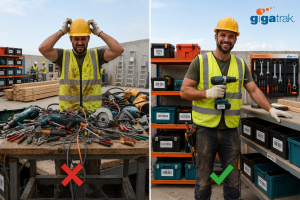
With GigaTrak’s asset tracking for contractors, your valuable inventory stays secure and fully accounted for across every work truck. Construction Asset Management Software. GigaTrak

Asset Tracking for Construction: The Contractor’s Guide to Jobsite Tool Control

Managing tools and heavy equipment across multiple jobsites costs contractors thousands of dollars every year in lost gear and wasted labor. When high-value power tools go missing, project schedules stall and direct replacement expenses destroy profit margins.

For 30 years, GigaTrak has provided barcode tool tracking systems to organizations like FDNY, Lockheed Martin, and the US Army. Implementing a dedicated strategy for asset tracking for construction replaces daily guesswork with absolute tool accountability.

This complete guide covers how commercial contractors eliminate tool loss, improve asset utilization, speed up field inventory audits, and keep projects moving on schedule.

The True Cost of Unmanaged Jobsite Assets

Tool loss is rarely limited to the price tag of replacing a stolen generator or missing rotary hammer. Unmanaged physical assets drain financial resources across your entire business operations.

  • Wasted Labor Hours: Field crews waste up to 30 minutes every shift searching gang boxes, work trucks, and job trailers for misplaced gear.
  • Redundant Purchases: Project managers buy or rent duplicate tools because no central system confirms existing equipment availability.
  • Project Delays and Penalties: Work stops completely when specialized equipment is missing, leading to missed milestones and contract penalties.
  • Subcontractor Equipment Hoarding: Workers stash critical items in personal vehicles or remote gang boxes, hiding active inventory from other crews.
  • Unscheduled Machinery Breakdown: Without maintenance tracking, unserviced equipment breaks down unexpectedly on active jobs.

What Is Asset Tracking for Construction?

Asset tracking for construction is the continuous management process of tagging physical tools, monitoring inventory movement, and assigning item responsibility to specific workers or jobsites. It relies on durable barcode tags, handheld barcode scanners, mobile devices, and central tracking software. Contractors use these tool tracking systems to verify asset location, maintenance history, and transfer records in real time.

Categorizing Construction Inventory for Total Control

Not every item on a jobsite requires the same level of tracking detail. Organizing inventory into three distinct asset tiers ensures proper field oversight without unnecessary paperwork.

1. Heavy Equipment and Vehicle Fleets

Excavators, skid steers, work trucks, and large trailers represent high capital costs. These high-value assets are tracked individually using active GPS hardware alongside periodic physical scans during site transfers.

2. High-Value Power Tools and Equipment

Rotary hammers, crimpers, laser levels, generators, and pipe benders move frequently between trucks and workers. Each item receives a unique asset tag and serial number record to track individual responsibility during every check-out.

3. Bulk Consumables and Hand Tools

Safety gear, drill bits, extensions, and hand tools are managed by total quantity counts rather than unique serial numbers. Tool crib software monitors bulk minimum stock levels to trigger restock orders automatically.

4 Steps to Implement Construction Asset Tracking

Moving from paper tracking sheets or simple spreadsheets to a digital asset tracking solution requires a systematic setup.

Step 1: Standardize Identification with Durable Barcode Tags

Ditch manual text entry. Affix durable, jobsite-ready barcode labels to every piece of equipment. Industrial barcode tags withstand extreme weather, grease, mud, and heavy physical abuse. Scanners read these labels instantly in warehouse yards or active job trailers.

Step 2: Establish Tool Crib Management Rules

What is tool crib management? Tool crib management is the operational practice of controlling, issuing, and tracking equipment from a central tool room, warehouse, or jobsite trailer. Assigning a dedicated crib manager or using mobile check-in and check-out workflows ensures no tool leaves storage without a digital transfer record.

Step 3: Mandate Digital Sign-Out Accountability

Tools rarely disappear on their own. They get lost when no single individual is accountable. Requiring workers to verify tool check-outs using handheld barcode scanners creates an indisputable audit trail. Everyone knows exactly who took the item, when it left the yard, and where it is supposed to be.

Step 4: Deploy Dedicated Construction Tool Tracking Software

Generic spreadsheets fail as soon as equipment spreads across multiple active locations. Specialized software centralizes item records, tracks maintenance schedules, logs transfer histories, and monitors overall asset utilization rates.

Explore GigaTrak Tool Tracking Systems to see how barcode workflows eliminate inventory confusion across your fleet.

How Construction Asset Tracking Improves Your Bottom Line

Digital tool management impacts far more than loss prevention. Controlling your inventory directly improves operational efficiency across four key areas:

  • Accurate Job Costing: Assign tool usage expenses directly to specific job codes or project cost centers for precise client billing.
  • Preventative Maintenance Tracking: Schedule service alerts based on usage hours or calendar intervals to protect asset lifespan and avoid costly breakdowns.
  • Faster Inventory Audits: Conduct complete job site audits in minutes using handheld barcode terminals instead of spending days counting items by hand.
  • Higher Asset Utilization: Identify idle tools sitting in tool rooms and redeploy them to active sites instead of purchasing new equipment.

Selecting Deployment Options: Cloud vs. On-Premise

Every construction business operates under different IT requirements and security mandates. When selecting tracking software, evaluate which deployment model fits your operational setup:

  • Cloud-Based Software: Access real-time tool inventory data from any internet-connected device or smartphone. Best for field operations requiring instant updates across multiple job sites.
  • On-Premise Deployment: Install software directly on local company servers. Essential for contractors operating under strict data security regulations or high-security government facilities.

Core Features Every Construction Tracking System Needs

Select software designed specifically for tough jobsite conditions rather than standard corporate offices.

Feature Field Requirement Business Impact
Mobile Barcode Scanning Scans and transfers tools using rugged handheld terminals or mobile apps. Eliminates paperwork and speeds up check-in/check-out cycles.
Offline Data Syncing Stores barcode scan data locally when cellular signal drops on remote sites. Prevents work interruptions and syncs records once back online.
Maintenance Tracking Logs service intervals, engine hours, and safety inspection dates. Extends asset lifecycle and prevents unexpected equipment failures.
Audit & Loss Reporting Generates reports showing loss rates, tool usage, and missing assets by site. Identifies missing items immediately to hold teams accountable.

Frequently Asked Questions

What is the best way to track tools on a construction site?

The most reliable method is attaching durable barcode tags to every tool and scanning them through dedicated tracking software during check-in and check-out. This builds a permanent digital history of item location and worker responsibility.

Why use barcode tags instead of manual spreadsheets?

Manual spreadsheets rely on human memory and manual typing, which cause frequent errors. Barcode scanning logs transfers in seconds, eliminates data entry errors, and updates master inventory records automatically.

Can barcode tracking software work on jobsites without internet service?

Yes. Barcode tracking software built with offline scanning capabilities stores transaction data directly on mobile handheld devices. The system updates your central database as soon as the terminal connects to Wi-Fi or cellular service.

What is the difference between active GPS and barcode asset tracking?

Active GPS tracking relies on battery-powered transmitters to provide real-time location mapping for heavy machinery and vehicles. Barcode asset tracking uses durable physical tags and scanners to track smaller power tools, equipment, and hand tools at a fraction of the cost per item.

Stop Missing Tools from Eating Your Profits

Effective asset tracking for construction keeps projects moving on schedule, lowers tool replacement costs, and holds field crews accountable. GigaTrak delivers simple barcode tracking hardware and software backed by 100% US-based customer support.

Ready to eliminate lost tool expenses and secure your inventory? Request a Consultation with a GigaTrak specialist today.

Contacting GigaTrak:

Request a Free Consultation and Demo.

Visit our Contact Page.

Fixed Asset Tracking Software vs General Asset: What’s the Difference?

Comparison between fixed asset tracking in a factory setting and general asset tracking on a construction jobsite with GigaTrak branding

Comparing General Asset vs. Fixed Asset Tracking Software: Which Does Your Business Need?

Published: July 2026 | Category: Operations & Asset Strategy | By: GigaTrak Team

Failing a corporate tax audit due to unverified physical assets costs thousands in penalties. Arriving at a remote job site without required power equipment costs valuable billable hours. While both problems stem from physical asset mismanagement, solving them requires distinct operational tools.

Organizations often group all physical items under a single tracking label. That oversight leads to misplaced equipment, inaccurate accounting registers, ghost assets, and bloated software budgets.

Since 1995, GigaTrak has equipped organizations—including the US Army, Lockheed Martin, FDNY, and Virginia Public Schools—with specialized inventory controls. Understanding when to implement specialized accounting solutions versus broader field tracking keeps operations seamless and financial ledgers precise.

What is Fixed Asset Tracking?

Fixed assets are long-term physical items utilized to generate income and sustain business operations. Unlike retail inventory or consumable materials, they are not intended for immediate resale or frequent employee transfers. Instead, they represent significant capital investments on your corporate balance sheet and remain active for longer than a single fiscal year.

Common Examples of Fixed Assets:

  • Manufacturing machinery and automated CNC equipment
  • Commercial fleet vehicles and transport trucks
  • Facility HVAC infrastructure and backup power generators
  • Enterprise IT servers, mainframes, and network racks
  • Specialized medical, testing, and laboratory instruments

For more detailed application examples, explore our dedicated asset tracking system breakdown.

How Fixed Asset Systems Protect Your Balance Sheet

Tracking a capital asset extends beyond confirming its physical room number—it actively manages valuation and Total Cost of Ownership (TCO) across the equipment lifecycle. Dedicated software connects field personnel directly to accounting ledgers.

  • Automates Tax Depreciation: Calculates straight-line, MACRS, declining balance, and custom schedules to maintain exact book value across financial periods.
  • Ensures Audit & GAAP Compliance: Produces permanent audit trails required for IRS reporting, GAAP standards, and insurance claim verifications.
  • Eliminates Ghost Assets: Identifies unverified equipment during annual barcode reconciliation, preventing property tax and insurance overpayments on missing items.
  • Centralizes Service Logs: Records preventative maintenance records and work orders to preserve equipment warranties and extend functional lifespans.

Strategic Takeaway: Valuation vs. Velocity

Fixed asset systems focus on financial accuracy, regulatory compliance, and valuation over months and years. Operational asset systems focus on chain of custody, scan speed, and loss prevention on a daily basis.

What is General Asset Tracking?

General asset tracking targets high-velocity operational tools. These portable items circulate continuously among jobsites, service vans, facilities, and staff members. While they may not be capitalized as long-term balance sheet assets, losing them immediately disrupts daily operations.

Common Examples of General Operational Assets:

  • Power drills, rotary hammers, and field tools
  • Shared laptops, tablets, and rugged barcode handhelds
  • Ladders, staging gear, and safety testing units
  • Specialized technician toolkits and maintenance sets

How Asset Tracking Software Stops Tool Loss

General asset tracking software prioritizes check-out speed and immediate accountability rather than long-term tax schedules.

  • Rapid Check-In / Check-Out: Assigns tools to specific technicians, crews, or jobsites in seconds using barcode or QR scans.
  • Real-Time Chain of Custody: Logs movement across job sites, warehouse rooms, and mobile service units to maintain clear ownership records.
  • Employee Accountability: Identifies the last assigned user for any missing gear, reducing tool loss and shrinkage by up to 40%.
  • Safety & Inspection Flags: Alerts managers when circulating equipment requires safety inspections, recalibration, or retirement.

Key Differences at a Glance

Comparison: Fixed Asset Tracking vs. General Asset Tracking Software

Feature / Capability Fixed Asset Tracking Software General Asset Tracking Software
Primary Objective Tax compliance, balance sheet accuracy, & audit trails Tool loss prevention, worker accountability, & jobsite efficiency
Target Items High-value, stationary capital equipment Portable tools, shared electronics, & circulating gear
Movement Frequency Infrequent or static location High-velocity daily/weekly movement
Tax Depreciation Built-in (Straight-line, MACRS, Declining) Not tracked
Core Users Finance teams, CPAs, & facility directors Operations leads, shop managers, & field supervisors
Key Scanning Action Annual physical verification barcode audits Daily check-in / check-out barcode scanning

Which System Fits Your Operations?

Many scaling enterprises require both tracking workflows operating in tandem.

Accounting-first applications lack fast mobile check-out features needed for field crews. Conversely, jobsite tool trackers cannot generate formal tax depreciation schedules required by finance teams.

Ask three essential evaluation questions:

  1. Do you need to satisfy tax regulations and track equipment values? Choose a dedicated fixed asset tracking software platform to automate book values and maintain audit-ready records.
  2. Are tools frequently missing from service trucks and jobsites? Implement an operational asset workflow featuring barcode check-out steps to enforce crew accountability.
  3. Does your IT infrastructure require self-hosted security? Verify that your software vendor offers both cloud-hosted (SaaS) and secure on-premise installation models.

Frequently Asked Questions

What is the difference between fixed asset tracking and inventory management?

Fixed asset tracking manages long-term capital assets that a company owns and utilizes internally. Inventory management monitors consumable supplies, raw materials, or finished goods intended for customer sale.

Can fixed asset tracking solutions run on-premise?

Yes. While many modern vendors force cloud-only subscription models, GigaTrak provides both cloud hosting and secure on-premise installations to accommodate strict enterprise IT security standards.

How does barcode tracking prevent ghost assets?

Staff scan physical barcode or RFID tags during routine physical audits. The software reconciles scanned tags against general ledger records, instantly spotting missing or unverified items prior to financial reporting.

Simplify Your Asset Operations with GigaTrak

Bridging the gap between accounting precision and field productivity doesn’t require multi-platform complexity. GigaTrak delivers proven barcode solutions backed by 30 years of industry leadership and 100% US-based support.

  • GigaTrak Fixed Asset System: Gives finance and facility leaders full control over locations, maintenance logs, and depreciation schedules.
  • GigaTrak Tool & Asset Tracking: Delivers ultra-fast barcode check-in/out workflows to eliminate tool loss across jobsites.

Request a Custom Demo Today

Direct Contact: Call 262-657-5500 | Email sales@gigatrak.com | Visit gigatrak.com

Government Asset Management Software: How FDNY Tracks Equipment

An FDNY firefighter holding a handheld mobile scanner to inspect GigaTrak barcode-tagged emergency equipment inside a fire truck compartment. GigaTrak's reliable Government Asset Tracking Software gives the firefighter and all other users full visibility of their tools and assets. In doing so, you save money by not having to replace lost equipment. GigaTrak's Government Asset Management Software in full display and use.

How FDNY Tracks Critical Gear with GigaTrak’s Government Asset Management Software

In emergency response, every second matters, and every piece of gear must perform without failure. For the Fire Department of the City of New York (FDNY)—the largest municipal fire department in the United States—managing thousands of life-saving assets across hundreds of firehouses, emergency medical stations, and specialized units is an immense logistical operational challenge.

When an emergency crew responds to a five-alarm structure fire or a complex rescue operation, firefighters cannot afford to discover that a thermal imaging camera is missing, an SCBA (Self-Contained Breathing Apparatus) air tank is past its inspection date, or a hydraulic rescue tool is sitting in a repair shop three boroughs away.

To maintain peak operational readiness, enforce accountability, and pass rigorous municipal audits, high-stakes public safety agencies like the FDNY, the U.S. Army, and municipal public works departments rely on government asset tracking software from GigaTrak.

Here is how modern government asset management software solves complex equipment challenges for first responders—and why GigaTrak remains the trusted standard for public sector asset accountability.

The High-Stakes Reality of First Responder Asset Management

Public safety agencies operate under conditions drastically different from private corporations:

  • Extreme Environment Wear & Tear: Firefighting gear, defibrillators, radios, and specialized saws are subjected to heat, water, and heavy impact daily.

  • Decentralized Operations: Equipment moves rapidly between apparatus (engines, ladders, rescue trucks), firehouses, maintenance depots, and active scene perimeters.

  • Strict Regulatory Compliance: Life-safety equipment requires mandatory inspection schedules, routine calibration, and detailed chain-of-custody documentation.

  • 24/7 Shift Rotations: High-value gear passes through dozens of hands every week as crews rotate shifts.

When emergency services rely on outdated tracking methods—such as manual spreadsheets, paper logbooks, or whiteboards—gaps inevitably appear. Tools go missing, maintenance dates pass unnoticed, and ghost assets inflate replacement budgets.

How GigaTrak Transforms Municipal Equipment Tracking

GigaTrak provides specialized government asset tracking software engineered specifically to eliminate administrative friction and establish total asset visibility. By replacing manual data entry with durable barcode scanning technology, GigaTrak streamlines how agencies log, check out, inspect, and audit critical gear.

The GigaTrak Asset Journey

  1. Procurement & Barcoding: Assign a unique ID tag or heavy-duty barcode to every piece of equipment upon arrival.

  2. Check-Out & Field Assignment: Instantly scan gear to specific firefighters, emergency crews, or apparatus rigs.

  3. Scheduled Maintenance: Automated alerts trigger regular inspections, safety tests, and calibrations before gear fails.

  4. Audits & Retirement: Maintain a complete digital audit trail from initial deployment to final asset decommission.

1. Rapid Check-In and Check-Out

With thousands of tools in circulation across dozens of stations, logging items manually creates bottlenecks. GigaTrak simplifies custody transfers down to a simple “point, shoot, and click” workflow.

First responders scan item barcodes alongside employee badges or vehicle IDs using rugged handheld terminals or mobile smartphones. The software instantly registers:

  • Who checked out the item.

  • Which rig, station, or team received it.

  • When it was checked out and when it is due back.

A process that previously took minutes per item is completed in seconds, ensuring rigs leave the station fully equipped and on time.

2. Proactive Maintenance & Compliance Tracking

In emergency services, tool failure isn’t an inconvenience—it’s a critical safety hazard. Gear like gas detectors, hydraulic rescue cutters, saws, and medical kits require regular servicing, testing, and battery replacements.

GigaTrak’s government asset management software features built-in maintenance scheduling. Fleet and quartermaster managers set automated maintenance alerts based on time intervals or usage cycles. If a piece of equipment requires calibration or safety testing, the software flags the item before deployment, preventing unserviced gear from being assigned to active duty.

3. Digital Chain of Custody

High-value assets—such as tactical radios, specialized thermal cameras, hazardous materials sensors, and narcotics boxes in EMS vehicles—require strict accountability.

When gear changes hands, GigaTrak creates an unchangeable digital paper trail. Personnel sign for equipment directly on mobile touchscreen scanners, linking each item to a specific officer or firefighter. If an item is misplaced, quartermasters can view its complete historical movement to pinpoint exactly where and when it was last scanned.

Comparison: Spreadsheets vs. Dedicated Government Software

Feature Excel / Paper Logbooks GigaTrak Government Asset Software
Data Entry Speed Slow, manual typing (high error rate) Instant barcode scanning
Accountability Unverified names on paper Digital signatures & badge-scan signatures
Maintenance Manual calendar reminders (easily missed) Automated safety & calibration alerts
Audit Preparation Weeks of physical search & record reconciliation Rapid mobile audits completed in hours
Off-line Function Unsynced local copies create data conflicts Guaranteed function during network outages

Security and Deployment Options for Municipal Agencies

Government agencies operate under strict IT security mandates and data sovereignty requirements. GigaTrak offers versatile deployment architectures designed to fit specific municipal security protocols.

Complete Data Sovereignty via On-Premise Deployment

For high-security operations, defense agencies, and public safety organizations that prefer or mandate local data control, GigaTrak offers complete on-premise installation.

  • Network Isolation: Runs entirely behind your agency’s firewall or within air-gapped internal networks.

  • Zero External Exposure: Asset databases remain strictly on internal agency servers, protecting sensitive facility layouts and high-value gear lists from third-party cloud vulnerabilities.

  • Guaranteed Reliability: Operations continue uninterrupted during internet outages or emergency power scenarios.

Flexible Cloud Hosting

For agencies seeking lower internal IT overhead, GigaTrak also provides cloud-hosted solutions. Cloud deployments offer secure, web-based accessibility across multiple facilities, enabling real-time asset synchronization across distant stations and mobile field units without local server maintenance.

Ensuring Fiscal Accountability and Audit Readiness

Public safety organizations manage public funds, state grants, and federal funding (such as FEMA or Urban Areas Security Initiative grants). Receiving public funding requires strict compliance with capitalization thresholds, annual financial reporting, and equipment audits.

Traditional Audits vs. GigaTrak Barcode Audits

Audit Metric Traditional Manual Audits GigaTrak Barcode Audits
Methodology Physical clipboard counts & manual entry Rapid scanning of room & asset barcodes
Completion Time Days to weeks of searching Completed in hours across entire stations
Accuracy & Reconciliation High rate of “ghost assets” & data errors Instant reconciliation against database records
Compliance Risk Increased risk of audit flags or grant issues Complete, verified digital audit trails
  1. Eliminating Ghost Assets: Missing or stolen gear left on financial registers (“ghost assets”) leads to inaccurate budget planning and failed audits. Regular barcode-based audits reconcile physical inventory against ledger data in real time.

  2. Accelerated Inventory Audits: Using portable handheld scanners, quartermasters can audit an entire tool room, armory, or supply station in a fraction of the time required by paper counts. Staff simply scan room location tags and sweep items, automatically identifying missing or out-of-place equipment.

  3. Depreciation and Lifecycle Reporting: GigaTrak tracks purchase dates, vendor details, warranty terms, and depreciation schedules, helping finance managers forecast capital equipment replacement cycles accurately before tools reach end-of-life.

Why Major Public Sector Organizations Choose GigaTrak

GigaTrak has provided barcode-based tracking software since 1995. From municipal fire departments and police agencies to the U.S. Army, Lockheed Martin, and public school districts nationwide, organizations choose GigaTrak for three primary reasons:

  1. Purpose-Built Simplicity: The platform eliminates clutter, prioritizing fast navigation, clear button layouts, and straightforward scanning workflows that require minimal training for active-duty personnel.

  2. Comprehensive Hardware & Tag Bundles: GigaTrak acts as a complete solution provider, offering pre-configured handheld scanners, mobile barcode apps, rugged pre-printed metal asset tags, labels, and barcode printers.

  3. Dedicated U.S.-Based Support: GigaTrak’s engineering and customer support teams are based entirely in the United States, offering direct access to knowledgeable technical support whenever assistance is needed.

Protect Your Agency’s Equipment with GigaTrak

Whether managing equipment for a metropolitan fire department like the FDNY, overseeing public works fleets, or securing municipal IT assets, effective inventory control requires software built for reliability, security, and speed.

GigaTrak’s government asset management software gives your organization full operational visibility, protects taxpayer investments, and ensures your critical gear is ready whenever an emergency strikes.

Ready to modernize your public agency’s asset management?

Contact GigaTrak today at 262-657-5500 or visit GigaTrak.com to request a live demo and discover how simple government asset tracking can be.


Contacting GigaTrak:

  • 262-657-5500
  • sales@gigatrak.com

Request Information

Barcode Asset Tracking Software: How It Works, Tag Types, & Best Systems

GigaTrak's Barcode asset tracking software being used to track thousands of assets and tools with ease. GigaTrak.

Barcode Asset Tracking Software: How It Works, Tag Types & Best Systems

Published by GigaTrak | 30 Years of Tool & Asset Tracking Expertise

A utility truck pulls away from a job site, leaving a $3,500 fusion welder lying in the brush. By the time anyone realizes the tool is missing, the crew is forty miles away, and nobody knows who took it out of the shop.

Unplanned tool replacements, duplicate equipment purchases, and unaccounted downtime slice directly into operating margins. Implementing systematic barcode asset tracking software solves this accountability gap by creating an unbroken, auditable chain of custody for every piece of gear your team takes into the field.

What Is Barcode Asset Tracking Software?
Barcode asset tracking software is an operational solution that pairs physical scannable labels—such as 1D linear codes or 2D QR codes—with optical scanning hardware and a centralized database to record asset check-outs, returns, location transfers, maintenance histories, and audits in real time.

Since 1995, GigaTrak has designed physical tracking architecture for commercial enterprises, government bodies, and educational institutions. High-volume operations like the Fire Department of the City of New York (FDNY), Lockheed Martin, the US Army, and Virginia Public Schools rely on GigaTrak solutions to manage mission-critical equipment. Whether you manage a central warehouse crib or disperse equipment across dozens of job sites, effective barcode asset tracking software forms the foundation of operational control.

Why Shift Away from Manual Asset Tracking?

Many businesses begin tracking gear with pen-and-paper clipboards or manual spreadsheets. While these methods seem cost-effective initially, they break down rapidly as operations scale.

Manual entries introduce human error. Industry research demonstrates that manual data entry yields an average error rate of 1 mistake per 300 keystrokes. In contrast, optical barcode scanning slashes data entry errors to virtually zero—fewer than 1 error per 36 trillion character scans.

Relying on manual logs creates additional operational risks:

  • Ghost Assets: Items stay listed on active inventory records long after they have been lost, stolen, or scrapped, distorting corporate asset valuations.
  • Hoarding in the Field: Subcontractors and field crews hold onto specialized tools in their service vans “just in case,” forcing management to purchase duplicate equipment needlessly.
  • Failed Compliance Audits: Regulated industries requiring routine tool calibration or safety certifications face steep fines when paper inspection records go missing.

How Does Barcode Asset Tracking Software Work?

Modern barcode asset tracking software requires minimal technical infrastructure while establishing complete accountability. The process follows four straightforward steps:

  1. Tagging the Physical Asset: A unique identification number or string is assigned to an asset in your system. A durable barcode tag containing this encoded identifier is attached directly to the tool, meter, or machine.
  2. Optical Scanning: A worker scans the physical tag using a handheld laser reader, tablet camera, or smartphone. The device reads the light and dark spaces of the code and translates them into digital data.
  3. Database Match: The system matches the scanned code against its database record, instantly pulling up item records such as model number, serial code, current location, and assigned owner.
  4. Transaction Logging: The operator selects an action (such as Check-Out, Transfer, Service Completed, or Audit Pass). The database updates instantly with a precise timestamp, worker ID, and new location.

Essential Hardware for Barcode Asset Tracking Software

1. Durable Barcode Tags and Labels

Retail consumer packaging uses paper labels, but equipment tracking requires durable tag materials engineered for severe industrial conditions:

  • Anodized Aluminum Tags: Ideal for outdoor power equipment, heavy machinery, and metal housing. High-contrast codes are sealed inside the metal layer to withstand extreme heat, chemicals, and intense UV exposure.
  • Metalized Polyester Labels: Flexible, cost-effective options with strong acrylic adhesives designed for power hand tools, diagnostic meters, and IT assets.
  • Destructible Vinyl Labels: Tamper-evident tags that fracture if someone attempts to peel them off, preventing unauthorized tag swapping between assets.

2. Scanning Hardware Options

Selecting hardware depends on where your personnel interacts with equipment:

  • Dedicated USB Laser Scanners: Inexpensive desktop units ideal for high-speed counter check-outs inside clean warehouse cribs.
  • Rugged Mobile Terminals: Handheld industrial computers built with integrated scanning engines, rubberized drop protection, and long battery life for busy distribution centers.
  • Smartphones and Mobile Tablets: Using mobile apps on iOS or Android devices lets field workers scan tags using built-in cameras, reducing upfront hardware investments.

1D Barcodes vs. 2D QR Codes: Which Should You Deploy?

1D Linear Barcode
┌───────────────────────┐
│ ║▌║█║▌│║▌║▌█║ ║▌║▌█║ │
│ 123456789012 │
└───────────────────────┘
  • Format: Horizontal scan line
  • Capacity: 20 to 25 characters
  • Hardware: Laser or CCD scanner
2D QR Code
┌───────────────────┐
│ █▀▀▀▀▀█ ▄ █ █▀▀▀▀▀█ │
│ █ ███ █ █ ▀ █ ███ █ │
└───────────────────┘
  • Format: Matrix grid scan
  • Capacity: 7,000+ characters
  • Hardware: Smartphone or 2D imager

1D Barcodes (Linear)

Linear barcodes store data horizontally using alternating vertical black bars and white spaces (such as Code 39 or Code 128).

  • Data capacity: Holds up to 20 to 25 characters, acting as a simple asset key to look up full data in your database.
  • Scanning speed: Provides near-instant processing when aimed straight on with traditional laser readers.
  • Best application: Structured indoor tool cribs with fixed checkout counters and high transaction volume.

2D QR Codes (Quick Response)

QR codes encode information across both horizontal and vertical axes within a square matrix grid.

  • Data capacity: Holds over 7,000 numeric or 4,000 alphanumeric characters, allowing you to encode direct web links, operating manuals, or safety documents on the tag.
  • Scanning versatility: Reads in 360 degrees using mobile devices, tablets, or dedicated 2D imagers.
  • Best application: Field service, job site audits, and remote equipment management where technicians rely on smart devices.

Head-to-Head Feature Comparison

Capability 1D Linear Barcodes 2D QR Codes
Primary Data Encoded Asset ID number only Asset ID, web links, specs, manuals
Data Storage Limit Low (20–25 characters) High (Up to 7,000+ characters)
Scanning Hardware Dedicated laser or CCD scanner Smartphones, tablets, 2D imagers
Scan Angle Required Must align horizontally 360-degree multidirectional alignment
Damage Resistance Fails if a single bar scratches off Scans even with 30% surface damage
Print Footprint Wide horizontal rectangle Compact square footprint

Key Factors When Choosing Your Tag Format

1. Job Site Environment and Hardware Wear

Equipment deployed on construction sites, utility corridors, and industrial floors encounters dirt, water, oil, and rough handling.

  • 1D Barcodes: Scratches or tears across vertical lines ruin the light-and-dark ratio, preventing laser beams from reading the label.
  • QR Codes: Built-in Reed-Solomon error correction keeps labels readable. Even if grease or scrapes obscure 30% of the grid, smartphone cameras read the data accurately.

2. Fixed Tool Cribs vs. Mobile Remote Crews

Your daily workflow dictates the most efficient scanning hardware.

  • Central tool cribs: Mounted laser scanners at crib windows handle hundreds of rapid check-outs per hour with point-and-click speed.
  • Field service crews: Outfitting every service vehicle with specialized laser readers adds substantial hardware costs. QR codes let field technicians audit tools using smartphones they already carry.

3. Physical Tagging Surface Area

Small power tools, test meters, and specialized instruments offer limited flat surface space for tagging.

  • 1D Barcodes: Long ID numbers require wider linear labels. Shrinking a 1D barcode squeezes bars together, causing print bleeding that prevents clear reads.
  • QR Codes: Store dense information in a small square, making them ideal for small hand tools or narrow handles.

Top Operational Benefits of Barcode Asset Tracking Software

Implementing **barcode asset tracking software** transforms reactive asset accounting into an organized operational workflow.

1. Dramatic Reduction in Lost Tool Expenses

When workers know every tool checked out to them is logged against their employee ID, gear returns reliably at the end of every shift. Organizations regularly cut annual tool replacement costs by over 40% in their first year of deployment.

2. Accelerated Check-Out and Audit Speed

Handwriting item descriptions and serial numbers during morning check-outs creates long lines at the crib window. Optical scanning completes check-outs in seconds, getting crews on the road faster.

3. Improved Preventive Maintenance and Safety Compliance

Ladders, rigging gear, high-voltage test meters, and torque wrenches require regular safety inspections. **Barcode asset tracking software** lets managers schedule routine service intervals. Scanning an item during checkout alerts crib operators instantly if an item is overdue for calibration or safety testing.

4. Balanced Inventory Across Multiple Locations

Centralized asset tracking gives managers full visibility over tool distribution across all job sites and service trucks. Instead of buying new equipment for a new project, managers can locate underutilized tools on nearby sites and transfer them directly.

Alternative Tracking Technologies

Depending on your operational footprint, complementary tracking options can serve specific asset categories:

  • GPS Asset Tracking: Best suited for long-haul fleet vehicles, heavy trailers, and large mobile generators requiring continuous real-time satellite position monitoring on open roads.
  • NFC (Near Field Communication): Useful for short-range mobile interactions, though tag costs run significantly higher than standard adhesive barcodes.

Selecting the Ideal Tagging System

Deploy 1D Barcodes if:

  • You operate dedicated laser scanning hardware at central crib checkout counters.
  • Your priority is ultra-fast checkout inside clean warehouse facilities.
  • You only need to cross-reference a short asset tag number against a local desktop database.

Deploy QR Codes if:

  • Your field personnel manage and audit tools using smart devices out on job sites.
  • Your tags face rain, abrasion, oil, or direct sunlight on active work sites.
  • You need to place compact labels on small hand tools, calibrated meters, or delicate devices.

Unify Your Equipment Management with GigaTrak

Whether you select 1D linear barcodes or 2D QR codes, your tracking architecture relies on the underlying system behind it.

GigaTrak provides comprehensive systems that support both 1D and 2D formats within a single environment. You can deploy 1D laser tags for internal warehouse operations while placing durable 2D QR codes on mobile field gear without splitting your inventory database.

  • Flexible Hardware Integration: Full compatibility with USB laser scanners, rugged handheld terminals, and mobile apps.
  • Complete Chain of Custody: Detailed records show who checked out each item, where it was transferred, and when it is due back.
  • Audit Functions: Streamlined audit features cut tool loss by over 40% within the first year of operation.
  • Deployment Flexibility: Choose between secure local on-premise servers or cloud hosting.
  • 100% US-Based Support: Direct access to technical support specialists with decades of hands-on experience.

Frequently Asked Questions

How much does a complete barcode asset tracking software system cost?

Total system costs depend on asset volume, facility count, and user licenses. Entry-level systems start around $200 to $500 annually, while enterprise implementations scale based on specific workflow needs. Leveraging existing smartphones for scanning helps minimize initial hardware costs.

Can one system manage both 1D barcodes and 2D QR codes at the same time?

Yes. GigaTrak handles both 1D barcodes and 2D QR codes in a single database. You can scan linear labels in your central warehouse while field workers scan QR codes on job sites using mobile devices.

What tags work best for heavy construction equipment used outdoors?

For severe environments, use anodized aluminum tags or metallic polyester barcode labels with heavy-duty acrylic adhesive. These resist water, UV rays, chemical exposure, and physical scraping far better than standard paper labels.

Is cloud or on-premise deployment better for barcode asset tracking software?

Cloud deployment suits multi-site companies that need instant mobile updates from remote field workers. On-premise deployment suits government agencies, defense contractors, or facilities with strict data security mandates or restricted internet connectivity.

Take Control of Your Asset Tracking Today

Relying on paper logs or unreadable tags leads to lost tools, unaccounted inventory, and unnecessary replacement costs. Know where every asset is before your trucks leave the yard.

GigaTrak provides the hardware, durable tags, and proven systems needed to keep your organization accountable.

Request a Consultation

Contacting GigaTrak:

  • 262-657-5500
  • sales@gigatrak.com

Request Information

Tool Tracking Software vs. Spreadsheets: Hidden Costs Revealed

Spreadsheets are now ineffective. This image shows how GigaTrak's tool tracking software is replacing spreadsheets and reducing labor and costs of equipment replacements.

Tool Tracking Software vs. Spreadsheets: What’s Really Costing You?

A crew arrives at a jobsite at 7:00 AM. They open the truck bed to start work, but the pipe threader is missing. The foreman calls the main shop, checks three other drivers, and searches through last week’s paper logs. Two hours later, four technicians are still sitting idle while someone drives to buy a duplicate tool.

If you manage operations, fleets, or jobsites, this scenario happens weekly. Most companies try to track physical gear using Excel or Google Sheets. What seems like a free solution quickly becomes a major operating expense.

Tool tracking software is a barcode-based system that monitors physical equipment across jobsites, warehouses, and service vehicles in real time.

Switching from static spreadsheets to dedicated software plugs silent financial leaks. You will know where every tool is before your crew leaves the yard.

The Hidden Financial Costs of Spreadsheet Tool Tracking

Spreadsheets work well for static accounting data. They fail when managing physical equipment moving between crews, trucks, and job sites.

Wasted Labor and Paid Downtime

Field technicians spend an average of 30 minutes every day searching for lost gear or calling other crews to locate assets.

Across a team of 10 field technicians, that equals 1,300 hours lost per year in pure downtime. You pay high-cost labor hours for employees to dig through truck beds and drive back and forth across town.

Human Error and Ghost Inventory

Research shows 88% of manually updated spreadsheets contain human errors. A missed row or a simple typo creates ghost inventory. These are tools that exist on your balance sheet but are nowhere to be found when a project kicks off.

Your team ends up panic-buying expensive duplicate tools or renting last-minute equipment just to stay on schedule.

Zero Real-Time Visibility

Spreadsheets rely on manual updates at the end of the day or week. By the time a manager opens the file on Tuesday morning, the data is useless.

Without instant updates, you lose control the moment an asset leaves your central crib or warehouse.

Equipment Loss and Shrinkage Metrics

Missing equipment directly erodes profit margins. Construction and field service operations lose 5% to 10% of their portable tool inventory every year to theft and misplacement.

Financial Impact Category Spreadsheet Tracking Performance
Annual Equipment Loss 5% to 10% total inventory loss per year
Tool Recovery Rates Under 7% without systematic barcode checkouts
Duplicate Tool Buys $3,000+ per 50 workers spent on unnecessary replacements

Without an automated system linking equipment directly to individual workers, recovery rates remain low. Most businesses absorb these replacement costs out of pocket.

4 Crucial Features Missing from Spreadsheets

Why do spreadsheets fail to stop equipment loss? They lack four built-in capabilities that dedicated tracking systems provide.

1. Fast Barcode and QR Code Scanning

Instead of typing serial numbers into a tiny cell, staff use durable barcode scanners or mobile devices to scan tags. A check-out process that used to take three minutes now takes two seconds.

2. Digital Chain of Custody

When high-value gear changes hands, the software records an exact digital paper trail. Employees sign for tools directly on screen, establishing immediate personal accountability.

3. Automated Maintenance Alerts

Tools require periodic calibration, safety checks, and routine servicing. Spreadsheets do not alert you when a saw needs maintenance. Tracking software sends automatic alerts to fleet managers before faulty gear causes a jobsite injury.

4. Location Tagging and GPS Mapping

When an asset is scanned, the system records the location coordinates. Managers get a clear view of where tools were last checked out, making it easy to identify which truck or crew has the item.

Tool Tracking Software vs. Spreadsheets: Side-by-Side Comparison

Feature Excel / Google Sheets Dedicated Tool Tracking Software
Data Entry Manual typing with high typo risk Instant barcode and QR code scanning
Real-Time Sync Requires manual saves and updates Instant cloud or local server sync
Accountability Relies on memory and paper logs Digital signatures and audit histories
Maintenance Forgotten dates and missed service Automated alerts for inspections
Deployment Basic file hosting only Cloud hosting or secure on-premise install

Built for High-Security and Complex Operations

Generic office software cannot handle complex security requirements. GigaTrak has provided barcode tool tracking solutions for over 30 years.

Clients like FDNY, Lockheed Martin, the US Army, and Virginia Public Schools rely on GigaTrak to keep their physical assets organized.

Unlike vendors that force you into a one-size-fits-all cloud system, GigaTrak offers both cloud and secure on-premise deployments. If your facility operates without an internet connection or requires self-hosted security, on-premise software keeps your data within your internal network. All support is based directly in the United States.

Calculating Your ROI

Upgrading to dedicated software pays for itself quickly. Calculate your potential savings using three operational numbers:

  • Labor Hours Lost: Multiply your average technician pay rate by 0.5 hours per day. Multiply that number by your total crew size and working days per year.

  • Annual Tool Loss: Sum up what you spent over the last 12 months replacing lost, stolen, or unreturned gear.

  • Preventable Rentals: Add up the expense of last-minute tool rentals ordered because nobody knew where company-owned items were located.

Most mid-sized operations recoup their investment within 3 to 6 months by eliminating duplicate buys and recovering lost labor hours.

How to Transition Off Spreadsheets

Moving off manual spreadsheets does not need to disrupt daily work:

  1. Audit High-Value Inventory: Start with power tools, testing gear, and specialized equipment. Do not worry about tagging small hand tools on day one.

  2. Apply Durable Barcode Tags: Attach heavy-duty, weather-resistant barcode or QR tags to your assets.

  3. Establish a Checkout Rule: Make scanning mandatory before gear leaves the crib. Because scanning takes seconds, field adoption happens quickly.

Frequently Asked Questions

What is tool tracking software?

Tool tracking software is a specialized application that uses barcodes, QR tags, or RFID to record who has an asset, where it is located, and when it is due back. It replaces manual logs and spreadsheets.

Can tool tracking software run on-premise without an internet connection?

Yes. GigaTrak provides on-premise installations that run entirely on your local network. This setup is ideal for government agencies, military bases, and high-security contractors.

How does barcode scanning improve inventory accuracy?

Barcode scanning eliminates manual typing errors. Scanning a barcode instantly updates the database, changes asset ownership, and logs precise timestamps in under two seconds.

Is US-based technical support available?

Yes. GigaTrak provides dedicated, US-based support to help set up hardware, configure databases, and train your staff.

Stop Letting Spreadsheets Drain Your Profits

Spreadsheets are fine for accounting. They are the wrong tool for managing moving physical equipment across jobsites and service vans.

Take control of your inventory, improve accountability, and keep your crews working.

Request a Consultation with GigaTrak today to speak with our US-based team and find the right cloud or on-premise setup for your operation.

Contacting GigaTrak:

  • 262-657-5500
  • sales@gigatrak.com

Request a Free Demo.

Contact Page.

How Education Asset Tracking Software Protects School-Issued Tech

How Education Asset Tracking Software Protects School-Issued Tech

Process & Technology Solutions at GigaTrak • Reading Time: 8 mins
GigaTrak education asset tracking software protecting student laptops and school equipment.

IT directors in K-12 school districts and higher education operations teams face a recurring challenge every academic year: thousands of devices are deployed to students, but hundreds fail to return. Missing Chromebooks, unreturned tablets, and lost media lab cameras quickly drain academic technology budgets.

Relying on manual spreadsheets, paper checkout sheets, or generic ticketing software creates ghost inventory and leaves school systems vulnerable during state compliance audits. Implementing dedicated education asset tracking software delivers simple, barcode-based visibility that prevents equipment loss and establishes strict institutional accountability.

For over 30 years, GigaTrak has provided specialized education asset tracking software solutions built to solve these deployment bottlenecks. Organizations ranging from public school systems to government agencies and emergency services rely on our platform to secure critical gear. Available as a cloud-based or on-premise deployment, every system is fully supported by our dedicated US-based customer support team.


In This Article


The Operational Cost of Missing School Assets

When academic institutions lack purpose-built education asset tracking software, three primary operational issues develop:

  • Ghost Inventory: School districts frequently purchase unnecessary replacement hardware while missing equipment sits misplaced in storage closets, empty classrooms, or off-site locations.
  • Audit Failures: Federal Title I grants and state technology funds strictly mandate verified audit trails detailing physical locations, student assignments, and item conditions. Basic spreadsheets routinely fail formal compliance reviews.
  • Unfunded Inventory Shrinkage: Schools absorb tens of thousands of dollars in annual equipment write-offs simply because checkout logs lack clear personal accountability and return tracking.

Structured barcode asset management creates an automated audit history, ensuring administrators know who holds every device, where it is located, and exactly when it is due back.


Managing K-12 1:1 Laptop Deployments and Returns

Large-scale 1:1 Chromebook rollouts require rapid checkout procedures and organized end-of-year return workflows.

Fall Deployment Workflow

Distributing thousands of mobile devices across a student body can create massive administrative bottlenecks. By using GigaTrak software paired with handheld barcode scanners or mobile devices, IT staff can quickly streamline intake and issuance:

  1. Pre-Tag Hardware: Affix durable, tamper-evident barcode asset tags to each device and register them within the central database.
  2. Scan and Assign: Scan the student ID card, scan the device barcode tag, and confirm the transaction.
  3. Record Custody: The software automatically links the student profile, serial number, checkout timestamp, and initial hardware condition in real time.

Spring Return Workflow

When the school year concludes, intake stations need to process thousands of hardware returns without queue delays:

  • Instant Check-In: Scanning the asset barcode clears custody from the student record in one second.
  • Condition Logging: Input standard notes for cracked screens, missing power adapters, or casing damage.
  • Maintenance Routing: Fully operational units are instantly cleared for summer storage, while damaged units automatically route to the IT repair queue.

AV Equipment Checkout Systems for Universities

Higher education environments introduce complex asset management needs. University libraries, journalism departments, and media research labs manage high-value equipment kits issued for short loan durations.

Tracking Multi-Piece AV Kits

A typical media lab inventory includes complex, multi-component equipment packages:

  • 4K cinema cameras, specialized lenses, and rig mounts
  • Wireless microphone receivers and lavalier audio sets
  • Portable LED lighting panels, stands, and battery banks

GigaTrak utilizes specialized kit tracking to link individual accessories to a primary parent container tag. Scanning the master container barcode instantly verifies every lens, cable, and battery during issue and check-in.

Enforcing Loan Durations

  • Customizable Loan Terms: Define hourly, daily, or semester-based return windows based on class requirements.
  • Automated Notifications: Send automated return reminders and overdue alerts to student email accounts.
  • Prevent Asset Hoarding: Maintain accurate inventory counts so equipment remains available for all enrolled students.

Damage Tracking and Audit Compliance

Hardware wear and accidental damage are inevitable. How your institution records and tracks these maintenance events directly impacts cost recovery and budget management.

Logging Maintenance & Repairs

When hardware is returned damaged, IT staff can immediately:

  • Attach high-resolution damage photos directly to the asset history record.
  • Log repair expenses, replacement part costs, and third-party vendor receipts.
  • Assign the hardware item to specific internal maintenance queues for technician review.

Financial Accountability and Compliance Reporting

When equipment goes unreturned or requires replacement, robust modern education asset tracking software enables IT administrators to collaborate directly with department heads:

  • Pull comprehensive user audit trails to verify historical custody.
  • Calculate item age and depreciation rates to settle replacement fees accurately.
  • Generate detailed compliance reports for grant providers, school boards, and state auditors.

Core Features of GigaTrak Education Asset Tracking Software

  • Unlimited Asset Capacity: Scale your database from 500 devices to over 50,000 without incurring penalty fees per tagged item.
  • Cloud or On-Premise Deployment: Select secure cloud hosting for cross-campus access, or host on local school servers for complete offline network control.
  • Mobile Barcode Applications: Turn standard iOS and Android smartphones or tablets into dedicated barcode scanners.
  • Kit and Container Tracking: Group individual accessories under a single master barcode to ensure complete set returns.
  • Built-In Audit Engine: Conduct rapid physical inventory counts and instantly generate discrepancy reports to locate missing hardware.

Why Educational Institutions Rely on GigaTrak

GigaTrak designs practical barcode tracking systems engineered to streamline asset management without requiring weeks of complex staff training. We deliver complete, turnkey packages—including rugged barcode labels, commercial handheld scanners, and intuitive software—backed by direct access to our full-time US customer support team.

Stop relying on manual spreadsheets to manage hundreds of thousands of dollars in school technology. Reclaim complete oversight of your laptops, tablets, and media lab gear with software built specifically for modern academic operations.

Take control of your school’s technology investment. Book a Free Demo today, or Contact a GigaTrak Specialist directly at +1 (262) 657-5500.


Frequently Asked Questions (FAQs)

Q1: What is education asset tracking software?

Education asset tracking software is a specialized management database that uses barcode tags, mobile handhelds, or smartphone apps to track the location, custody, assignment history, and physical condition of school-owned technology assets.

Q2: How does GigaTrak assist with state and federal grant audits?

GigaTrak tracks device funding sources, historical assignment records, serial numbers, and physical locations. The software generates single-click compliance and audit reports that satisfy strict state and federal grant requirements (such as Title I funding).

Q3: Can GigaTrak be installed on local school district servers?

Yes. GigaTrak provides both cloud-hosted subscription options and self-hosted on-premise installations for districts requiring direct database ownership and local network security.

Q4: Can we use mobile phones to scan school equipment during deployment?

Yes. GigaTrak offers dedicated mobile applications for iOS and Android devices, allowing IT staff and volunteers to scan asset tags, verify student IDs, and assign devices anywhere on campus.

Stop Wasting Labor Hours: Asset Tracking for Contractors

GigaTrak tool tracking software gives you visibility of all your tools. GigaTrak has unlimited tracking no matter the plan. GigaTrak is the leader in tracking with barcode technology.

Stop Wasting Labor Hours: Asset Tracking for Contractors

Process & Technology Solutions at GigaTrak • Reading Time: 12 mins

A contractor’s crew sits idle on a jobsite because a critical rotary hammer is missing. The foreman calls the warehouse, but nobody knows who had it last. Meanwhile, your billable hours slip away.

For many electrical, plumbing, and mechanical contractors, this scenario happens daily. The average construction worker loses over 30 minutes per day simply searching for tools and equipment. When scaled across a crew of twenty, that is over 2,500 lost labor hours every year.

You can stop this drain on your payroll. The answer lies in establishing a structured workflow using modern asset tracking for contractors.

The True Cost of Manual Inventory Management

Many construction firms still rely on whiteboards, spreadsheets, or paper logs. These manual methods fail because they depend on busy people remembering to write down what they took. Without dedicated asset tracking for contractors, your valuable physical inventory easily disappears into the back of employee work vans and trucks.

When equipment goes missing, three major issues destroy your labor efficiency:

  • Idle Labor: Workers stand around, waiting for a replacement item to arrive at the job site.

  • Double Purchasing: Purchasing managers buy duplicate tools because they cannot locate the original, wasting valuable capital.

  • Administrative Chasing: Warehouse managers spend hours calling foremen, trying to locate missing items.

Since 1995, GigaTrak has helped businesses replace chaotic manual systems with simple, barcode-based tool tracking for contractors. Our clients include the FDNY, Lockheed Martin, the US Army, and Virginia Public Schools. We build professional tracking platforms that keep crews working and hold employees accountable. Implementing a proven asset tracking for contractors strategy is the fastest way to protect your equipment investments.

Why Alternative Solutions Fall Short on the Jobsite

To solve the headache of missing assets, many construction companies try generic Bluetooth tags, manufacturer-specific apps, or simple peer-to-peer sharing tools. These systems often fail because they do not match the harsh realities of field construction.

The Limits of Bluetooth and Manufacturer-Locked Systems

Some firms adopt manufacturer-specific applications using built-in Bluetooth chips or external tags. They work fine if your entire physical inventory comes from a single brand. However, most trade contractors manage a mixed fleet.

Buying external Bluetooth tags for other brands is expensive, requires constant battery replacements, and tags can easily knock off during rough use on a busy jobsite.

Furthermore, Bluetooth tracking suffers from major technical drawbacks:

  • Limited Range: Bluetooth signals only broadcast between 100 and 400 feet.

  • Network Dependence: Location data only updates if a phone with that specific manufacturer’s app is nearby.

  • No Security Value: If gear is stolen, the system will not help you find it unless the thief walks near someone running that exact app.

The Failures of Peer-to-Peer Mobile Sharing Apps

Other mobile solutions focus on peer-to-peer tool sharing in the field, letting workers transfer items directly using mobile phones. While convenient, this removes central authority from your inventory pipeline.

If a worker forgets to scan a transfer, the chain of custody breaks immediately, and the office loses all visibility. Effective tool tracking for contractors requires centralized control—not self-reporting from busy crews on a jobsite.

The Complexity of Office Asset Managers

Some companies try using corporate IT software built to track office furniture, corporate laptops, and software licenses. While highly customizable, these platforms present field workers with dozens of confusing data fields.

Your crew wants to get their gear and get to work—they will not fill out complex digital forms on a jobsite. These platforms also require a constant internet connection, which fails in basements, concrete structures, and rural jobsites.

Why GigaTrak’s Barcode Solution Works

GigaTrak bypasses short-range Bluetooth or worker self-reporting by using a centralized, barcode-based check-out/check-in architecture. This enforces immediate accountability and physical discipline, making it the most reliable system for asset tracking for contractors.

 Warehouse Manager Scans ID Badge  ➔  Scans Equipment Barcode  ➔  3-Second Audit-Proof Assignment 

Direct Accountability at the Point of Exit

With GigaTrak, an item cannot leave your warehouse without being assigned to a specific person or jobsite. The warehouse manager scans the item barcode, then scans the employee’s barcoded ID badge. The transfer records in under three seconds. Because employees know the system holds them personally responsible, equipment is treated with care and returned on time.

Built for Mixed-Brand Inventories

A barcode label does not care who manufactured the equipment. You can apply our durable, weather-resistant barcode tags to any brand of drill, saw, generator, or safety harness. You can even place barcodes on bins of consumable items, keeping your entire physical inventory under a single, unified system.

Flexible Security & Deployment Options

Unlike cloud-only competitors, GigaTrak supports both cloud-hosted databases and local, on-premise installations. This flexibility is vital for contractors working on secure military facilities, utility plants, or government projects where IT protocols forbid storing operational data on public cloud servers.

Offline Reliability for Remote Crews

Our mobile applications do not require a constant cellular signal. Field crews can scan barcodes and complete transfers while working deep underground or in remote areas. The application stores transactional data locally and automatically syncs back to your main database once reconnected to Wi-Fi or cellular service.

The mobile app operates offline, allowing crews to track tools anywhere. Source: GigaTrak

4 Steps to Eliminate Lost Labor Hours

  1. Catalog Your Physical Inventory: Gather all hand tools, power tools, and heavy equipment. Enter their serial numbers, purchase dates, and values into your master catalog.

  2. Apply Durable Barcode Labels: Affix rugged, weather-resistant barcode tags to each item. For small tools or bulk items, barcode the container holding them.

  3. Establish a Scan-Out Workflow: Scan the employee’s ID badge, then scan the tool’s barcode before it leaves the warehouse. This takes seconds and establishes an indisputable chain of custody.

  4. Perform Periodic Warehouse Audits: Use a mobile scanner to scan everything in your tool crib. The software will instantly flag any items that are missing, overdue, or due for safety inspections.

Key Capabilities Tailored for Harsh Environments

Feature Generic Spreadsheets GigaTrak Asset Tracking
Data Verification Manual entry (error-prone) Instant barcode scan
Offline Functionality Requires active connection Built-in offline syncing
Hardware Requirements Computer required iOS / Android smartphones & rugged scanners
Chain of Custody Unverified / Missing Time-stamped & badge-linked
  • Works With Your Existing Hardware: Your crew can use their existing iOS or Android smartphones to scan barcodes in the field, keeping implementation costs low.

  • Dedicated US-Based Support: GigaTrak provides direct, expert support from our US-based team to assist with database setup, label selection, and staff onboarding.

Frequently Asked Questions

What is asset tracking for contractors?

Asset tracking for contractors is an inventory system that uses barcodes, handheld scanners, and dedicated software to monitor the location, usage history, maintenance schedules, and custody of jobsite tools and heavy equipment.

What are the main benefits of tool tracking for contractors?

Implementing a structured system reduces tool replacement costs by up to 40%. It eliminates idle labor hours, improves employee accountability, prevents double purchasing, and automates safety calibration schedules.

Can field crews track equipment without an active internet connection?

Yes. GigaTrak’s mobile app allows users to check assets in and out while completely offline. The application stores transactional data locally and syncs with the main database once the device reconnects to Wi-Fi or cellular service.

How long does it take to deploy this system?

Most contractors install GigaTrak and begin tracking their first batch of equipment on the very same day.

Does GigaTrak offer on-premise installation?

Yes. We offer both cloud-hosted database subscriptions and local, on-premise database licenses so you can match your company’s IT and security requirements.

Take Control of Your Inventory Today

Every day you wait to organize your equipment is another day of wasted payroll and missing gear. Stop chasing down tools and let your team focus on profitable work.

Are you ready to build a more accountable, profitable business with reliable asset tracking for contractors?

Get Full Visibility Over Your Equipment

Contact GigaTrak’s US-based team (with over 30 years of industry experience) to schedule your tailored walk-through.

  • Phone: 262-657-5500

  • Email: sales@gigatrak.com

  • Website: gigatrak.com

Request a Free Demo Today

Stop Losing Assets in Service Trucks: Asset Tracking for Contractors

Stop losing equipment in your fleet vehicles. Learn how GigaTrak’s barcode asset tracking software keeps your service trucks and employees accountable and your tools visible.

Reading Time: 8 minutes

The Common Problem

Every operations manager knows this headache. A $400 rotary hammer goes missing from a service truck. It was not stolen. It is simply buried under scrap material or hidden under a seat.

When equipment gets forgotten or misplaced in fleet vehicles and trailers, the financial consequences add up quickly. Crews waste valuable billable hours searching for gear. Companies end up making costly, unnecessary duplicate purchases.

Stop losing equipment in your fleet vehicles. GigaTrak provides barcode tool tracking software to keep your service trucks accountable and your tools visible.

The Solution for Equipment Visibility

To solve this, you don’t need to micromanage your field crew or rely on outdated, error-prone spreadsheets. You simply need to modernize your approach to asset or tool tracking.

By leveraging GigaTrak’s Asset Tracking System (ATS) and treating your service trucks and fleet vehicles as mobile “containers,” you can eliminate the field inventory black hole once and for all.

Since 1995, GigaTrak has helped organizations like the US Army, Lockheed Martin, and the FDNY solve this exact problem. Our barcode asset tracking software stops the fleet inventory black hole. You will know exactly what is in each truck before it leaves the yard.

Why Service Trucks Drain Your Bottom Line

Many construction and field service companies track tools leaving the main warehouse. However, they lose visibility when those tools are loaded onto service trucks. This lack of control costs money in three ways.

  • Tool Hoarding: Technicians keep tools in their trucks so they do not have to request them again. This stops other crews from using them.
  • Wasted Hours: Crew members spend hours calling around or driving to other sites to find a tool. Field workers waste up to 30 minutes a day searching for equipment.
  • Duplicate Purchases: When a crew cannot find a tool, they buy a replacement at a local store. These emergency purchases drain your budget.

How Container Technology Solves Fleet Loss

Traditional asset tracking software assigns a tool to a static location or a person. Field operations are too fluid for this approach.

GigaTrak uses mobile container tracking to group tools under a parent asset. In this system, your service truck is the container. You assign tools to the truck, not just the driver.

Definition: Tool tracking software is a digital system that uses barcodes to monitor physical assets.

By using a barcode system, you scan the truck’s master barcode once. This action moves every tool assigned to that vehicle. The table below shows the difference between standard tracking and container tracking.


Tracking Method Standard Asset Tracking GigaTrak Container Tracking
Location Unit Tracks last scanned static location Groups tools under a mobile vehicle
Scan Requirement Scan every tool individually Move all tools with one master scan
Accountability Assigned to a person or site Driver is accountable for the container
Hardware Cost Requires high monthly cellular fees Uses cost-effective barcode labels


The Power of GigaTrak 1.5 in the Field

Field crews will not use slow or difficult software. GigaTrak 1.5 features a simple interface designed for speed. Your team can process data in seconds.

Offline Scan Storage

Many job sites have poor cellular service. Cloud-only tracking tools fail without a connection. GigaTrak includes two connection options to solve this.

  • Live Mode: Updates the database instantly over Wi-Fi or cellular networks.
  • Batch Mode: Stores scans on the device when there is no signal. The GigaTrak app syncs the data automatically once the connection returns.

Versatile Scanning Hardware

You do not need to buy expensive hardware. The GigaTrak app turns any standard iOS or Android smartphone into a scanner. For high-volume warehouses, GigaTrak works with enterprise laser scanners.

Introducing GigaTrak 1.5 A Faster, Smarter, Better Way to Track Your Assets, Tools, and Inventory The latest version of GigaTrak has arrived. GigaTrak 1.5 features a refreshed interface, improved performance, and powerful new capabilities designed to make asset management easier than ever. Whether you’re in the office or on the go, you’ll spend less time navigating and more time getting work done.

Five Steps to Secure Your Fleet Inventory

Converting your fleet into organized mobile warehouses is simple. Follow this guide to set up a container system.

  1. Mark trucks as containers in GigaTrak: Check the container option in your database for each service truck.
  2. Apply metal barcode labels: Put anodized aluminum barcode labels on each vehicle door jamb. These labels resist heat, dirt, and grease.
  3. Scan tools into the truck: Scan the truck’s master barcode, then scan each tool inside. The database links them immediately.
  4. Perform field transfers: When a worker borrows a tool, they scan the tool barcode with their phone to update ownership.
  5. Run fast vehicle audits: A supervisor scans the truck barcode to see a list of assigned tools. Missing items show up instantly. This audit takes less than five minutes.

Flexible Hosting Options for Your Data

GigaTrak does not force you into a single subscription model. We offer two hosting options.

Cloud Hosting

Our cloud option requires no IT setup. GigaTrak hosts your database on secure servers. You pay a simple annual subscription. This option is ideal for fast deployment.

Self-Hosted On-Premise

Government agencies and corporate IT departments often prefer to own their software. GigaTrak offers a self-hosted option with a one-time purchase. Your data stays on your local servers for maximum security.

Why Trust GigaTrak with Your Equipment?

Asset tracking requires a reliable partner. GigaTrak has protected physical investments for over 30 years. Our clients include Virginia Public Schools, FDNY, Lockheed Martin, and the US Army.

We build and support our tool tracking software in the United States. When you contact us, you speak with a US-based technical expert. We do not use overseas call centers. Our team resolves issues quickly to keep your operations running.

Frequently Asked Questions

How do you track tools in a service truck?

You track tools by treating the truck as a container. First, you place a rugged barcode label on the truck. Scan the truck barcode, then scan the barcodes of all tools stored inside.

Does GigaTrak work without cellular service?

Yes. The mobile app has a batch mode. Workers scan tools offline, and the app updates the database once they regain a signal.

Can we use our own smartphones for asset tracking?

Yes. The GigaTrak app works on standard Android and iOS devices. You do not need to purchase proprietary scanning hardware.

Take Control of Your Tools Today

Do not let missing equipment and wasted labor hours eat into your profit margins. Implementing a barcode tracking system improves operational efficiency, boosts accountability, and protects your bottom line.

Ready to see how GigaTrak can secure your inventory?

Contact our team today to Request a Free Demo.

Contacting GigaTrak:
  • 262-657-5500
  • sales@gigatrak.com

Maximize Jobsite Efficiency with Asset Tracking for Contractors | GigaTrak

Maximize Jobsite Efficiency with Asset Tracking for Contractors

Process & Technology Solutions at GigaTrak • Reading Time: 10 mins
Streamline your jobsite equipment management using GigaTrak's asset tracking for contractors with barcode technology.

Friday morning at 6:00 AM, your field crew arrives at the jobsite. The supervisor opens the truck bed, but the commercial laser level is missing. The warehouse manager claims the tool went to another site two weeks ago, while that site’s supervisor insists they never received it.

Your team cannot start work. Six workers wait idle for ninety minutes while someone tracks down a replacement or rents an alternative. This delay destroys your project timeline and kills profitability.

Implementing modern asset tracking for contractors solves this exact visibility problem. GigaTrak has provided reliable inventory and equipment management systems since 1995. Our clients include the FDNY, Lockheed Martin, the US Army, and Virginia Public Schools. We understand how to eliminate operational blind spots in demanding field environments.


The Financial Impact of Missing Equipment

Many businesses focus only on the direct replacement cost of missing items. The real expense, however, is wasted labor. When a crew searches for lost equipment, project progress stops completely. A missing five-hundred-dollar asset can quickly cost thousands of dollars in lost productivity.

Industry data shows that construction teams lose an average of 90 hours every month searching for misplaced tools and equipment. If your average labor cost is forty dollars per hour, you lose thirty-six hundred dollars monthly. That totals over forty-three thousand dollars every year in pure waste.

Dedicated asset tracking for contractors eliminates this financial drain by establishing absolute accountability. With GigaTrak’s asset tracking for contractors, your valuable physical inventory stays secure and fully accounted for across every work truck. When field crews know every item is logged, equipment hoarding stops and workers take better care of assigned gear.


Why Spreadsheets and Whiteboards Fail

Growing construction firms often start by tracking equipment on whiteboards or shared digital spreadsheets. While these manual methods might work for one warehouse and two local crews, they fail completely as operations scale.

Manual tracking systems suffer from critical operational flaws:

  • Data entry errors occur whenever employees manually type serial numbers.
  • Field workers forget to update spreadsheets when transferring equipment between jobsites.
  • Whiteboards offer zero historical data for maintenance logs, safety inspections, or asset depreciation.
  • Multiple users overwrite entries simultaneously on shared digital files, destroying data integrity.

Effective jobsite logistics require a digital foundation. Barcode-driven asset tracking for contractors records equipment movements automatically, removing human error from your daily operations.


Core Features of Professional Asset Tracking Systems

An effective solution must handle daily field realities while balancing data accuracy with speed. To protect your equipment fleet, look for a platform that includes four core capabilities:

1. Check-In and Check-Out Workflows

Reliable systems require a clear, indisputable chain of custody. Hand tools, safety gear, and heavy machinery must be assigned directly to specific individuals. Barcode scanning creates an instant digital record: a worker scans their badge, then scans the barcode attached to the asset. The software logs the exact time, date, and user in under three seconds.

2. Real-Time Inventory Visibility

Warehouse managers and company executives need a single source of truth. A centralized dashboard shows where every asset is located at any given moment. You can filter inventory by jobsite, employee, or asset class, preventing unnecessary duplicate purchases when equipment is simply sitting idle on another jobsite.

3. Comprehensive Audit Trails

Government agencies, military branches, and defense contractors face strict compliance mandates. GigaTrak serves organizations with zero tolerance for data errors. Robust asset tracking for contractors maintains an unalterable history for every physical asset, tracking purchase dates, maintenance records, transfers, and retirement dates across its full lifecycle.

4. Asset Compliance and Safety Reporting

Power equipment, rigging gear, and safety harnesses require regular inspections and calibrations. The platform stores calibration records and safety certificates directly on each asset profile, allowing you to generate compliance reports instantly during jobsite inspections.


A construction team utilizing GigaTrak's asset tracking for contractors to manage equipment and eliminate payroll loss.
Managing Assets in Low-Connectivity Environments

Jobsites rarely offer ideal internet access. Crews frequently work in concrete basements, subways, or remote rural locations where standard mobile apps fail due to lost cellular signals.

GigaTrak resolves this challenge with a dedicated offline batch mode. Workers can scan barcodes, execute transfers, and log returns without an active cellular or Wi-Fi connection. The mobile application stores all tracking data securely on the device and automatically syncs with the main database once reconnected, ensuring continuous field adoption without system freezes.


Hardware Selection for Harsh Field Conditions

Software requires durable hardware to succeed on a busy jobsite. Standard paper labels tear and fade quickly under harsh conditions. Physical equipment requires rugged barcode tags that survive mud, moisture, heavy impact, and extreme weather.

Contractors can select from specialized tagging options tailored to their fleet:

  • Rigid metal foil tags attach to generators, compressors, and heavy equipment via industrial-grade adhesives.
  • Flexible polyester asset labels wrap around power tool handles and power cords.
  • Heavy-duty ceramic or metal-backed tags attach to high-value, compact gear like specialty lasers.

GigaTrak provides complete hardware packages and rugged handheld scanners designed to withstand drops onto concrete. Our US-based support team helps you select the precise tag types for your specific fleet.


Cloud Versus On-Premise Software Deployment

Different organizations require different technical architectures. GigaTrak offers flexible deployment configurations to meet your specific corporate IT and security policies.

Cloud-Based Solutions

Our cloud-based deployment offers remote accessibility from any web-connected mobile device or desktop. This model fits companies with decentralized teams working across multiple regions, reducing internal IT management since GigaTrak handles server maintenance and automated backups.

On-Premise Solutions

Alternatively, our on-premise installation hosts the database directly on your internal corporate servers. Defense contractors like Lockheed Martin often select local installations to meet strict data sovereignty regulations, giving your internal IT department total control over database firewalls and security permissions.


Step-by-Step Guide to System Adoption

System rollouts succeed when management focuses on clean processes and team adoption. To implement a seamless tracking workflow, follow this structured roadmap:

  1. Designate a central warehouse manager or inventory controller to oversee the master database.
  2. Audit and clean your existing equipment data before importing it into the system.
  3. Apply durable barcode tags to high-value assets first, then expand to smaller equipment.
  4. Run a pilot test with a single field crew to refine daily check-out routines.
  5. Establish clear corporate guidelines regarding equipment responsibility and loss reporting.

Frequently Asked Questions

How long does it take to onboard a new field crew?

Most field workers master the mobile barcode scanning app in less than fifteen minutes. The interface uses intuitive menus built for fast operation on fast-paced jobsites.

Can the system track scheduled maintenance and safety inspections?

Yes. The software tracks service intervals based on calendar dates or usage cycles. It generates automatic alerts when an asset requires calibration, safety testing, or routine maintenance, preventing unserviced equipment from entering the field.

What happens if a barcode tag gets damaged on a jobsite?

Supervisors can manually search for the item by serial number or asset ID in the mobile software. A replacement barcode tag can then be printed directly from your main warehouse terminal.

Does GigaTrak provide technical support within the United States?

Yes. All software development, implementation consulting, and technical support operations are based entirely in the United States. You speak directly with trained specialists who understand construction logistics.


Secure Your Inventory Fleet Today

Stop paying your workforce to search for lost gear. GigaTrak delivers complete visibility across your warehouse cribs and remote jobsites, protecting millions of dollars in physical assets for trade contractors, corporate fleets, emergency services, and government agencies.

Do not let missing equipment eat into your project profit margins. Take control of your inventory today.

Request a Free Demo with a GigaTrak specialist to build your custom asset tracking system.

Contacting GigaTrak:

Phone: 262-657-5500

Email: sales@gigatrak.com

Website: gigatrak.com


10 Signs Your Company Needs Tool Tracking Software | GigaTrak

Person finds their lost tool using GigaTrak's state-of-the-art tool and asset tracking system. Shows last barcode transaction (check-in/check-out). barcode technology. tool tracking system.

Discover 10 warning signs that your organization needs barcode tool tracking software to eliminate tool loss.
Process & Technology Solutions at GigaTrak • Reading Time: 10 mins

Tool Tracking Software

Crews arrive at a job site only to realize a critical piece of equipment is missing. This operational failure stalls projects and wastes paid labor hours. If your company experiences frequent tool loss, you need specialized tool tracking software. Managing physical inventory on manual spreadsheets leads to massive inaccuracies. A dedicated tool tracking system resolves these costly field errors.

GigaTrak has provided a barcode-based tool tracking system since 1995. Organizations like the FDNY, Lockheed Martin, the US Army, and Virginia Public Schools trust our tool tracking software to manage physical assets. We offer both cloud deployment and on-premise deployment options. Every software configuration includes dedicated, US-based support. Our team believes if your business or organization has any of the ten problems below, you are in need of a strong, barcode-driven tool tracking system.

1. High Replacement Costs Without Tool Tracking Software

Unmanaged physical operations lose five to ten percent of their equipment every year. Replacing missing items drains your corporate capital budget. A professional tool tracking system stops this financial waste. Our tool tracking software records every asset assignment to eliminate high replacement costs. Implementing a tool tracking system protects your operational bottom line.

Without tool tracking software, your purchasing department clears duplicate orders constantly. A barcode tool tracking system provides complete visibility over your inventory assets. Companies that deploy a tool tracking system notice an immediate drop in equipment losses. Tracking your inventory with tool tracking software ensures long-term capital preservation.

When capital expenditures rise because of missing inventory, operating margins shrink. Many businesses accept these losses as a normal cost of doing business. A modern tool tracking system proves that these expenses are entirely preventable. Security improves the moment you introduce tool tracking software to your warehouse operations.

2. Equipment Hoarding

Technicians often hide specialized gear in personal trucks or job boxes. This equipment hoarding behavior creates a false shortage across your company. The warehouse purchases unneeded items because assets remain hidden from view. A barcode tool tracking system creates total visibility for every team member.

Deploying tool tracking software ensures that hidden assets are brought back into active circulation. When workers know that tool tracking software records their inventory custody, hoarding stops. A software solution assigns clear responsibility to each individual. Your tool tracking system provides the data required to hold field crews accountable.

Hoarding behavior stems from a lack of faith in company logistics. Technicians hide equipment because they fear it will not be available when needed. A tool tracking system restores trust across your entire team. When real-time availability is shown, workers no longer feel the need to hide assets.

3. Spreadsheet Errors

Relying on manual spreadsheets introduces severe human entry errors. Field data changes faster than someone can update an Excel cell. A modern tool tracking system provides instant, accurate data updates. Your warehouse needs tool tracking software to eliminate phantom inventory records.

Spreadsheets lack the capability to manage a complex tool tracking system effectively. Tool tracking software uses simple barcode scans to update status fields automatically. This automation ensures your tool tracking system remains accurate during busy shifts. Switching to software saves hours of administrative data entry.

Shared spreadsheets often suffer from accidental deletions and version conflicts. Multiple users cannot update a manual log simultaneously without creating data discrepancies. Tool tracking software records transactions in a secure database. A barcode tool tracking system preserves data integrity across all corporate departments.

4. Audit Failures

Specialized industries must maintain verified calibration schedules to satisfy safety laws. Missing a regulatory deadline leads to severe penalties or project shutdowns. A tool tracking system stores historical maintenance records securely. This tool tracking software alerts managers before calibration dates expire.

Using tool tracking software protects your business during unexpected safety inspections. A barcode tool tracking system provides a paperless compliance trail for every item. If your company struggles with compliance, tool tracking software offers a permanent fix. Trusting a professional tool tracking system ensures your field gear meets all legal requirements.

Safety inspectors demand proof of regular equipment testing and maintenance. Manual filing cabinets make retrieving these records difficult during an active audit. Tool tracking software stores digital certificates directly on the asset profile. A tool tracking system allows you to export compliance reports instantly.

5. Emergency Purchases

Project managers often make costly emergency purchases on corporate credit cards during site crises. They buy duplicate items because they cannot locate existing inventory. A tool tracking system provides immediate location data across all operations. You can eliminate unnecessary auxiliary spending with tool tracking software.

Emergency procurement signals a broken tool tracking system. Tool tracking software allows field supervisors to check nearby inventory from their mobile devices. If a tool is available nearby, your team does not need to purchase a replacement. Tool tracking software keeps your operational expenditures within budget.

These sudden local purchases result in a bloated, unmanaged tool crib. Your business ends up owning twenty identical items when five would suffice. Tool tracking software highlights these patterns of waste. A barcode tool tracking system gives purchasing managers the data to deny unnecessary requisitions.

6. Excessive Field Search Times Waste Labor Hours

Paid crews should not spend thirty minutes every morning hunting for gear. Excessive field search times reduce labor utilization rates on job sites. A tool tracking system shows exact item locations instantly. Employees use the software to save valuable labor hours.

When your company utilizes tool tracking software, searching for equipment becomes unnecessary. The barcode tool tracking system logs the exact bin, vehicle, or facility for each item. Tool tracking software gives your managers real-time answers. Spending less time searching means your crews finish projects faster.

Consider the compounding cost of fifteen technicians searching for gear daily. Those lost minutes turn into hundreds of wasted payroll hours each month. Tool tracking software reclaims this lost time immediately. A tool tracking system ensures that production begins the moment a shift starts.

7. Reactive Maintenance

Waiting for an item to break before servicing it increases project downtime. Reactive repairs cost far more than proactive servicing. A tool tracking system monitors equipment runtime hours automatically. This tool tracking software lets you schedule service before mechanical failures occur.

Tool tracking software tracks the service history of every asset in your fleet. A barcode tool tracking system logs inspection notes during check-out cycles. This data allows your shop mechanics to catch wear early. Implementing tool tracking software shifts your business into an efficient preventative maintenance model.

Unexpected equipment breakdowns stop work on the critical path of a project. Repairs performed under emergency conditions carry steep shipping and labor premiums. Tool tracking software schedules maintenance during natural operational lulls. A tool tracking system extends the overall lifecycle of your physical investments.

8. Disputes Over Accountability

When an item breaks or disappears, teams often blame each other. A lack of custody data damages workplace morale. A barcode tool tracking system attaches a specific employee name to each asset. This tool tracking software replaces finger-pointing with objective accountability.

GigaTrak’s system records the exact time an item changes hands. The tool tracking system creates an unalterable history of user custody. Workers treat equipment with more care when the tracker records their responsibility. A tool tracking system establishes clear ownership across your entire workforce.

Anonymity breeds negligence in corporate tool cribs. When anyone can grab a tool without logging it, no one feels responsible for its care. Our software removes this anonymity completely. A barcode tool tracking system encourages field crews to report damage immediately.

9. Redundant Tool Overstocking

Companies buy extra inventory as a safety buffer to compensate for poor visibility. Overstocking ties up cash that your business requires for growth. A tool tracking system optimizes your inventory counts. You reduce physical storage costs by deploying tool tracking software.

Tool tracking software reveals which items sit idle in your warehouse. A barcode tool tracking system helps you downsize underutilized inventory. By analyzing tool tracking software reports, you can reallocate assets to active job sites. A tool tracking system eliminates the financial burden of overstocking.

Tying up capital in excess physical inventory limits your corporate liquidity. Warehouses must also pay insurance and storage fees on these idle items. It aligns your equipment purchases with actual project data. A tool tracking system ensures your money remains active in profit-generating areas.

10. Multi-Site Tracking Blindspots Eliminated

Managing assets across several locations requires real-time coordination. Without a central tool tracking system, a manager in one city cannot see idle gear in another. GigaTrak builds a tool tracking system that connects multiple facilities to a single database.

Our tool tracking software removes geographical blindspots completely. Supervisors use the tool tracking system to transfer items between sites seamlessly. The software updates the master registry the moment a barcode is scanned. A centralized tool tracking system unifies your corporate asset management.

Regional branches often end up operating as separate silos without centralized software. One branch might lease expensive gear while another branch leaves identical gear on shelves. Tool tracking software maximizes total corporate utility. A barcode tool tracking system bridges the gap between distant operational hubs.

The Hidden Logistics Tax: How Ghost Assets Warping Corporate Valuations

Unmanaged inventory creates a hidden logistics tax that skews corporate financial health. Items that exist on paper but are missing from the physical warehouse are known as ghost assets. These phantom listings distort corporate valuations during year-end reporting. Executives make critical business expansion decisions based on inventory figures that do not match reality.

Furthermore, insurance policies require companies to pay ongoing premiums for these missing items. Businesses waste capital protecting tools that were lost years ago on distant job sites. Corporate tax burdens also remain artificially inflated because capital depreciation values stay unadjusted. Transitioning to professional tool tracking software eliminates these balance sheet distortions instantly.

A barcode tool tracking system replaces guesswork with audited physical counts. This accounting correction helps your finance team file precise corporate tax documentation. Clean asset data improves corporate credit evaluations and strengthens investor confidence. Knowing your exact equipment availability allows you to bid on large commercial contracts accurately.

The Core Process of a Barcode Tool Tracking System

Manual asset logs require strict user discipline. Workers must write down serial numbers accurately. A barcode tool tracking system removes human error entirely. This process relies on durable barcode tracking technology instead of manual data entry. Technicians apply a durable barcode label to each asset. A quick scan updates the tool tracking system instantly.

GigaTrak designs each tool tracking system for heavy-duty operational environments. Our asset tags protect your tool tracking software data against grease, moisture, and rough handling.

  • Step 1: Enter all corporate gear into the central tool tracking system database. Record details including serial numbers, purchase dates, and maintenance schedules.

  • Step 2: Attach a unique, durable barcode tag linked to your tool tracking software. Use anodized metal tags for heavy machinery.

  • Step 3: Scan the barcode and the employee badge during check-out. The tool tracking system links ownership to that specific individual instantly.

  • Step 4: Scan items periodically at job sites to verify physical location. This practice keeps your tool tracking software data accurate.

Frequently Asked Questions

Can a barcode tool tracking system work without an internet connection?

Yes, our barcode tool tracking system supports offline data collection. Handheld scanners store scan data locally when field sites lack cellular coverage. The tool tracking system syncs the data once the device connects to a network.

What is the difference between cloud and on-premise?

Our cloud deployment options store your tool tracking system database on secure remote servers. On-premise deployment installs the software directly on your local company servers. GigaTrak provides both options for your tool tracking system setup. The structures are often also called cloud- or self-hosted.

How does asset tracking software improve regulatory compliance?

A tool tracking system maintains an unalterable audit trail for every asset. The tool tracking software logs service histories, calibration dates, and user assignments. This organized data provides immediate proof of compliance during official inspections.

What hardware works best with a barcode tool tracking system?

Rugged mobile devices and dedicated enterprise scanners deliver the highest performance. Standard mobile devices work well for basic checks, but industrial environments require specialized hardware. GigaTrak provides field-tested scanners built specifically for software integration.

How long does it take to implement a tool tracking system?

Implementation depends on the total volume of your physical assets. Small organizations often deploy a tracking system within a few business days. Large enterprises use a staged approach to apply barcode tags without disrupting ongoing operations.

Stop the Financial Drain of Unmanaged Inventory

Ignoring the warning signs of tool loss damages your operational efficiency. Missing equipment delays projects and frustrates field crews. Manual asset tracking methods cannot scale with growing operations. Your company requires an accurate tool tracking system to protect corporate capital. Barcode technology provides the most reliable verification method for tools and equipment. Scanning a physical asset via a tool tracking system ensures accountability and removes human error.

Partner with an Industry Expert

GigaTrak builds a tool tracking system for organizations that cannot afford tracking failures. We have provided professional tool tracking software for over 30 years. Our team understands the challenges of field operations and warehouse management. We serve clients ranging from regional municipal schools to the US Army and Lockheed Martin.

We provide flexible deployment models to fit your corporate IT requirements. Choose our cloud tool tracking system for mobile access. Select our on-premise tool tracking system for local network security. All clients receive direct assistance from our US-based support specialists.

Do not let missing items reduce your corporate profit margins. Take control of your inventory today. Request a Demo with a GigaTrak specialist to build your custom tool tracking system.

Contacting GigaTrak:

  • 262-657-5500
  • sales@gigatrak.com
  • gigatrak.com