
Barcode Asset Tracking Software: How It Works, Tag Types, & Best Systems

Barcode Asset Tracking Software: How It Works, Tag Types & Best Systems
A utility truck pulls away from a job site, leaving a $3,500 fusion welder lying in the brush. By the time anyone realizes the tool is missing, the crew is forty miles away, and nobody knows who took it out of the shop.
Unplanned tool replacements, duplicate equipment purchases, and unaccounted downtime slice directly into operating margins. Implementing systematic barcode asset tracking software solves this accountability gap by creating an unbroken, auditable chain of custody for every piece of gear your team takes into the field.
What Is Barcode Asset Tracking Software?
Barcode asset tracking software is an operational solution that pairs physical scannable labels—such as 1D linear codes or 2D QR codes—with optical scanning hardware and a centralized database to record asset check-outs, returns, location transfers, maintenance histories, and audits in real time.
Since 1995, GigaTrak has designed physical tracking architecture for commercial enterprises, government bodies, and educational institutions. High-volume operations like the Fire Department of the City of New York (FDNY), Lockheed Martin, the US Army, and Virginia Public Schools rely on GigaTrak solutions to manage mission-critical equipment. Whether you manage a central warehouse crib or disperse equipment across dozens of job sites, effective barcode asset tracking software forms the foundation of operational control.
Why Shift Away from Manual Asset Tracking?
Many businesses begin tracking gear with pen-and-paper clipboards or manual spreadsheets. While these methods seem cost-effective initially, they break down rapidly as operations scale.
Manual entries introduce human error. Industry research demonstrates that manual data entry yields an average error rate of 1 mistake per 300 keystrokes. In contrast, optical barcode scanning slashes data entry errors to virtually zero—fewer than 1 error per 36 trillion character scans.
Relying on manual logs creates additional operational risks:
- Ghost Assets: Items stay listed on active inventory records long after they have been lost, stolen, or scrapped, distorting corporate asset valuations.
- Hoarding in the Field: Subcontractors and field crews hold onto specialized tools in their service vans “just in case,” forcing management to purchase duplicate equipment needlessly.
- Failed Compliance Audits: Regulated industries requiring routine tool calibration or safety certifications face steep fines when paper inspection records go missing.
How Does Barcode Asset Tracking Software Work?
Modern barcode asset tracking software requires minimal technical infrastructure while establishing complete accountability. The process follows four straightforward steps:
- Tagging the Physical Asset: A unique identification number or string is assigned to an asset in your system. A durable barcode tag containing this encoded identifier is attached directly to the tool, meter, or machine.
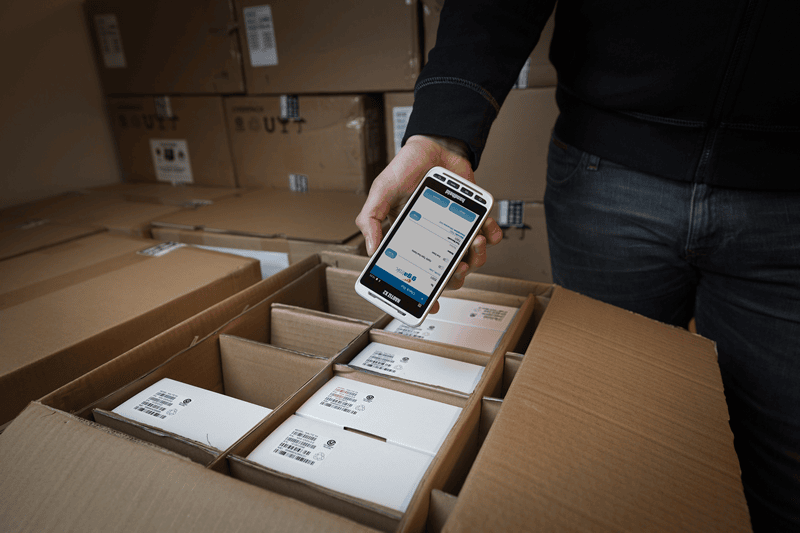
- Optical Scanning: A worker scans the physical tag using a handheld laser reader, tablet camera, or smartphone. The device reads the light and dark spaces of the code and translates them into digital data.
- Database Match: The system matches the scanned code against its database record, instantly pulling up item records such as model number, serial code, current location, and assigned owner.
- Transaction Logging: The operator selects an action (such as Check-Out, Transfer, Service Completed, or Audit Pass). The database updates instantly with a precise timestamp, worker ID, and new location.
Essential Hardware for Barcode Asset Tracking Software
1. Durable Barcode Tags and Labels
Retail consumer packaging uses paper labels, but equipment tracking requires durable tag materials engineered for severe industrial conditions:
- Anodized Aluminum Tags: Ideal for outdoor power equipment, heavy machinery, and metal housing. High-contrast codes are sealed inside the metal layer to withstand extreme heat, chemicals, and intense UV exposure.
- Metalized Polyester Labels: Flexible, cost-effective options with strong acrylic adhesives designed for power hand tools, diagnostic meters, and IT assets.
- Destructible Vinyl Labels: Tamper-evident tags that fracture if someone attempts to peel them off, preventing unauthorized tag swapping between assets.
2. Scanning Hardware Options
Selecting hardware depends on where your personnel interacts with equipment:
- Dedicated USB Laser Scanners: Inexpensive desktop units ideal for high-speed counter check-outs inside clean warehouse cribs.
- Rugged Mobile Terminals: Handheld industrial computers built with integrated scanning engines, rubberized drop protection, and long battery life for busy distribution centers.
- Smartphones and Mobile Tablets: Using mobile apps on iOS or Android devices lets field workers scan tags using built-in cameras, reducing upfront hardware investments.
1D Barcodes vs. 2D QR Codes: Which Should You Deploy?
│ ║▌║█║▌│║▌║▌█║ ║▌║▌█║ │
│ 123456789012 │
└───────────────────────┘
- Format: Horizontal scan line
- Capacity: 20 to 25 characters
- Hardware: Laser or CCD scanner
│ █▀▀▀▀▀█ ▄ █ █▀▀▀▀▀█ │
│ █ ███ █ █ ▀ █ ███ █ │
└───────────────────┘
- Format: Matrix grid scan
- Capacity: 7,000+ characters
- Hardware: Smartphone or 2D imager
1D Barcodes (Linear)
Linear barcodes store data horizontally using alternating vertical black bars and white spaces (such as Code 39 or Code 128).
- Data capacity: Holds up to 20 to 25 characters, acting as a simple asset key to look up full data in your database.
- Scanning speed: Provides near-instant processing when aimed straight on with traditional laser readers.
- Best application: Structured indoor tool cribs with fixed checkout counters and high transaction volume.
2D QR Codes (Quick Response)
QR codes encode information across both horizontal and vertical axes within a square matrix grid.
- Data capacity: Holds over 7,000 numeric or 4,000 alphanumeric characters, allowing you to encode direct web links, operating manuals, or safety documents on the tag.
- Scanning versatility: Reads in 360 degrees using mobile devices, tablets, or dedicated 2D imagers.
- Best application: Field service, job site audits, and remote equipment management where technicians rely on smart devices.
Head-to-Head Feature Comparison
| Capability | 1D Linear Barcodes | 2D QR Codes |
|---|---|---|
| Primary Data Encoded | Asset ID number only | Asset ID, web links, specs, manuals |
| Data Storage Limit | Low (20–25 characters) | High (Up to 7,000+ characters) |
| Scanning Hardware | Dedicated laser or CCD scanner | Smartphones, tablets, 2D imagers |
| Scan Angle Required | Must align horizontally | 360-degree multidirectional alignment |
| Damage Resistance | Fails if a single bar scratches off | Scans even with 30% surface damage |
| Print Footprint | Wide horizontal rectangle | Compact square footprint |
Key Factors When Choosing Your Tag Format
1. Job Site Environment and Hardware Wear
Equipment deployed on construction sites, utility corridors, and industrial floors encounters dirt, water, oil, and rough handling.
- 1D Barcodes: Scratches or tears across vertical lines ruin the light-and-dark ratio, preventing laser beams from reading the label.
- QR Codes: Built-in Reed-Solomon error correction keeps labels readable. Even if grease or scrapes obscure 30% of the grid, smartphone cameras read the data accurately.
2. Fixed Tool Cribs vs. Mobile Remote Crews
Your daily workflow dictates the most efficient scanning hardware.
- Central tool cribs: Mounted laser scanners at crib windows handle hundreds of rapid check-outs per hour with point-and-click speed.
- Field service crews: Outfitting every service vehicle with specialized laser readers adds substantial hardware costs. QR codes let field technicians audit tools using smartphones they already carry.
3. Physical Tagging Surface Area
Small power tools, test meters, and specialized instruments offer limited flat surface space for tagging.
- 1D Barcodes: Long ID numbers require wider linear labels. Shrinking a 1D barcode squeezes bars together, causing print bleeding that prevents clear reads.
- QR Codes: Store dense information in a small square, making them ideal for small hand tools or narrow handles.
Top Operational Benefits of Barcode Asset Tracking Software
Implementing **barcode asset tracking software** transforms reactive asset accounting into an organized operational workflow.
1. Dramatic Reduction in Lost Tool Expenses
When workers know every tool checked out to them is logged against their employee ID, gear returns reliably at the end of every shift. Organizations regularly cut annual tool replacement costs by over 40% in their first year of deployment.
2. Accelerated Check-Out and Audit Speed
Handwriting item descriptions and serial numbers during morning check-outs creates long lines at the crib window. Optical scanning completes check-outs in seconds, getting crews on the road faster.
3. Improved Preventive Maintenance and Safety Compliance
Ladders, rigging gear, high-voltage test meters, and torque wrenches require regular safety inspections. **Barcode asset tracking software** lets managers schedule routine service intervals. Scanning an item during checkout alerts crib operators instantly if an item is overdue for calibration or safety testing.
4. Balanced Inventory Across Multiple Locations
Centralized asset tracking gives managers full visibility over tool distribution across all job sites and service trucks. Instead of buying new equipment for a new project, managers can locate underutilized tools on nearby sites and transfer them directly.
Alternative Tracking Technologies
Depending on your operational footprint, complementary tracking options can serve specific asset categories:
- GPS Asset Tracking: Best suited for long-haul fleet vehicles, heavy trailers, and large mobile generators requiring continuous real-time satellite position monitoring on open roads.
- NFC (Near Field Communication): Useful for short-range mobile interactions, though tag costs run significantly higher than standard adhesive barcodes.
Selecting the Ideal Tagging System
Deploy 1D Barcodes if:
- You operate dedicated laser scanning hardware at central crib checkout counters.
- Your priority is ultra-fast checkout inside clean warehouse facilities.
- You only need to cross-reference a short asset tag number against a local desktop database.
Deploy QR Codes if:
- Your field personnel manage and audit tools using smart devices out on job sites.
- Your tags face rain, abrasion, oil, or direct sunlight on active work sites.
- You need to place compact labels on small hand tools, calibrated meters, or delicate devices.
Unify Your Equipment Management with GigaTrak
Whether you select 1D linear barcodes or 2D QR codes, your tracking architecture relies on the underlying system behind it.
GigaTrak provides comprehensive systems that support both 1D and 2D formats within a single environment. You can deploy 1D laser tags for internal warehouse operations while placing durable 2D QR codes on mobile field gear without splitting your inventory database.
- Flexible Hardware Integration: Full compatibility with USB laser scanners, rugged handheld terminals, and mobile apps.
- Complete Chain of Custody: Detailed records show who checked out each item, where it was transferred, and when it is due back.
- Audit Functions: Streamlined audit features cut tool loss by over 40% within the first year of operation.
- Deployment Flexibility: Choose between secure local on-premise servers or cloud hosting.
- 100% US-Based Support: Direct access to technical support specialists with decades of hands-on experience.
Frequently Asked Questions
Total system costs depend on asset volume, facility count, and user licenses. Entry-level systems start around $200 to $500 annually, while enterprise implementations scale based on specific workflow needs. Leveraging existing smartphones for scanning helps minimize initial hardware costs.
Yes. GigaTrak handles both 1D barcodes and 2D QR codes in a single database. You can scan linear labels in your central warehouse while field workers scan QR codes on job sites using mobile devices.
For severe environments, use anodized aluminum tags or metallic polyester barcode labels with heavy-duty acrylic adhesive. These resist water, UV rays, chemical exposure, and physical scraping far better than standard paper labels.
Cloud deployment suits multi-site companies that need instant mobile updates from remote field workers. On-premise deployment suits government agencies, defense contractors, or facilities with strict data security mandates or restricted internet connectivity.
Take Control of Your Asset Tracking Today
Relying on paper logs or unreadable tags leads to lost tools, unaccounted inventory, and unnecessary replacement costs. Know where every asset is before your trucks leave the yard.
GigaTrak provides the hardware, durable tags, and proven systems needed to keep your organization accountable.
Contacting GigaTrak:
- 262-657-5500
- sales@gigatrak.com
Request Information