Call us: 262-657-5500
GigaTrak
  • Request Quote
  • Client Center
  • Technical Support
  • Menu Menu
Call us: 262-657-5500

Tag Archive for: cloud-hosted

What is Compliance Tracking? | GigaTrak’s Barcode Technology

in Blog

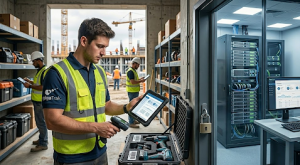
Compliance Tracking with GigaTrak, the leader in asset and tool tracking with barcode technology.
Struggling with messy inventory spreadsheets before an official inspection? Learn how barcode-powered physical asset compliance tracking software reduces liability risk, ensures audit readiness, and protects your operational budget.

Process & Technology Solutions at GigaTrak • Reading Time: 15 mins

What is Physical Asset Compliance Tracking?

Physical asset compliance tracking is a digital management method that helps organizations monitor their physical inventory against regulatory laws, safety codes, and internal quality frameworks. The system pairs tracking software with barcode technology to replace manual logging sheets.

The software records every tool transaction, safety check, and custody change. This creates a permanent, tamper-proof record of your organization’s physical assets.

Introduction

Many organizations are not aware that the cost of non-compliance is nearly three times the cost of maintaining proper compliance tracking systems. A small oversight in equipment maintenance or a missing inspection record can quickly lead to regulatory violations, project shutdowns, and heavy financial losses.

Can your company afford that operational risk? Probably not.

Failing to adhere to industry safety regulations and inventory standards causes devastating repercussions for commercial enterprises. For instance, federal safety violations and missing equipment documentation can cost companies thousands of dollars per day in active penalties. Implementing dedicated compliance tracking software makes the difference between consistent business growth and sudden operational failure.

This guide outlines how to build an unshakeable system of record using barcode technology.

What is Physical Asset Compliance Tracking?

Physical asset compliance tracking is a digital management method that helps organizations monitor their physical inventory against regulatory laws, safety codes, and internal quality frameworks. The system pairs tracking software with barcode technology to replace manual logging sheets.

The software records every tool transaction, safety check, and custody change. This creates a permanent, tamper-proof record of your organization’s physical assets.

The Core Importance of Asset Compliance Systems

Compliance tracking systems help organizations meet complex legal, insurance, and operational requirements. They find and fix inventory gaps early. This prevents legal penalties, operational disruptions, and long-term damage to your corporate reputation.

If you operate in heavy field services, government sectors, or healthcare logistics, tracking software helps you demonstrate due diligence. It maintains deep trust with your clients, protects your workforce, and keeps your company competitive.

Key Features of Effective Compliance Tracking Systems

To select the best compliance tracking setup, you must evaluate your field needs and your specific regulatory rules. Look for these foundational features when designing your asset management ecosystem.

+-------------------------------------------------------------------------+
|                FOUNDATIONAL COMPLIANCE TRACKING ELEMENTS                |
+-------------------------------------------------------------------------+
|  [Regulatory Mapping] ----> Aligns inventory controls with safety codes |
|  [Barcode Verification] --> Forces physical scan, eliminates guessing   |
|  [Continuous Ledger] ----> Generates permanent, digital history logs    |
|  [Automated Alerts] ------> Signals upcoming maintenance or deadlines   |
+-------------------------------------------------------------------------+

Regulatory Mapping and Asset Categorization

Your tracking software must align internal asset controls with specific safety codes and corporate standards. The system should group tools by their required inspection intervals. This sorting gives compliance officers an immediate overview of audit readiness across all active equipment pools.

Hardware and Software Integrations

An asset system must sync data across your enterprise network. Connecting your inventory database with your central management software ensures that personnel changes update automatically. It ties asset ownership to active employees, simplifying accountability across separate jobsites.

Continuous Monitoring and Ledger Tracking

Inventory oversight cannot be a single annual event. True compliance tracking requires continuous monitoring to catch safety issues before equipment leaves your warehouse. Continuous scanning keeps your database audit-ready at all times, protecting your operations from surprise inspections.

Automated Alerts and Remediation Scheduling

Automated notifications alert shop managers about expired safety certifications, overdue tools, or upcoming calibration deadlines. Staff can act quickly to pull hazardous gear from service. The software can also lock out unverified assets, preventing workers from checking out non-compliant equipment.

Clear Reporting and Real-Time Dashboards

Dashboards turn raw scan data into actionable operational insights. They show active risk levels, identify missing item trends, and display upcoming service demands. Compliance managers use these reporting tools to generate clean documentation that satisfies rigorous regulatory standards.

Comprehensive Training Resources

Deploying new barcode technology requires clear instructional materials. Look for platforms that offer direct implementation guidance, video tutorials, and clear setup checklists. Proper training shortens your onboarding timeline and helps your field crew adopt the scanning system quickly.

User-Friendly Interface for Field Crews

If your field technicians find the tracking application difficult to use, they will stop scanning items. A simple layout with large buttons ensures consistent daily use. Software with a minimal learning curve reduces data entry errors and saves valuable corporate training hours.

Responsive US-Based Technical Support

Compliance issues require immediate resolution to avoid project delays. Access to responsive, knowledgeable support staff ensures that system issues get fixed fast. Your team can maintain constant uptime, minimizing the risk of documentation gaps during critical audit windows.

Major Strategic Benefits of Barcode Compliance Systems

Transitioning to barcode technology does more than eliminate paper logs. It builds a highly efficient, automated operational workflow. Here are the primary advantages of upgrading your asset controls.

1. Reduced Exposure to Severe Legal Risks

Legal disputes over damaged equipment or jobsite injuries drain corporate resources. Capital spent on legal defense reduces your capacity to expand operations or hire top talent. Digital tracking ensures constant safety compliance, greatly lowering your exposure to liability claims.

2. Maximum Operational Transparency

Centralizing your tracking data gives every manager visibility into asset locations. Digital logs show who took an item, where they stored it, and when they scanned it last. This transparency helps leadership locate inventory bottlenecks and fix issues before they disrupt your clients.

3. Drastic Reduction in Human Effort

Automated barcode scanning eliminates the hours spent typing serial numbers into office spreadsheets. The software handles evidence collection, logs transaction times, and sends automated reminders. Your warehouse staff can focus on high-value tasks, like preventative tool maintenance.

4. Direct Corporate Scalability

Cloud-based platforms allow your compliance tracking workflows to expand alongside your business volume. As you open new regional offices or add vehicles, the database accommodates the increased data flow. Standardized workflows prevent administrative bottlenecks during periods of fast corporate growth.

5. Enhanced Inter-Departmental Collaboration

A shared asset database breaks down communication barriers between your office and your field crews. Separate departments can easily track shared tools, log equipment transfers, and share maintenance documentation. This shared visibility prevents duplicate tool purchases and improves resource allocation.

6. Safer Work Environments for Employees

Productive teams require safe working conditions. Barcode compliance systems protect your crew by keeping unverified or broken gear out of circulation. Digital safety checklists force operators to inspect tools before use, ensuring total adherence to workplace safety mandates.

Detailed Profiles of GigaTrak Compliance Configurations

GigaTrak offers dedicated tracking frameworks designed for enterprise compliance tracking. Rather than offering a single generic application, GigaTrak builds specific deployment variations to match unique organizational environments.

+------------------------------------------------------------------------+
|                      GIGATRAK DEPLOYMENT EDITIONS                      |
+------------------------------------------------------------------------+
|  [Tool Tracking Edition] ------> Manages fluid, high-velocity field gear|
|  [Asset Tracking Edition] -----> Monitors fixed infrastructure & values|
|  [On-Premise Server Edition] --> Total data isolation behind firewalls |
|  [Mobile Application Hub] -----> Handheld scanning for remote off-grid |
+------------------------------------------------------------------------+

1. GigaTrak Tool Tracking Software (Cloud Edition)

This configuration manages high-velocity tool environments where gear moves constantly between workshops, service trucks, and active jobsites.

  • Key Features: Automated check-out and check-in tracking; real-time tool location logs; historical worker custody tracking; automated text alerts for overdue tools.

  • Standout Benefit: It forces absolute personal accountability. Because every tool transaction links to a specific employee badge scan, item loss drops significantly.

  • Deployment Pricing: Customized pricing tailored to your corporate database size and concurrent user requirements.

2. GigaTrak Asset Tracking Software (Cloud Edition)

This edition tracks fixed infrastructure items, IT equipment pools, and high-value corporate investments that remain at specific geographic installations.

  • Key Features: Fixed asset location histories; depreciation schedule calculators; maintenance log attachments; audit reconciliation reporting.

  • Standout Benefit: It wipes out expensive ghost assets from your accounting ledgers. This optimization prevents companies from overpaying on corporate property taxes and asset insurance premiums.

  • Deployment Pricing: Customized enterprise licensing based on total tracked inventory volume.

3. GigaTrak Corporate Asset Tracking (On-Premise Server Edition)

This secure deployment model installs directly onto your company’s physical internal servers, bypassing external cloud infrastructure entirely.

  • Key Features: Local SQL database hosting; full internal network data isolation; customized database configuration options; active directory employee syncing.

  • Standout Benefit: It provides total data isolation. This architecture matches the security rules of defense contractors, government agencies, and installations that must run entirely behind a secure corporate firewall.

  • Deployment Pricing: One-time corporate server software license fee with optional annual maintenance support contracts.

4. GigaTrak Mobile Scanning Terminal Solutions

This option combines GigaTrak’s specialized mobile software apps with rugged handheld hardware terminals or smartphone devices to track inventory in remote field settings.

  • Key Features: Local offline data caching; camera-based barcode scanning; durable hardware builds; automatic background database synchronization.

  • Standout Benefit: It solves the off-grid tracking challenge. Field technicians can log equipment status, record inspections, and change item locations without internet access. The device stores the scans locally and syncs with the central database once network access returns.

  • Deployment Pricing: Per-device software licensing paired with selected hardware procurement configurations.

All of GigaTrak’s barcode technology solutions are available in both the Cloud-Hosted and Self-Hosted architectures.

Technical Architecture: Why Barcodes Defeat Manual Entry

A reliable system of record requires data accuracy. Software that allows operators to manually type in serial numbers introduces data corruption risks. Workers misread letters, drop digits, or copy rows incorrectly.

Barcode technology requires physical verification. An employee must walk up to the equipment and aim the scanner directly at the tag. The laser or camera reads the encoded data instantly.

This action removes typos, prevents staff from falsifying records from an office desk, and confirms the asset physically exists at that location.

Four Steps to Transition from Spreadsheets to Barcode Software

Replacing outdated tracking files does not require stopping your daily business operations. Following a structured implementation strategy ensures a smooth transition.

  [Step 1: Clean Data]    --> Fix typos and clear duplicate spreadsheet rows
           │
           ▼
  [Step 2: Tag Material]  --> Apply anodized metal tags to field machinery
           │
           ▼
  [Step 3: Group Rules]   --> Restrict system deletion rights to managers
           │
           ▼
  [Step 4: Phased Launch] --> Test the scanning workflow in one shop first

Step One: Reconcile and Clean Your Inventory Data

Do not import disorganized data into your new database. Review your current inventory spreadsheets to remove duplicate entries. Fix obvious typos in serial numbers. Organize your assets into clear categories based on tool type, physical location, and maintenance needs.

Step Two: Select and Apply Durable Barcode Tags

Your barcodes must survive the environments where your tools operate. Standard paper labels work well for office laptops and indoor files.

However, outdoor construction equipment requires heavy-duty tags. Choose anodized aluminum asset tags or thermal-transfer polyester labels. These materials resist damage from abrasion, chemicals, moisture, and extreme temperatures.

Step Three: Establish Group Permissions and User Access

Configure your tracking software to restrict system privileges based on employee roles.

Allow your field crews to check items out or report broken gear from their mobile devices. Restrict higher-level system functions, such as deleting history logs or altering regulatory compliance schedules, to authorized compliance officers.

Step Four: Execute a Phased Departmental Rollout

Do not try to change your entire enterprise inventory tracking system in a single day. Select one department, tool room, or jobsite to serve as your testing location.

Tag the assets at this location, train the local operators, and test your offline data syncing processes. Once you refine the workflow, expand the tracking software across your remaining facilities.

Financial Analysis: The Clear ROI of Active Tracking Controls

Implementing dedicated compliance tracking software protects your organization’s financial bottom line. It changes asset management from an administrative expense into an operational savings driver.

Reclaiming Billable Labor Hours

Manually searching for misplaced equipment before an audit drains employee productivity. Technicians waste hours walking through warehouses looking for missing assets.

With a barcode system of record, your team knows exactly who last scanned the item and where it resides. This visibility speeds up inventory audits, letting your workers focus on billable client projects.

Lowering Capital Replacement Costs

Tools that receive regular, documented maintenance last longer. Automated asset software tracks usage metrics and sends proactive alerts before components fail.

Preventing major mechanical breakdowns reduces emergency tool rental fees. It also helps your operations team avoid buying premature equipment replacements.

Compliance Tracking

FAQ

Why are manual spreadsheets considered an unacceptable risk by regulatory auditors?

Manual spreadsheets lack automated data controls, historical logging, and system version tracking. They allow users to accidentally delete rows, alter entry dates, or overwrite inspection histories without detection.

When an inspector demands verified proof of equipment testing, an easily editable spreadsheet fails to provide the secure, tamper-proof chain of custody required by regulatory agencies.

How does specialized tool tracking software lower corporate insurance premiums?

Insurance underwriting firms evaluate corporate risk based on your internal operational controls. Utilizing an asset tracking system proves that your management actively monitors equipment loss, tracks tool locations, and enforces strict safety inspection schedules.

Providing your insurance carrier with detailed compliance logs demonstrates reduced liability risk. This documentation frequently qualifies your organization for lower annual premium rates.

Can field employees use their own mobile devices to scan barcodes?

Yes. Modern software compliance architectures support mobile device deployment. Your field technicians can use specialized mobile apps to turn their smartphones or tablets into handheld scanning terminals.

Workers use the device camera to scan asset barcodes directly in the field. This capability lets them update tool locations, record safety inspections, and log item conditions without returning to a central office.

What is the process for migrating existing data into GigaTrak software?

Migrating your legacy tracking information is direct. GigaTrak’s software features built-in data import tools. You can export your current inventory lists into standard CSV or Excel formats.

The system guides you through mapping your data columns to the new database fields. This utility populates your new asset tracking environment quickly, saving your staff from performing manual data entry.

What is the difference between compliance tracking and general GRC tools?

Compliance tracking software focuses on monitoring physical controls, tool safety histories, asset conditions, and daily operational deadlines.

Governance, Risk, and Compliance (GRC) platforms take a broader corporate view. They focus on abstract corporate policies, legal regulations, cybersecurity risks, and financial reporting compliance across the entire enterprise.

Build an Unshakeable System of Record with GigaTrak

Building a secure, audit-ready enterprise requires moving past unorganized spreadsheet files and manual field workflows. Reliable operational accountability demands a tracking framework engineered to turn physical asset visibility into an unshakeable system of record.

GigaTrak delivers this level of control. For three decades, our team has built tracking systems designed for industries facing strict regulatory pressures.

We help your organization replace manual chaos with clear operational visibility. Our tracking software runs on the exact deployment model your IT infrastructure requires, backed by reliable, US-based technical support.

Do not let manual data errors or outdated spreadsheets leave your organization vulnerable to failed audits and financial penalties. GigaTrak provides the visibility and control you need to satisfy strict regulatory requirements.

Request a Demo to speak with our application specialists today, or call our offices directly at 262-657-5500 to learn how we can secure your operational compliance.

Pages

  • About TTS
  • About Us
  • About Us Old
  • Account Administration
  • Accounts adding or editing
  • Add New Tool Basic & Advanced
  • Add New Tool No Master
  • Add Photo & Doc
  • Aerospace
  • Asset and Inventory Tracking Software
  • Asset Button
  • Asset Control Systems
  • Asset Database Solutions
  • Asset Inventory Management
  • Asset Inventory System
  • Asset Management
  • Asset Management Barcode Software
  • Asset Management Companies
  • Asset Management Inventory Software
  • Asset Management Programs
  • Asset Management Software
  • Asset Management Software and Barcode
  • Asset Management Software with Barcode Scanner
  • Asset Management Systems
  • Asset Management Tracking
  • Asset Scanner Software
  • Asset Software for Schools
  • Asset Software Management
  • Asset Software Management for Schools
  • Asset Tagging Software
  • Asset Tagging System
  • Asset Tracker Software
  • Asset Tracking
  • Asset Tracking and Management Solution
  • Asset Tracking Barcode Solutions
  • Asset Tracking Contact Us LP 2026
  • Asset Tracking for Hospitals
  • Asset Tracking for Laptops
  • Asset Tracking for Universities
  • Asset Tracking Free Demo Of Software LP 2026
  • Asset Tracking Paid Ad LP 2026
  • Asset Tracking Software
  • Asset Tracking Software
  • Asset Tracking Software for Schools
  • Asset Tracking Software for Schools
  • Asset Tracking Software With Barcode
  • Asset Tracking System
  • Asset Tracking System
  • Asset Tracking System
  • Asset Tracking System
  • Asset Tracking System
  • Asset Tracking System Capterra LP
  • Asset Tracking System Contact Us LP
  • Asset Tracking System Contact Us LP 2024
  • Asset Tracking System Free Demo Of Software LP
  • Asset Tracking System Free Demo Of Software LP 2024
  • Asset Tracking System LP
  • Asset Tracking System LP 2023 Old
  • Asset Tracking System LP 2024
  • Asset Tracking System paid ad LP 2024
  • Asset Tracking System Test Drive It Now LP
  • Asset Tracking System Test Drive It Now LP 2024
  • Asset Tracking System Watch Our Product Video LP
  • Asset Tracking System Watch Our Product Video LP 2024
  • Asset Tracking Test Drive It Now LP 2026
  • Asset Tracking Watch Our Product Video LP 2026
  • ATS Access DB Back Up
  • ATS App Features and Batch Syncing
  • ATS Device Application Video
  • ATS Full Instructional Video
  • ATS HH Configurations
  • ATS Install and Batch Setup
  • ATS Live Quick Review
  • ATS Mobile Handheld Application Tutorial
  • ATS Mobile Handheld Batch Download
  • ATS Mobile Terminal Application Videos
  • ATS Promo
  • ATS Promo Labels
  • ATS Quick Help
  • ATS Recorded Training Video
  • ATS Setup Options
  • ATS Training Library
  • ATS Training Videos
  • Audit Bin Count
  • Automated Physical Asset Management
  • Available Packages
  • Back-Up Compact Database
  • BagCheck Software System
  • Barcode Check In Check Out
  • Barcode Inventory Tracking
  • Barcode Inventory Tracking
  • Barcode labels design
  • Barcode Management
  • Barcode Scanner For Tools
  • Barcode Software for Schools
  • Barcode Solutions for Document Tracking
  • Barcode Solutions for Tool Tracking
  • Barcode Solutions for Tool Tracking
  • Barcode Tools
  • Barcode Tools
  • Barcode Tracking Software
  • Barcodes
  • Barcoding Equipment Software
  • Basic Tool Management Software
  • Best Asset Management Software
  • Blog
  • Book Demo
  • Business
  • Business Asset Control Software
  • Business Asset Management Software
  • Cart
  • Change Password
  • Check in a tool employee location or container
  • Check In By
  • Check in tools using a computer
  • Check In/Check Out
  • Check In/Check Out Inventory Software
  • Check Out By
  • Check out tools on a computer
  • Checkout
  • Checkout to Checkout
  • CIO Review Construction Tool Tracking Provider
  • Class type setup user defined fields used to categorize tools
  • Client Center
  • Client Center
  • Cloud Based Software
  • Company Asset Management Software
  • Condition Administration
  • Construction Inventory Tool Control Program
  • Construction Tool Tracking
  • Contact Training
  • Contact Us Sales Request
  • Container
  • Container with Audit
  • Contractors
  • Customer Testimonials
  • Customers By Industry
  • Dap MT1010
  • Database compact
  • Datalogic Memor Cold Boot
  • Datalogic Memor Warm Boot
  • Datalogic QD2590
  • Datalogic Skorpio Cold Boot
  • Datalogic Skorpio Warm Boot
  • Document Tracking Software
  • Document Tracking System
  • Document Tracking System
  • Document Tracking System Free Demo Of Software LP
  • Document Tracking System LP
  • Document Tracking System Manage Files By Location LP
  • Document Tracking System Record When Folders Move LP
  • Document Tracking System Test Drive It Now LP
  • Draft Request Information
  • DTS App
  • DTS Custom Fields
  • DTS Demo Video
  • DTS Employee Import
  • DTS Filter Search
  • DTS Initial System Setup
  • DTS Items Icon
  • DTS Items Import
  • DTS Label Designer
  • DTS Location Import
  • DTS Overview and Setup
  • DTS Training Library
  • DTS Training Videos
  • DTS Transfer
  • Education
  • Education Asset Tracking System
  • Email Promo
  • Employee Access Levels
  • Employee Administration
  • Employee Administration – Add New Employee
  • Employee Delete
  • Employee list export or print
  • Employee view setting up buttons they see
  • Employees, Locations and Tools – importing
  • Equipment and Tools Management for Construction
  • Equipment Check In Check Out Software
  • Equipment Check Out Software
  • Equipment Check Out Systems
  • Equipment Inventory Asset Manager
  • Equipment Inventory Barcode Scanner
  • Equipment Inventory Management Software
  • Equipment Inventory Software
  • Equipment Rental Inventory Management
  • Equipment Rental Tracking Software
  • Equipment Rental Tracking System
  • Equipment Tracking Software
  • Export Tools
  • Facilities tools are stored in – Create or edit
  • Facility Administration
  • FAQ
  • File Tab
  • File Tab Menu
  • File Tab Overview
  • Find Tool (F1)
  • Find Tools
  • Fixed Asset Barcode Scanner
  • Fixed Asset Inventory
  • Fixed Asset Management
  • Fixed Asset Software
  • Fixed Asset System
  • Fixed Asset Tagging System
  • Frequently Asked Questions
  • Funding Source Administration
  • Furniture Asset Management Software
  • GigaTrak Tool Tracking Mobile Application video
  • GigaTrak Virtual Brochure
  • Global User Admin – Change Password
  • Godex 4 Thermal Transfer Printer
  • Government
  • GTS Training Library
  • Guard Tour System
  • Handheld Configuration
  • Handheld Docking & Syncing
  • Handheld options
  • Handheld terminal – downloading transactions
  • Handheld terminal – synchronize data
  • Handheld Terminal Functions
  • Hardware
  • Hardware Comparison
  • Hardware Training Library
  • Healthcare
  • Help Tab
  • Help Tab Menu
  • Home
  • Home screen navigation
  • Home Screen Navigation
  • Home-2
  • Honeywell 60s
  • Honeywell 6100
  • Honeywell 6100 Cold Boot
  • Honeywell 6100 Warm Boot
  • Honeywell CT45
  • Honeywell Dolphin 70e
  • Honeywell Dolphin CT60 Handheld Computer
  • Honeywell Voyager 1452g Wireless Upgradeable Area-Imaging Scanner
  • Hospital Equipment Tracking Systems
  • Hotel Asset Management Tracker
  • How To Barcode Inventory
  • Identify
  • IMS Training Library
  • In and Out Software
  • Industrial Tool Barcoding
  • Industries
  • Information fields – Create or edit the by using the support tab
  • Institutional Asset Tracking
  • Intermec CK3
  • Intermec CN51
  • Intermec CN70
  • Intermec CS40
  • Intermec PB22
  • Intermec PF8
  • Intermec SG20
  • Introduction
  • Inventory Assets
  • Inventory Barcode Scanner System
  • Inventory Control
  • Inventory Control
  • Inventory Control Software
  • Inventory Control Tools
  • Inventory Management
  • Inventory Management Software
  • Inventory Management Software for Equipment
  • Inventory Management System
  • Inventory Management System
  • Inventory Management With Scanner
  • Inventory Software
  • Inventory Software Solutions
  • Inventory Solutions
  • Inventory System Software
  • Inventory Tools
  • Inventory Tracking
  • Inventory Tracking System
  • Join Us
  • Join Us
  • Keep Track of Assets
  • Keep Track of Building Equipment with Barcode
  • Keep Track of Inventory with Barcode
  • Keep Track of School Equipment with Barcode
  • Keep Track of Your Company’s Assets
  • Keeping your handheld mobile devices disinfected and ready for safe use
  • Label Printer and Designer
  • Label Tab Menu
  • Latest Technology
  • License and version information
  • Location Administration
  • Locations – Create and edit storage, transfer and check out
  • Log In
  • Log in over an existing user
  • Log in Temporarily
  • Login
  • Logon
  • Logon and Maintenance Alert
  • LXE MX8
  • Machine Shop Tool Crib Software
  • Main setup screen: Rename categories, set maintenance reminders, add your own company logo to reports, and setup the auto email function
  • Maintenance
  • Maintenance Due Alert
  • Maintenance Repair Provider Administration
  • Manage Assets
  • Manage Building Equipment with Barcode
  • Manage Business Assets with Asset Management Software
  • Manage Inventory
  • Manage Physical Assets
  • Manage Sales Orders
  • Managing Your Tools Through Barcoding
  • Manufacturer Administration
  • Manufacturing
  • Master Catalog
  • Master Catalog
  • Medical Equipment Tracking Software
  • Member Login
  • Member Tab Overview
  • Members
  • Members Import
  • Members Import
  • Members Setup In Gigatrak Contractor Edition
  • Memor 10
  • Memor 11
  • Memor X3
  • Mobile App Transition Guide
  • Mobile Device Application Data Safety
  • Mobile Terminals – Batch Download
  • Nautiz X2
  • Nautiz X4
  • Nautiz X9
  • New User
  • Newsletter 2019
  • Newsletter Own or rent On-Premise vs. Cloud solutions
  • Occupancy Monitoring Control System
  • Package Management System
  • Package Tracking System
  • Package Tracking System for School’s and Universities
  • Panasonic Toughpad FZ
  • Password – change the “global” password
  • Password Reset
  • Password Reset
  • Physical Asset Management
  • Physical Count
  • Physical Inventory Management
  • Physical Inventory Software
  • Preprinted Barcode Labels
  • Printer Assignment
  • Printer Setup
  • Printers
  • Privacy Policy
  • Privacy Statement
  • Process Tracking Software
  • Profile
  • Profile
  • Promo Contact Form
  • PTS Container
  • PTS Delivery
  • PTS Label Designer
  • PTS Mobile App
  • PTS Receive
  • PTS Training Library
  • PTS Training Videos
  • PTS Transfer
  • Purchase Process
  • Purge History
  • Quick Check In
  • Record Maintenance
  • Record Maintenance in Miles Hours
  • Register My Software
  • Register My Software
  • Registration
  • Registration
  • Registration
  • Remote Support Tool
  • Remote Warehouse Inventory Software
  • Rental Tracking Software
  • Reports
  • Reports Accessing
  • Request Information
  • Request Information
  • Request Information
  • Request Information
  • Request Information ATS Trial
  • Request Information Capterra
  • Request Information Labels
  • Request Information LP
  • Request Information LP Cloud
  • Request Information LP Premise
  • Request Information Mobile App
  • Request Information TTS Cloud
  • Request Information TTS Cloud Capterra
  • Request Information TTS Premise Capterra
  • Request Information TTS Trial
  • Request Quote
  • Reseller
  • Reservations
  • Reservations
  • Reservations
  • Reservations Overview
  • Returning Consumables
  • RFID
  • RFID Asset Management
  • RFID Tool Tracking System
  • Sales Request Quote
  • Scanners
  • Schedule Training
  • Search Solutions
  • Search Solutions 2
  • Search Solutions LP
  • Security Access User Setup
  • Self Hosted Mobile App Transition Guide
  • SEO golden page
  • Service Request Customer Login
  • Setup Options
  • Simple Inventory Software
  • Sitemap
  • Skorpio X3
  • Skorpio X4
  • Small Business Inventory Control Software
  • Small Tool Tracking
  • Software
  • Software for Asset Management
  • Software for Inventory Control
  • Software Inventory Tool
  • Software to Track Assets
  • Software to Track Tools
  • Software Updates
  • Specialty Software
  • Stores Tracking System
  • STS Checkout Button
  • STS Download Button
  • STS File Tab Menu
  • STS Full Instructional Video
  • STS Handheld App
  • STS Help Tab Menu
  • STS Initial Screen
  • STS Introduction and Startup
  • STS Inventory Tab Menu
  • STS Label Example
  • STS Label Tab Menu
  • STS Logon
  • STS Mobile Terminal Application
  • STS Parts Button
  • STS PO Button
  • STS Receipts Button
  • STS Requisition Button
  • STS Support Tab Menu
  • STS Training Library
  • STS Training Videos
  • STS Transfer Button
  • Supplier Administration
  • Support Request
  • Support Tab Menu
  • Symbol LS2208
  • Tax Information
  • Technical Support
  • Term and Conditions
  • Thank You
  • Thank You Booking
  • Thank You Search Solutions
  • Thank You Technical Support
  • Thank You Training Request
  • Tool – add, maintain, view
  • Tool – Tracking Maintenance
  • Tool – Transfer to another storage location
  • Tool – Transfer, Detailed Instructions
  • Tool – view history
  • Tool – view maintenance history
  • Tool and Equipment Management
  • Tool Check In Check Out Software
  • Tool Check Out System
  • Tool condition – define
  • Tool Control Software
  • Tool Crib Management
  • Tool Crib Management Software
  • Tool Crib Software
  • Tool Crib Software
  • Tool Crib Tracking
  • Tool Crib Tracking Software
  • Tool History (F3)
  • Tool Information (F2) – Add New Tool
  • Tool Inventory
  • Tool Inventory Control
  • Tool Inventory RFID
  • Tool Inventory Software
  • Tool Inventory System
  • Tool Maintenance Repair Providers – Adding
  • Tool Management System
  • Tool Manufacturer Administration
  • Tool Rental Software
  • Tool Reporting Systems
  • Tool reservation – create
  • Tool reservation – find a
  • Tool Room Inventory Software
  • Tool Room Management System
  • Tool Screen Color Selector
  • Tool Support Admin – Class – Type Setup
  • Tool Tracker Software for Contractors
  • Tool Tracking
  • Tool Tracking Contact Us LP 2026
  • Tool Tracking Free Demo Of Software LP 2026
  • Tool Tracking Inventory
  • Tool Tracking LP New
  • Tool Tracking Paid Ad LP 2026
  • Tool Tracking Software
  • Tool Tracking Software
  • Tool Tracking System
  • Tool Tracking System
  • Tool Tracking System
  • Tool Tracking System App
  • Tool Tracking System App
  • Tool Tracking System App Email
  • Tool Tracking System Capterra
  • Tool Tracking System Contact Us LP
  • Tool Tracking System Contact Us LP 2024
  • Tool Tracking System Free Demo Of Software LP
  • Tool Tracking System Free Demo Of Software LP 2024
  • Tool Tracking System LP
  • Tool Tracking System LP 2
  • Tool Tracking System LP 2023
  • Tool Tracking System LP 2024
  • Tool Tracking System new copy template
  • Tool Tracking System Test Drive It Now LP
  • Tool Tracking System Test Drive It Now LP 2024
  • Tool Tracking System Watch Our Product Video LP
  • Tool Tracking System Watch Our Product Video LP 2024
  • Tool Tracking Systems
  • Tool Tracking Test Drive It Now LP 2026
  • Tool Tracking Watch Our Product Video LP 2026
  • Toolroom Inventory Control
  • Toolroom Inventory Management System
  • Tools, – find, view history and maintenance
  • Toolwatch – importing information from
  • Track Anything with Barcode
  • Track Assets with Barcode
  • Track Cleaning Supplies
  • Track Construction Tools with Barcode
  • Track Contractor Tools with Barcode
  • Track Educational Assets
  • Track Fixed Assets with Barcode
  • Track Institutional Assets
  • Track Inventory
  • Track Inventory with Barcode
  • Track Janitorial Supplies
  • Track Office Furniture
  • Track Physical Assets
  • Track Physical Assets with Software
  • Track Physical Inventory with Barcode
  • Track Production Orders
  • Track Rental Tools with Barcode
  • Track Repair Parts with Barcode
  • Track School Assets with Barcode
  • Track Tools
  • Track Tools with Bar Code
  • Track Tools with Barcode
  • Track Work Orders
  • Tracking Software
  • Training Request
  • Transfer
  • TTS Batch Sync and Function
  • TTS Binned Consumables
  • TTS Binned Non Consumables
  • TTS Cloud Mobile App Setup
  • TTS Device Application Videos
  • TTS Full Application Training
  • TTS Full Instructional Video
  • TTS Handheld Application
  • TTS Handheld SD Synch Option
  • TTS Handheld Standard Synch
  • TTS Handheld Terminal Mobile Application Videos
  • TTS Handheld USB Synch Option
  • TTS Handheld Virtual Synch Option
  • TTS Kiosk
  • TTS Limited Batch
  • TTS Manual Batch
  • TTS Pro Icon Buttons
  • TTS Pro Menu Tabs
  • TTS Promo
  • TTS QR Code Generator
  • TTS Quick Start Video
  • TTS Recorded Training Videos
  • TTS Training Library
  • TTS Training Video
  • TTS Web Portal Overview
  • TTS Web Portal Training Video
  • TTS Web Portal Videos
  • TTS Wireless Batch
  • Unitech MS912
  • Update Tool Data Export Import
  • Use Barcode to Keep Track of Assets and Inventory
  • User Defined Fields
  • User manual – find
  • User Rights – Accessing
  • Videos
  • View Tab
  • Warehouse Barcode Scanning System for Tools
  • Warehouse Inventory Control
  • Warehouse Inventory Management System
  • Warehouse Management
  • Warehouse Management
  • Warehouse Management Software
  • What is Specialty Software
  • WIN-RPD
  • Zebra DS2278
  • Zebra ET40 10 tablet
  • Zebra GC420
  • Zebra LP 2844
  • Zebra TLP 2824 Plus
  • Zebra ZD220

Categories

  • Blog
  • Client Center
  • Export
  • Hardware
  • LP
  • Software

Archive

  • July 2026
  • June 2026
  • May 2026
  • December 2023
  • November 2023
blank

Products

  • Tool Tracking System
  • Asset Tracking System
  • Package Tracking System
  • Document Tracking System

Hardware

  • Scanners
  • Printers
  • Labels

About Us

  • Blog
  • Videos
  • Testimonials
  • FAQ
  • Term and Conditions
  • Privacy Statement

Contact Us

  • Request Quote
  • Client Center
  • Technical Support
© Copyright 2026. GigaTrak. All Rights Reserved.
Scroll to top Scroll to top Scroll to top