
Tag Archive for: asset tracking for military

Why Barcode Hardware is The Backbone of Tool Tracking
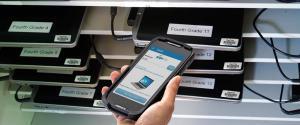
Picture shows GigaTrak's barcode hardware and tool tracking software being used to track the assets of a school. Barcode hardware is essential for reliable tracking. GigaTrak’s integrated software is the most reliable way to protect your physical assets.

Why Barcode Hardware is The Backbone of Tool Tracking

Reading Time: 15 Minutes

Every morning at 6:45 AM, contracting and field service companies across the country lose money to a single, frustrating question:

“Who has the rotary hammer?”

While employees search through truck beds, call coworkers who are still asleep, or make unplanned trips to local supply stores to buy duplicates, jobsites sit idle. If you run an operation in construction, mechanical contracting, utilities, or warehousing, tracking physical inventory is an ongoing struggle. You fight against human error, chaotic field environments, and rapid equipment turnover every day.

In response, many organizations look for digital solutions. They search online for terms like barcode hardware and tool tracking software. They immediately meet slick software platforms promising that a simple mobile app and basic QR code stickers can eliminate tool loss entirely.

However, in industrial environments, software-only tracking systems fail.

A software-based tracking application is only as reliable as the physical data entered into it. In the real world, the true point of failure is not the cloud database. It is the physical interaction between the worker, the tool, and the reading device.

GigaTrak has spent over 30 years helping organizations solve this exact problem. Since 1995, high-profile clients like the FDNY, Lockheed Martin, the US Army, and Virginia Public Schools have trusted us to secure their physical assets. This guide explains why physical barcode hardware is essential for reliable tracking, evaluates how major competitors stack up, and details why GigaTrak’s integrated software, high-durability labels, and professional barcode scanning hardware provide the most reliable tracking system for your business.

The Critical Link: Why Rugged Barcode Hardware is the True Backbone of Asset Management

To understand why tool tracking programs fail, we must look at where data capture actually happens. Field personnel work in demanding environments. They handle tools in dust, mud, rain, and snow. They wear heavy gloves, rush to meet deadlines, and focus on physical labor rather than digital data entry.

When a tracking system relies entirely on consumer-grade smartphones, several physical limitations emerge.

Camera and Lens Vulnerability

Smartphone camera lenses scratch easily. In environments with fine drywall dust, concrete particulate, or metal filings, micro-scratches quickly cover the camera lens. This prevents the camera from focusing on a barcode or QR code, which renders mobile scanning useless.

Environmental Obstacles

Standard smartphone capacitive touchscreens do not function properly in heavy rain or sub-zero temperatures. In cold weather, lithium-ion phone batteries drain rapidly. This often leaves workers without a functional device mid-shift.

High-Friction Workflows

Using a personal phone requires a worker to pull out their device, unlock it, open an app, wait for the camera to focus on the code, and manually click a button to confirm. If a worker must check out 15 separate items every morning, this multi-step process creates friction. When processes are slow, field compliance drops, data becomes inaccurate, and tool tracking fails.

To overcome these challenges, a reliable asset system requires dedicated, industrial-grade barcode hardware designed for abuse. Dedicated barcode scanners and rugged mobile terminals feature integrated scan engines that utilize high-speed imagers or lasers. These devices read barcodes in milliseconds, even through layers of grease, dirt, plastic wrap, or physical damage.

By turning data capture into a single physical button click, dedicated hardware eliminates workflow friction. This ensures high employee compliance and clean data.

The Paper Label Trap: Why App-Only Competitors Fail in the Field

A popular segment of the tracking market includes software-only apps like Sortly and ShareMyToolbox. These platforms provide clean user interfaces, subscription-based pricing, and the ability to print basic QR codes from any office printer.

While these platforms work well in stationary, climate-controlled spaces like offices or retail storage, they struggle in active field operations.

The Problem of the Personal Work Van Black Hole

In construction and field service, the vast majority of tool loss does not happen inside a secure warehouse or central tool crib. Instead, items disappear from personal work vans and trucks. Tools move from one service truck to another on-site, get left in cabs, or end up buried beneath heavy materials in truck beds.

Under a software-only system, tracking these field transfers relies entirely on manual compliance. If a supervisor wants to audit 50 tools rolling around in a work van, they must climb into the van, pull out every tool, and use a smartphone camera to scan each individual QR sticker one by one. Because this process is tedious and time-consuming, audits get skipped. Work vans become digital black holes, and accountability disappears.

The Rapid Degradation of Print-Your-Own Labels

Software-only competitors often instruct users to print QR codes on standard desktop printers or purchase cheap adhesive stickers.

Within days of being dragged across concrete, exposed to motor oil, or tossed into metal gang boxes, these standard paper or light plastic labels smudge, tear, or peel off. Once a barcode is unreadable, the digital tracking chain breaks. Workers will not manually type a 12-digit serial number in the field. Instead, they bypass the system entirely, leading to untracked inventory and lost assets.

Over-Engineered or Over-Priced: The Flaws of Alternative Hardware Competitors

Recognizing the limits of software-only applications, some providers offer hardware compatibility. However, these solutions feature significant drawbacks. These include proprietary hardware lock-in, restrictive subscription pricing, or overly complex enterprise software.

1. Proprietary, Brand-Locked Tool Ecosystems

Many major tool manufacturers offer proprietary Bluetooth and smart tracking hardware built directly into their high-end tools, such as Milwaukee ONE-KEY or Hilti ON! Track.

  • The Issue of Brand Lock-In: While these tools work well within their own brand, they limit your purchasing options. A business rarely utilizes a single brand.

  • Asset Disconnect: If your fleet includes Milwaukee drills, Bosch rotary hammers, DeWalt saws, and Honda generators, tracking them on a brand-locked platform is difficult. You must buy expensive specialty adapters or manage multiple disjointed tracking systems, which defeats the purpose of unified inventory management.

2. High Subscription Costs and Scale Penalties

Several asset tracking companies, like GoCodes or Asset Panda, provide physical tracking materials such as metal tags with pre-printed QR codes. However, their software business models penalize organizational growth.

  • Tiered Asset Limits: These platforms utilize tiered pricing plans capped at a specific number of tracked assets, such as up to 500 or 1,000 items.

  • The Scale Penalty: As soon as you begin tracking smaller accessories, safety equipment, consumables, or extension cords, you quickly exceed your limit. You must upgrade to more expensive tiers, resulting in higher annual software costs simply because you are tracking your gear more thoroughly.

3. Legacy Enterprise Systems

On the other end of the spectrum are legacy enterprise platforms like ToolWatch or ToolHound. These systems are capable but carry significant operational burdens.

  • Complex Implementations: These programs target massive, multinational corporations. They require expensive upfront consulting, weeks of specialized staff training, and complex configurations that are difficult for average users to navigate.

  • High Cost of Entry: Between setup fees, mandatory support contracts, and proprietary hardware replacement costs, legacy systems are financially out of reach for small to mid-sized businesses.

The GigaTrak Advantage: Complete Software Control and Physical Durability

GigaTrak takes a practical, highly rugged approach. Instead of choosing between a fragile mobile app and an expensive legacy system, businesses get a professional software platform paired with battle-tested barcode scanning and printing hardware. We support our clients with a dedicated, US-based support team.

Flexible Hosting Options: Cloud vs. Self-Hosted

Unlike platforms that force you into a perpetual subscription model, GigaTrak offers two distinct structures.

  1. The Cloud Option: A secure, annual subscription hosted on GigaTrak’s cloud infrastructure. This option allows your office, warehouse, and field teams to access real-time tool data from any internet-connected device or mobile application.

  2. The Self-Hosted Option: A one-time software purchase that you host locally on your company’s own server or network. This model eliminates recurring monthly or annual software fees, allowing you to own your tracking system outright.

Track Unlimited Assets Without Extra Fees

GigaTrak does not charge a penalty fee for scaling your business. Regardless of the version you choose, GigaTrak allows you to track an unlimited number of assets, tools, consumables, and materials without raising your base software cost. You can track high-value machinery and cheap consumables side-by-side in the same database.

Professional-Grade Industrial Labels and Tags

To ensure your barcodes survive under real-world conditions, GigaTrak provides high-durability labeling options that perform better than standard print-at-home stickers.

  • Polypropylene Labels: Flexible, water-resistant synthetic labels designed for indoor storage and light-duty field assets.

  • Premium Polyester Labels: High-strength, chemical-resistant labels that withstand heavy abrasion, UV exposure, and extreme jobsite temperatures.

  • Aluminum Foil Tags: Heavy-duty metallic tags that mold directly to irregular surfaces. These tags utilize high-tack adhesives that chemically cure to metal or plastic tools, making them virtually impossible to tear or peel off.

Picture shows GigaTrak's barcode hardware and tool tracking software being used to track equipment, tools, and assets. Barcode hardware is essential for reliable tracking. GigaTrak’s integrated software is the most reliable way to protect your physical assets.

Battle-Tested Barcode Hardware: Supported GigaTrak Scanner and Printer Models

GigaTrak does not rely on third-party hardware workarounds. We source, test, and support industrial scanners, mobile terminals, and thermal printers designed to work with our software platforms.

Our clients choose from several specialized hardware models tailored to their operating environments.

Handheld Mobile Computers for Field and Warehouse Audits

These rugged handhelds combine the processing power of an Android device with a physical, dedicated laser scan engine. They allow users to check tools in and out, perform cycle counts, and audit inventory in the field without relying on personal smartphones.

  • Datalogic Memor 11: A versatile, rugged mobile computer built with an Android operating system and a high-performance 2D scan engine. It features strong wireless connectivity, making it ideal for real-time data entry in large warehouses or active job sites.

  • Honeywell CT45: An ultra-rugged mobile computer designed for extreme environments. Built on a durable architecture, it features superior drop resistance, long battery life, and an advanced scan engine capable of reading damaged or dirty barcodes from varying distances.

  • Zebra ET40: A rugged enterprise tablet perfect for field supervisors who need a larger display screen for viewing complex inventory lists, blueprints, or asset histories, while retaining industrial-grade durability and scanning capabilities.

Desktop and USB Barcode Scanners

For central tool cribs, office check-out stations, or warehouse intake desks, wired and wireless USB scanners provide rapid, reliable scanning.

  • Datalogic QD2590: A highly durable, corded 2D area imager. It is built to handle constant, high-volume scanning at warehouse desks. It reads barcodes instantly regardless of orientation.

  • Zebra DS2278: A cordless, Bluetooth-enabled 2D scanner. It is never tethered by a cable, which gives warehouse workers the freedom to move around their workstations to scan bulky, heavy equipment.

  • Unitech MS912: An ultra-compact, pocket-sized wireless scanner. This device easily pairs with mobile phones or tablets via Bluetooth, giving field workers a lightweight scanning option that is much faster and more accurate than a smartphone camera.

Industrial Barcode Label Printers

Instead of relying on standard desktop office printers, GigaTrak supports specialized thermal transfer printers designed to output high-resolution, long-lasting asset labels.

  • GoDEX GE300: A compact, cost-effective desktop thermal transfer printer. It is perfect for light- to medium-volume printing of polypropylene and polyester asset labels.

  • Zebra ZD220: A reliable, industry-standard desktop thermal printer. It features a simple design and durable construction, and it is built to deliver sharp, smear-proof barcodes day after day.

Calculating the True ROI of Barcode Tool Tracking

To understand the financial benefits of deploying a unified tracking system, let us look at a practical ROI model based on a mid-sized electrical or mechanical contractor.

The Standard Scenario: 15 Field Service Vans (Before GigaTrak)

Consider a contractor running 15 active service vans with a total inventory of 600 tracked assets, such as press tools, rotary hammers, pipe benders, and expensive test kits.

  • Average Annual Tool Loss: Without a secure check-out or audit system, each van averages a loss of 5 tools per year. These are left on job sites, misplaced, or stolen.

  • Average Cost per Asset: Let us assume an average replacement cost of $350 per tool.

  • Direct Replacement Cost:

15 vans  X  5 tools lost/year  X  $350 average cost = $26,250 lost annually
  • Indirect Labor Waste: When a tool is missing, work stops. Crew members spend an average of 45 minutes searching for the tool, calling coworkers, or driving to a local distributor to purchase a replacement. At a burdened labor rate of $50/hour across multiple delayed workers, this downtime costs an additional $15,000 per year in lost productivity.
  • Total Annual Loss: Over $41,250 in unnecessary overhead waste.

The Impact of GigaTrak Barcode Hardware Implementation

By equipping your tool crib with a GigaTrak system, including GigaTrak Contractor Edition software, a Zebra ZD220 printer, durable polyester labels, and rugged Honeywell CT45 handhelds, you establish control.

  • Absolute Accountability: You assign every tool directly to an employee or a specific service truck before it leaves the warehouse.

  • Rapid, High-Frequency Audits: Truck audits that previously took 45 minutes of manual sorting are reduced to a rapid-fire scan with a rugged, dedicated mobile computer.

  • 90% Loss Reduction: Establishing immediate, clear accountability and regular field audits typically reduces tool loss by 90% or more.

The Financial Recovery

Direct Tool Replacement Savings: $26,250  X  90% = $23,625

Productivity & Downtime Savings: $15,000  X  80% = $12,000 saved

Total Annual Savings: $35,625

Because GigaTrak offers a Self-Hosted option alongside highly competitive hardware pricing, the entire system typically pays for itself within the first 3 to 6 months. Following that initial payback period, those operational savings go directly back to your company’s bottom-line profitability.

Frequently Asked Questions About Tool Tracking Hardware

What is the difference between a smartphone scanner and dedicated barcode hardware?

Smartphone cameras use software to process images, which is slow and fails in low light or dusty conditions. Dedicated barcode hardware uses physical laser or imaging engines to read codes instantly, even if the label is dirty, greased, or damaged.

Can I use my existing tools with GigaTrak barcode hardware?

Yes. Unlike brand-locked systems that require you to buy specific smart tools, GigaTrak works with any brand. You simply apply our high-durability labels to your existing fleet of tools, from drills to generators, and scan them into the system.

Do I need an active internet connection to scan tools in the field?

No. GigaTrak offers self-hosted and offline-compatible options. Rugged mobile terminals can store scan data locally in the field and sync the records back to the database once the device connects to Wi-Fi or a cellular network.

Secure Your Operations with GigaTrak

A tool and asset tracking system is only as reliable as the physical hardware used to capture the data. Software-only applications are built on manual input, fragile mobile phone cameras, and low-durability labels that degrade quickly on actual job sites.

GigaTrak solves this operational gap by pairing database software with rugged, physical barcode scanning and printing hardware designed to handle industrial work environments. With a cost-effective barcode labeling setup and a mobile computer network, GigaTrak provides the visibility, durability, and hosting flexibility your business needs to protect its investments.

Stop wasting valuable labor hours searching for lost equipment and paying to replace tools you have already purchased multiple times. Take control of your inventory, secure your physical assets, and keep your field crews working efficiently.

Ready to protect your inventory?

Contact the GigaTrak team at 262-657-5500 today to speak with an experienced specialist, or sign up for a 15-day risk-free trial of our complete Tool Tracking Solution!

Purchasing barcode hardware: https://www.gigatrak.com/hardware/

10 Signs Your Company Needs Tool Tracking Software | GigaTrak

Person finds their lost tool using GigaTrak's state-of-the-art tool and asset tracking system. Shows last barcode transaction (check-in/check-out). barcode technology. tool tracking system.

Discover 10 warning signs that your organization needs barcode tool tracking software to eliminate tool loss.
Process & Technology Solutions at GigaTrak • Reading Time: 10 mins

Tool Tracking Software

Crews arrive at a job site only to realize a critical piece of equipment is missing. This operational failure stalls projects and wastes paid labor hours. If your company experiences frequent tool loss, you need specialized tool tracking software. Managing physical inventory on manual spreadsheets leads to massive inaccuracies. A dedicated tool tracking system resolves these costly field errors.

GigaTrak has provided a barcode-based tool tracking system since 1995. Organizations like the FDNY, Lockheed Martin, the US Army, and Virginia Public Schools trust our tool tracking software to manage physical assets. We offer both cloud deployment and on-premise deployment options. Every software configuration includes dedicated, US-based support. Our team believes if your business or organization has any of the ten problems below, you are in need of a strong, barcode-driven tool tracking system.

1. High Replacement Costs Without Tool Tracking Software

Unmanaged physical operations lose five to ten percent of their equipment every year. Replacing missing items drains your corporate capital budget. A professional tool tracking system stops this financial waste. Our tool tracking software records every asset assignment to eliminate high replacement costs. Implementing a tool tracking system protects your operational bottom line.

Without tool tracking software, your purchasing department clears duplicate orders constantly. A barcode tool tracking system provides complete visibility over your inventory assets. Companies that deploy a tool tracking system notice an immediate drop in equipment losses. Tracking your inventory with tool tracking software ensures long-term capital preservation.

When capital expenditures rise because of missing inventory, operating margins shrink. Many businesses accept these losses as a normal cost of doing business. A modern tool tracking system proves that these expenses are entirely preventable. Security improves the moment you introduce tool tracking software to your warehouse operations.

2. Equipment Hoarding

Technicians often hide specialized gear in personal trucks or job boxes. This equipment hoarding behavior creates a false shortage across your company. The warehouse purchases unneeded items because assets remain hidden from view. A barcode tool tracking system creates total visibility for every team member.

Deploying tool tracking software ensures that hidden assets are brought back into active circulation. When workers know that tool tracking software records their inventory custody, hoarding stops. A software solution assigns clear responsibility to each individual. Your tool tracking system provides the data required to hold field crews accountable.

Hoarding behavior stems from a lack of faith in company logistics. Technicians hide equipment because they fear it will not be available when needed. A tool tracking system restores trust across your entire team. When real-time availability is shown, workers no longer feel the need to hide assets.

3. Spreadsheet Errors

Relying on manual spreadsheets introduces severe human entry errors. Field data changes faster than someone can update an Excel cell. A modern tool tracking system provides instant, accurate data updates. Your warehouse needs tool tracking software to eliminate phantom inventory records.

Spreadsheets lack the capability to manage a complex tool tracking system effectively. Tool tracking software uses simple barcode scans to update status fields automatically. This automation ensures your tool tracking system remains accurate during busy shifts. Switching to software saves hours of administrative data entry.

Shared spreadsheets often suffer from accidental deletions and version conflicts. Multiple users cannot update a manual log simultaneously without creating data discrepancies. Tool tracking software records transactions in a secure database. A barcode tool tracking system preserves data integrity across all corporate departments.

4. Audit Failures

Specialized industries must maintain verified calibration schedules to satisfy safety laws. Missing a regulatory deadline leads to severe penalties or project shutdowns. A tool tracking system stores historical maintenance records securely. This tool tracking software alerts managers before calibration dates expire.

Using tool tracking software protects your business during unexpected safety inspections. A barcode tool tracking system provides a paperless compliance trail for every item. If your company struggles with compliance, tool tracking software offers a permanent fix. Trusting a professional tool tracking system ensures your field gear meets all legal requirements.

Safety inspectors demand proof of regular equipment testing and maintenance. Manual filing cabinets make retrieving these records difficult during an active audit. Tool tracking software stores digital certificates directly on the asset profile. A tool tracking system allows you to export compliance reports instantly.

5. Emergency Purchases

Project managers often make costly emergency purchases on corporate credit cards during site crises. They buy duplicate items because they cannot locate existing inventory. A tool tracking system provides immediate location data across all operations. You can eliminate unnecessary auxiliary spending with tool tracking software.

Emergency procurement signals a broken tool tracking system. Tool tracking software allows field supervisors to check nearby inventory from their mobile devices. If a tool is available nearby, your team does not need to purchase a replacement. Tool tracking software keeps your operational expenditures within budget.

These sudden local purchases result in a bloated, unmanaged tool crib. Your business ends up owning twenty identical items when five would suffice. Tool tracking software highlights these patterns of waste. A barcode tool tracking system gives purchasing managers the data to deny unnecessary requisitions.

6. Excessive Field Search Times Waste Labor Hours

Paid crews should not spend thirty minutes every morning hunting for gear. Excessive field search times reduce labor utilization rates on job sites. A tool tracking system shows exact item locations instantly. Employees use the software to save valuable labor hours.

When your company utilizes tool tracking software, searching for equipment becomes unnecessary. The barcode tool tracking system logs the exact bin, vehicle, or facility for each item. Tool tracking software gives your managers real-time answers. Spending less time searching means your crews finish projects faster.

Consider the compounding cost of fifteen technicians searching for gear daily. Those lost minutes turn into hundreds of wasted payroll hours each month. Tool tracking software reclaims this lost time immediately. A tool tracking system ensures that production begins the moment a shift starts.

7. Reactive Maintenance

Waiting for an item to break before servicing it increases project downtime. Reactive repairs cost far more than proactive servicing. A tool tracking system monitors equipment runtime hours automatically. This tool tracking software lets you schedule service before mechanical failures occur.

Tool tracking software tracks the service history of every asset in your fleet. A barcode tool tracking system logs inspection notes during check-out cycles. This data allows your shop mechanics to catch wear early. Implementing tool tracking software shifts your business into an efficient preventative maintenance model.

Unexpected equipment breakdowns stop work on the critical path of a project. Repairs performed under emergency conditions carry steep shipping and labor premiums. Tool tracking software schedules maintenance during natural operational lulls. A tool tracking system extends the overall lifecycle of your physical investments.

8. Disputes Over Accountability

When an item breaks or disappears, teams often blame each other. A lack of custody data damages workplace morale. A barcode tool tracking system attaches a specific employee name to each asset. This tool tracking software replaces finger-pointing with objective accountability.

GigaTrak’s system records the exact time an item changes hands. The tool tracking system creates an unalterable history of user custody. Workers treat equipment with more care when the tracker records their responsibility. A tool tracking system establishes clear ownership across your entire workforce.

Anonymity breeds negligence in corporate tool cribs. When anyone can grab a tool without logging it, no one feels responsible for its care. Our software removes this anonymity completely. A barcode tool tracking system encourages field crews to report damage immediately.

9. Redundant Tool Overstocking

Companies buy extra inventory as a safety buffer to compensate for poor visibility. Overstocking ties up cash that your business requires for growth. A tool tracking system optimizes your inventory counts. You reduce physical storage costs by deploying tool tracking software.

Tool tracking software reveals which items sit idle in your warehouse. A barcode tool tracking system helps you downsize underutilized inventory. By analyzing tool tracking software reports, you can reallocate assets to active job sites. A tool tracking system eliminates the financial burden of overstocking.

Tying up capital in excess physical inventory limits your corporate liquidity. Warehouses must also pay insurance and storage fees on these idle items. It aligns your equipment purchases with actual project data. A tool tracking system ensures your money remains active in profit-generating areas.

10. Multi-Site Tracking Blindspots Eliminated

Managing assets across several locations requires real-time coordination. Without a central tool tracking system, a manager in one city cannot see idle gear in another. GigaTrak builds a tool tracking system that connects multiple facilities to a single database.

Our tool tracking software removes geographical blindspots completely. Supervisors use the tool tracking system to transfer items between sites seamlessly. The software updates the master registry the moment a barcode is scanned. A centralized tool tracking system unifies your corporate asset management.

Regional branches often end up operating as separate silos without centralized software. One branch might lease expensive gear while another branch leaves identical gear on shelves. Tool tracking software maximizes total corporate utility. A barcode tool tracking system bridges the gap between distant operational hubs.

The Hidden Logistics Tax: How Ghost Assets Warping Corporate Valuations

Unmanaged inventory creates a hidden logistics tax that skews corporate financial health. Items that exist on paper but are missing from the physical warehouse are known as ghost assets. These phantom listings distort corporate valuations during year-end reporting. Executives make critical business expansion decisions based on inventory figures that do not match reality.

Furthermore, insurance policies require companies to pay ongoing premiums for these missing items. Businesses waste capital protecting tools that were lost years ago on distant job sites. Corporate tax burdens also remain artificially inflated because capital depreciation values stay unadjusted. Transitioning to professional tool tracking software eliminates these balance sheet distortions instantly.

A barcode tool tracking system replaces guesswork with audited physical counts. This accounting correction helps your finance team file precise corporate tax documentation. Clean asset data improves corporate credit evaluations and strengthens investor confidence. Knowing your exact equipment availability allows you to bid on large commercial contracts accurately.

The Core Process of a Barcode Tool Tracking System

Manual asset logs require strict user discipline. Workers must write down serial numbers accurately. A barcode tool tracking system removes human error entirely. This process relies on durable barcode tracking technology instead of manual data entry. Technicians apply a durable barcode label to each asset. A quick scan updates the tool tracking system instantly.

GigaTrak designs each tool tracking system for heavy-duty operational environments. Our asset tags protect your tool tracking software data against grease, moisture, and rough handling.

  • Step 1: Enter all corporate gear into the central tool tracking system database. Record details including serial numbers, purchase dates, and maintenance schedules.

  • Step 2: Attach a unique, durable barcode tag linked to your tool tracking software. Use anodized metal tags for heavy machinery.

  • Step 3: Scan the barcode and the employee badge during check-out. The tool tracking system links ownership to that specific individual instantly.

  • Step 4: Scan items periodically at job sites to verify physical location. This practice keeps your tool tracking software data accurate.

Frequently Asked Questions

Can a barcode tool tracking system work without an internet connection?

Yes, our barcode tool tracking system supports offline data collection. Handheld scanners store scan data locally when field sites lack cellular coverage. The tool tracking system syncs the data once the device connects to a network.

What is the difference between cloud and on-premise?

Our cloud deployment options store your tool tracking system database on secure remote servers. On-premise deployment installs the software directly on your local company servers. GigaTrak provides both options for your tool tracking system setup. The structures are often also called cloud- or self-hosted.

How does asset tracking software improve regulatory compliance?

A tool tracking system maintains an unalterable audit trail for every asset. The tool tracking software logs service histories, calibration dates, and user assignments. This organized data provides immediate proof of compliance during official inspections.

What hardware works best with a barcode tool tracking system?

Rugged mobile devices and dedicated enterprise scanners deliver the highest performance. Standard mobile devices work well for basic checks, but industrial environments require specialized hardware. GigaTrak provides field-tested scanners built specifically for software integration.

How long does it take to implement a tool tracking system?

Implementation depends on the total volume of your physical assets. Small organizations often deploy a tracking system within a few business days. Large enterprises use a staged approach to apply barcode tags without disrupting ongoing operations.

Stop the Financial Drain of Unmanaged Inventory

Ignoring the warning signs of tool loss damages your operational efficiency. Missing equipment delays projects and frustrates field crews. Manual asset tracking methods cannot scale with growing operations. Your company requires an accurate tool tracking system to protect corporate capital. Barcode technology provides the most reliable verification method for tools and equipment. Scanning a physical asset via a tool tracking system ensures accountability and removes human error.

Partner with an Industry Expert

GigaTrak builds a tool tracking system for organizations that cannot afford tracking failures. We have provided professional tool tracking software for over 30 years. Our team understands the challenges of field operations and warehouse management. We serve clients ranging from regional municipal schools to the US Army and Lockheed Martin.

We provide flexible deployment models to fit your corporate IT requirements. Choose our cloud tool tracking system for mobile access. Select our on-premise tool tracking system for local network security. All clients receive direct assistance from our US-based support specialists.

Do not let missing items reduce your corporate profit margins. Take control of your inventory today. Request a Demo with a GigaTrak specialist to build your custom tool tracking system.

Contacting GigaTrak:

  • 262-657-5500
  • sales@gigatrak.com
  • gigatrak.com


What is Compliance Tracking?| GigaTrak’s Barcode Technology

Compliance Tracking with GigaTrak, the leader in asset and tool tracking with barcode technology.
Struggling with messy inventory spreadsheets before an official inspection? Learn how barcode-powered physical asset compliance tracking software reduces liability risk, ensures audit readiness, and protects your operational budget.

Process & Technology Solutions at GigaTrak • Reading Time: 15 mins

What is Physical Asset Compliance Tracking?

Physical asset compliance tracking is a digital management method that helps organizations monitor their physical inventory against regulatory laws, safety codes, and internal quality frameworks. The system pairs tracking software with barcode technology to replace manual logging sheets.

The software records every tool transaction, safety check, and custody change. This creates a permanent, tamper-proof record of your organization’s physical assets.

Introduction

Many organizations are not aware that the cost of non-compliance is nearly three times the cost of maintaining proper compliance tracking systems. A small oversight in equipment maintenance or a missing inspection record can quickly lead to regulatory violations, project shutdowns, and heavy financial losses.

Can your company afford that operational risk? Probably not.

Failing to adhere to industry safety regulations and inventory standards causes devastating repercussions for commercial enterprises. For instance, federal safety violations and missing equipment documentation can cost companies thousands of dollars per day in active penalties. Implementing dedicated compliance tracking software makes the difference between consistent business growth and sudden operational failure.

This guide outlines how to build an unshakeable system of record using barcode technology.

What is Physical Asset Compliance Tracking?

Physical asset compliance tracking is a digital management method that helps organizations monitor their physical inventory against regulatory laws, safety codes, and internal quality frameworks. The system pairs tracking software with barcode technology to replace manual logging sheets.

The software records every tool transaction, safety check, and custody change. This creates a permanent, tamper-proof record of your organization’s physical assets.

The Core Importance of Asset Compliance Systems

Compliance tracking systems help organizations meet complex legal, insurance, and operational requirements. They find and fix inventory gaps early. This prevents legal penalties, operational disruptions, and long-term damage to your corporate reputation.

If you operate in heavy field services, government sectors, or healthcare logistics, tracking software helps you demonstrate due diligence. It maintains deep trust with your clients, protects your workforce, and keeps your company competitive.

Key Features of Effective Compliance Tracking Systems

To select the best compliance tracking setup, you must evaluate your field needs and your specific regulatory rules. Look for these foundational features when designing your asset management ecosystem.

FOUNDATIONAL COMPLIANCE TRACKING ELEMENTS

Regulatory Mapping –> Aligns inventory controls with safety codes | Barcode Verification –> Forces physical scan, eliminates guessing |

Continuous Ledger–> Generates permanent, digital history logs | Automated Alerts –> Signals upcoming maintenance or deadlines

Regulatory Mapping and Asset Categorization

Your tracking software must align internal asset controls with specific safety codes and corporate standards. The system should group tools by their required inspection intervals. This sorting gives compliance officers an immediate overview of audit readiness across all active equipment pools.

Hardware and Software Integrations

An asset system must sync data across your enterprise network. Connecting your inventory database with your central management software ensures that personnel changes update automatically. It ties asset ownership to active employees, simplifying accountability across separate jobsites.

Continuous Monitoring and Ledger Tracking

Inventory oversight cannot be a single annual event. True compliance tracking requires continuous monitoring to catch safety issues before equipment leaves your warehouse. Continuous scanning keeps your database audit-ready at all times, protecting your operations from surprise inspections.

Automated Alerts and Remediation Scheduling

Automated notifications alert shop managers about expired safety certifications, overdue tools, or upcoming calibration deadlines. Staff can act quickly to pull hazardous gear from service. The software can also lock out unverified assets, preventing workers from checking out non-compliant equipment.

Clear Reporting and Real-Time Dashboards

Dashboards turn raw scan data into actionable operational insights. They show active risk levels, identify missing item trends, and display upcoming service demands. Compliance managers use these reporting tools to generate clean documentation that satisfies rigorous regulatory standards.

Comprehensive Training Resources

Deploying new barcode technology requires clear instructional materials. Look for platforms that offer direct implementation guidance, video tutorials, and clear setup checklists. Proper training shortens your onboarding timeline and helps your field crew adopt the scanning system quickly.

User-Friendly Interface for Field Crews

If your field technicians find the tracking application difficult to use, they will stop scanning items. A simple layout with large buttons ensures consistent daily use. Software with a minimal learning curve reduces data entry errors and saves valuable corporate training hours.

Responsive US-Based Technical Support

Compliance issues require immediate resolution to avoid project delays. Access to responsive, knowledgeable support staff ensures that system issues get fixed fast. Your team can maintain constant uptime, minimizing the risk of documentation gaps during critical audit windows.

Major Strategic Benefits of Barcode Compliance Systems

Transitioning to barcode technology does more than eliminate paper logs. It builds a highly efficient, automated operational workflow. Here are the primary advantages of upgrading your asset controls.

1. Reduced Exposure to Severe Legal Risks

Legal disputes over damaged equipment or jobsite injuries drain corporate resources. Capital spent on legal defense reduces your capacity to expand operations or hire top talent. Digital tracking ensures constant safety compliance, greatly lowering your exposure to liability claims.

2. Maximum Operational Transparency

Centralizing your tracking data gives every manager visibility into asset locations. Digital logs show who took an item, where they stored it, and when they scanned it last. This transparency helps leadership locate inventory bottlenecks and fix issues before they disrupt your clients.

3. Drastic Reduction in Human Effort

Automated barcode scanning eliminates the hours spent typing serial numbers into office spreadsheets. The software handles evidence collection, logs transaction times, and sends automated reminders. Your warehouse staff can focus on high-value tasks, like preventative tool maintenance.

4. Direct Corporate Scalability

Cloud-based platforms allow your compliance tracking workflows to expand alongside your business volume. As you open new regional offices or add vehicles, the database accommodates the increased data flow. Standardized workflows prevent administrative bottlenecks during periods of fast corporate growth.

5. Enhanced Inter-Departmental Collaboration

A shared asset database breaks down communication barriers between your office and your field crews. Separate departments can easily track shared tools, log equipment transfers, and share maintenance documentation. This shared visibility prevents duplicate tool purchases and improves resource allocation.

6. Safer Work Environments for Employees

Productive teams require safe working conditions. Barcode compliance systems protect your crew by keeping unverified or broken gear out of circulation. Digital safety checklists force operators to inspect tools before use, ensuring total adherence to workplace safety mandates.

Detailed Profiles of GigaTrak Compliance Configurations

GigaTrak offers dedicated tracking frameworks designed for enterprise compliance tracking. Rather than offering a single generic application, GigaTrak builds specific deployment variations to match unique organizational environments.

+------------------------------------------------------------------------+
|                      GIGATRAK DEPLOYMENT EDITIONS                      |
+------------------------------------------------------------------------+
|  [Tool Tracking Edition] ------> Manages fluid, high-velocity field gear|
|  [Asset Tracking Edition] -----> Monitors fixed infrastructure & values|
|  [On-Premise Server Edition] --> Total data isolation behind firewalls |
|  [Mobile Application Hub] -----> Handheld scanning for remote off-grid |
+------------------------------------------------------------------------+

1. GigaTrak Tool Tracking Software (Cloud Edition)

This configuration manages high-velocity tool environments where gear moves constantly between workshops, service trucks, and active jobsites.

  • Key Features: Automated check-out and check-in tracking; real-time tool location logs; historical worker custody tracking; automated text alerts for overdue tools.

  • Standout Benefit: It forces absolute personal accountability. Because every tool transaction links to a specific employee badge scan, item loss drops significantly.

  • Deployment Pricing: Customized pricing tailored to your corporate database size and concurrent user requirements.

2. GigaTrak Asset Tracking Software (Cloud Edition)

This edition tracks fixed infrastructure items, IT equipment pools, and high-value corporate investments that remain at specific geographic installations.

  • Key Features: Fixed asset location histories; depreciation schedule calculators; maintenance log attachments; audit reconciliation reporting.

  • Standout Benefit: It wipes out expensive ghost assets from your accounting ledgers. This optimization prevents companies from overpaying on corporate property taxes and asset insurance premiums.

  • Deployment Pricing: Customized enterprise licensing based on total tracked inventory volume.

3. GigaTrak Corporate Asset Tracking (On-Premise Server Edition)

This secure deployment model installs directly onto your company’s physical internal servers, bypassing external cloud infrastructure entirely.

  • Key Features: Local SQL database hosting; full internal network data isolation; customized database configuration options; active directory employee syncing.

  • Standout Benefit: It provides total data isolation. This architecture matches the security rules of defense contractors, government agencies, and installations that must run entirely behind a secure corporate firewall.

  • Deployment Pricing: One-time corporate server software license fee with optional annual maintenance support contracts.

4. GigaTrak Mobile Scanning Terminal Solutions

This option combines GigaTrak’s specialized mobile software apps with rugged handheld hardware terminals or smartphone devices to track inventory in remote field settings.

  • Key Features: Local offline data caching; camera-based barcode scanning; durable hardware builds; automatic background database synchronization.

  • Standout Benefit: It solves the off-grid tracking challenge. Field technicians can log equipment status, record inspections, and change item locations without internet access. The device stores the scans locally and syncs with the central database once network access returns.

  • Deployment Pricing: Per-device software licensing paired with selected hardware procurement configurations.

All of GigaTrak’s barcode technology solutions are available in both the Cloud-Hosted and Self-Hosted architectures.

Technical Architecture: Why Barcodes Defeat Manual Entry

A reliable system of record requires data accuracy. Software that allows operators to manually type in serial numbers introduces data corruption risks. Workers misread letters, drop digits, or copy rows incorrectly.

Barcode technology requires physical verification. An employee must walk up to the equipment and aim the scanner directly at the tag. The laser or camera reads the encoded data instantly.

This action removes typos, prevents staff from falsifying records from an office desk, and confirms the asset physically exists at that location.

Four Steps to Transition from Spreadsheets to Barcode Software

Replacing outdated tracking files does not require stopping your daily business operations. Following a structured implementation strategy ensures a smooth transition.

  [Step 1: Clean Data]    --> Fix typos and clear duplicate spreadsheet rows
           │
           ▼
  [Step 2: Tag Material]  --> Apply anodized metal tags to field machinery
           │
           ▼
  [Step 3: Group Rules]   --> Restrict system deletion rights to managers
           │
           ▼
  [Step 4: Phased Launch] --> Test the scanning workflow in one shop first

Step One: Reconcile and Clean Your Inventory Data

Do not import disorganized data into your new database. Review your current inventory spreadsheets to remove duplicate entries. Fix obvious typos in serial numbers. Organize your assets into clear categories based on tool type, physical location, and maintenance needs.

Step Two: Select and Apply Durable Barcode Tags

Your barcodes must survive the environments where your tools operate. Standard paper labels work well for office laptops and indoor files.

However, outdoor construction equipment requires heavy-duty tags. Choose anodized aluminum asset tags or thermal-transfer polyester labels. These materials resist damage from abrasion, chemicals, moisture, and extreme temperatures.

Step Three: Establish Group Permissions and User Access

Configure your tracking software to restrict system privileges based on employee roles.

Allow your field crews to check items out or report broken gear from their mobile devices. Restrict higher-level system functions, such as deleting history logs or altering regulatory compliance schedules, to authorized compliance officers.

Step Four: Execute a Phased Departmental Rollout

Do not try to change your entire enterprise inventory tracking system in a single day. Select one department, tool room, or jobsite to serve as your testing location.

Tag the assets at this location, train the local operators, and test your offline data syncing processes. Once you refine the workflow, expand the tracking software across your remaining facilities.

Financial Analysis: The Clear ROI of Active Tracking Controls

Implementing dedicated compliance tracking software protects your organization’s financial bottom line. It changes asset management from an administrative expense into an operational savings driver.

Reclaiming Billable Labor Hours

Manually searching for misplaced equipment before an audit drains employee productivity. Technicians waste hours walking through warehouses looking for missing assets.

With a barcode system of record, your team knows exactly who last scanned the item and where it resides. This visibility speeds up inventory audits, letting your workers focus on billable client projects.

Lowering Capital Replacement Costs

Tools that receive regular, documented maintenance last longer. Automated asset software tracks usage metrics and sends proactive alerts before components fail.

Preventing major mechanical breakdowns reduces emergency tool rental fees. It also helps your operations team avoid buying premature equipment replacements.

Compliance Tracking

FAQ

Why are manual spreadsheets considered an unacceptable risk by regulatory auditors?

Manual spreadsheets lack automated data controls, historical logging, and system version tracking. They allow users to accidentally delete rows, alter entry dates, or overwrite inspection histories without detection.

When an inspector demands verified proof of equipment testing, an easily editable spreadsheet fails to provide the secure, tamper-proof chain of custody required by regulatory agencies.

How does specialized tool tracking software lower corporate insurance premiums?

Insurance underwriting firms evaluate corporate risk based on your internal operational controls. Utilizing an asset tracking system proves that your management actively monitors equipment loss, tracks tool locations, and enforces strict safety inspection schedules.

Providing your insurance carrier with detailed compliance logs demonstrates reduced liability risk. This documentation frequently qualifies your organization for lower annual premium rates.

Can field employees use their own mobile devices to scan barcodes?

Yes. Modern software compliance architectures support mobile device deployment. Your field technicians can use specialized mobile apps to turn their smartphones or tablets into handheld scanning terminals.

Workers use the device camera to scan asset barcodes directly in the field. This capability lets them update tool locations, record safety inspections, and log item conditions without returning to a central office.

What is the process for migrating existing data into GigaTrak software?

Migrating your legacy tracking information is direct. GigaTrak’s software features built-in data import tools. You can export your current inventory lists into standard CSV or Excel formats.

The system guides you through mapping your data columns to the new database fields. This utility populates your new asset tracking environment quickly, saving your staff from performing manual data entry.

What is the difference between compliance tracking and general GRC tools?

Compliance tracking software focuses on monitoring physical controls, tool safety histories, asset conditions, and daily operational deadlines.

Governance, Risk, and Compliance (GRC) platforms take a broader corporate view. They focus on abstract corporate policies, legal regulations, cybersecurity risks, and financial reporting compliance across the entire enterprise.

Build an Unshakeable System of Record with GigaTrak

Building a secure, audit-ready enterprise requires moving past unorganized spreadsheet files and manual field workflows. Reliable operational accountability demands a tracking framework engineered to turn physical asset visibility into an unshakeable system of record.

GigaTrak delivers this level of control. For three decades, our team has built tracking systems designed for industries facing strict regulatory pressures.

We help your organization replace manual chaos with clear operational visibility. Our tracking software runs on the exact deployment model your IT infrastructure requires, backed by reliable, US-based technical support.

Do not let manual data errors or outdated spreadsheets leave your organization vulnerable to failed audits and financial penalties. GigaTrak provides the visibility and control you need to satisfy strict regulatory requirements.

Request a Demo to speak with our application specialists today, or call our offices directly at 262-657-5500 to learn how we can secure your operational compliance.

Asset Tracking Software for Government & Agencies | GigaTrak

Image of a government agency that has theirs costs protected by GigaTrak's barcode technology. GigaTrak's state of the art tool tracking software being used at US Government agencies.
Eliminate ghost assets and tracking errors with secure tool tracking software. Select cloud or on-premise deployment with US support.

What is GOVERNMENT ASSET TRACKING SOFTWARE?

Introduction to Government Asset Tracking Software

Maintaining asset tracking for agencies is more than just a logistical necessity—it is the foundation of fiscal responsibility and operational transparency. Whether you are managing sensitive government equipment or high-value tools, implementing a reliable government asset tracking software solution is the only way to ensure bulletproof accountability.

A municipal utility truck leaves the maintenance yard at 6:00 AM to repair a broken water main. The crew arrives at the jobsite, opens the truck bed, and realizes the specialized $4,500 pipe locator is missing. The tool was left in a personal work van or a job box the previous afternoon. The crew sits idle for two hours while waiting for a replacement. Taxpayer dollars are wasted. Project deadlines slip. Public trust erodes.

This scenario happens daily in public organizations that lack structured inventory control. Managing physical assets across utility departments, school districts, and emergency services requires absolute accountability. Implementing specialized government asset tracking software fixes these field vulnerabilities.

GigaTrak has provided barcode-based asset tracking systems since 1995. Our clients include the US Army, FDNY, Lockheed Martin, and Virginia Public Schools. We build tracking platforms that protect public resources and verify fiscal compliance. Our software offers flexible configurations to match your specific government IT requirements.

The Legal and Financial Mandates of Public Inventory Control

Government operations do not function like private businesses. Public agencies must follow strict legal mandates. These laws include the Government Accountability Office guidelines and local municipal fiscal codes. Your organization must be ready for comprehensive financial audits at any time using verified government asset tracking software.

Eliminating Ghost Assets from Financial Ledgers

A ghost asset is a piece of equipment that stays on your financial ledger but does not exist in physical reality. It may have been broken, lost, or stolen years ago. Carrying these phantom items causes major operational and financial issues.

Your agency files inaccurate financial statements when ghost assets persist. You waste tax dollars paying insurance premiums and licensing fees for missing gear. Regular barcode scanning via government asset tracking software keeps your digital inventory aligned with physical reality, flagging missing items before they distort your annual financial reporting.

Enforcing a Strict Chain of Custody

When an emergency crew, a public utility team, or law enforcement personnel signs out high-value gear, you need a definitive record. This record must include an immutable timestamp, the employee’s name, and the specific location.

Dedicated government asset tracking software removes guesswork from physical inventory management. It creates an unchangeable audit trail that holds individuals responsible for their assigned gear. When workers know the system tracks every item, asset loss drops significantly.

Meeting Capitalization Thresholds

Federal capitalization rules change often. Public agencies must organize inventory by value and risk level. You need flexible government asset tracking software to stay compliant.

The platform must separate high-risk, low-value items like mobile electronics from high-value fixed assets that require formal financial depreciation. GigaTrak lets you sort equipment into custom asset classes, helping you meet specific government accounting rules without creating double data entry.

Choosing Your Architecture: On-Premise vs. Cloud Databases

Before installing an asset database, your agency must select a system architecture. Your choice depends on your IT infrastructure, security clearance, and budget models. GigaTrak provides both options within our government asset tracking software framework.

The Case for Local On-Premise Installations

An on-premise deployment places the government asset tracking software database directly onto your agency’s physical servers. This option suits specific operating environments:

  • Data Sovereignty: Defense agencies choose local servers because they require full control over their data network. Keeping data local keeps inventory files completely isolated from the public internet, stopping remote cyber threats.

  • No Recurring Subscription Fees: On-premise setups utilize a one-time software license purchase. If your municipality operates on rigid annual capital expense budgets, buying the software outright removes future budget surprises.

  • Direct Control via Local IT: If your agency has an internal IT team, on-premise provides a customized environment where your staff manages server hardware and runs local security firewalls.

Learn more about local database management on our dedicated GigaTrak On-Premise Software page.

The Case for Cloud-Based System Access

Cloud-based government asset tracking software hosts your database on secure internet servers. The software provider handles infrastructure maintenance, which alters your operational footprint:

  • High Mobile Accessibility: If you manage field teams across multiple towns or remote job locations, the cloud offers instant access. Workers scan barcodes with smartphones or cellular handheld terminals directly from the field, updating data instantly across the agency.

  • Reduced Technical Demands: Smaller towns or specialized departments often lack large IT teams. A cloud system handles system updates automatically.

  • Background Security Updates: Security patches and regulatory software updates happen without manual work from your staff, allowing your team to focus on daily operations.

Review our deployment models on the GigaTrak Cloud System overview page.

Essential Capabilities of Government Asset Tracking Software

Generic database tools or spreadsheets fail to handle the fast-moving realities of public sector field operations. Effective public asset control requires purpose-built features designed for high-volume tracking.

MANUAL SPREADSHEETS GOVERNMENT ASSET TRACKING SOFTWARE
High human error rates 2-second scan verification
No historical user verification Automated, time-stamped audit log
Missing maintenance alerts Proactive maintenance & safety alerts
Vulnerable to accidental deletion Secure, encrypted role-based access control

Barcode Verification vs. Manual Spreadsheets

Manual data entry creates errors. Clerks mistype serial numbers, forget dates, and misspell employee names. Barcode scanning within government asset tracking software solves this issue completely.

Workers scan a durable asset tag, and the software updates instantly. This process takes less than two seconds, removing human error and speeding up equipment checkouts during morning shift changes.

Verifiable Audit Trails for Compliance

An audit trail tracks the entire lifecycle of an asset. The software records who bought the item, who used it, when it was serviced, and when it was retired.

If an asset breaks on a jobsite, the historical log shows its exact maintenance history. This verification is critical during state or federal funding reviews, proving your agency maintained the gear according to manufacturer safety guidelines.

Offline Functional Support in Remote Zones

Field crews often work in areas without cellular coverage—underground basements, remote parks, or disaster recovery zones. Your government asset tracking software must function without an internet connection.

GigaTrak mobile scanning terminals store data locally when offline. When the worker returns to a cellular or Wi-Fi zone, the device syncs automatically with the main database, ensuring no operational data is lost.

Implementation Protocols for Municipal Departments

Buying software is only the first step. Successful public asset protection requires a clear rollout plan. Following a structured framework ensures high adoption rates and clean data.

Selecting and Applying Asset Labels

Not all barcode labels are identical. Equipment used in construction or severe field environments needs durable tags; standard paper labels tear and fade quickly.

Agencies should use anodized aluminum tags or metal-backed barcodes for heavy machinery and field gear. For indoor office electronics, polyester labels work well. Apply tags to clean, flat surfaces where workers can scan them easily without blocking controls or safety switches.

Conducting the Initial Physical Inventory Count

Before entering data into your new government asset tracking software, you must verify your existing assets:

  1. Collect all equipment from vans, trucks, tool cribs, and storage lockers.

  2. Purge broken or obsolete items that are no longer useful.

  3. Scan and log every remaining item into the centralized database.

  4. Establish a clean, audited baseline for your asset registry.

This initial count ensures your software starts with accurate information, preventing your team from tracking items you no longer own.

Establishing Check-Out and Check-In Workflows

Define strict rules for how equipment moves through your organization. Every employee must scan their ID badge before taking assets from a central warehouse or crib.

The manager scans the asset barcode to link the item to that specific worker. When the worker returns the equipment, the manager scans it back into the storage location. If an item returns damaged, the system flags it for immediate repair and blocks other workers from selecting it.

Real-World Public Sector Applications

Asset tracking needs differ across various government sectors. Examining specific applications shows how specialized government asset tracking software solves distinct operational challenges.

School District Material Logistics

Large school districts manage thousands of items across multiple buildings, tracking maintenance equipment, lawnmowers, specialized science lab gear, and IT hardware.

Virginia Public Schools utilizes asset tracking to monitor inventory across many facilities. Centralized government asset tracking software allows district administrators to see exactly where assets reside. If one school needs an expensive floor buffer, administrators check the system to borrow one from a nearby campus instead of purchasing new equipment. This practice saves thousands of dollars in capital expenditures.

Fire Department and Emergency Medical Services

Emergency services cannot afford missing equipment. Firefighters rely on specialized extraction gear, thermal cameras, and oxygen systems.

The FDNY uses tracking systems to manage critical assets. Before a shift begins, personnel scan the equipment on each vehicle. The government asset tracking software verifies that all mandatory rescue gear is present and fully functional. This automated check saves time, ensures compliance with emergency codes, and protects lives.

Military and Defense Contractor Accountability

The US Army and defense contractors like Lockheed Martin operate under strict security and compliance standards. They track high-value components, calibrated test equipment, and secure communications gear.

These organizations require government asset tracking software that offers detailed security permissions, offline capabilities, and rigid audit histories. Accurate asset control ensures operational readiness and safeguards national security resources.

Overcoming Staff Adoption Obstacles

Field workers sometimes resist new technology, viewing new tracking platforms as unnecessary monitoring or micro-management. Management must address these concerns directly to ensure project success.

Explaining the Benefits to Field Personnel

Frame the government asset tracking software as a solution that helps workers do their jobs safely and efficiently. Explain that tracking prevents situations where someone faces blame for equipment another person lost. It ensures that when a technician needs a specific tool, it is operational, inspected, and ready to go.

Providing Hands-On Software Training

Do not just hand workers a new scanning device and expect results. Run practical training sessions in your primary storage facilities.

Have every team member practice scanning badges, checking out gear, and logging returned equipment. Keep training focused on daily tasks. GigaTrak provides US-based technical support to help guide your team through the onboarding process.

Protecting Public Resources for the Long Term

Achieving total inventory visibility does not have to be an administrative burden. GigaTrak provides specialized government asset tracking software engineered to meet the stringent auditing demands, compliance standards, and operational workflows faced by modern public sector organizations.

We recognize that no two agencies share the exact same IT infrastructure or security protocol. GigaTrak provides the flexibility to choose your deployment architecture:

  • If your agency demands complete data containment and a one-time licensing model, our On-Premise Government Asset Tracking Software gives your internal IT team total localized control.

  • If your operations require real-time field data across multiple districts, our Cloud-Based System effortlessly bridges the gap between field crews and the central facility.

By transforming your inventory into an organized, auditable database, GigaTrak helps your agency eliminate lost equipment, enforce absolute employee accountability, and protect public resources.

Ready to eliminate compliance gaps and secure your agency’s assets?

Book a Consultation with a GigaTrak Specialist Today.

Visit our consultation page at GigaTrak Demo or call our US-based support center directly at +1 (262) 657-5500 to speak with an inventory specialist.

Contacting GigaTrak:

  • 262-657-5500
  • sales@gigatrak.com

Request Information

Frequently Asked Questions About Government Asset Tracking Software

Can we use smartphones instead of dedicated scanning hardware?

Yes. Our cloud-based government asset tracking software runs on iOS and Android devices. Workers download the app and use the phone camera to scan barcodes. For high-volume cribs and warehouses, dedicated rugged scanning terminals are faster and more durable.

What happens if an asset barcode label gets damaged in the field?

Our systems use high-durability barcode labels designed for harsh conditions. If a label becomes unreadable, an administrator can search for the asset by its unique serial number in the software and print a replacement tag instantly.

Is training included with the software purchase?

Yes. GigaTrak provides comprehensive onboarding and training support. Our team is based entirely in the United States, guiding your administrators through system configuration, data import, and hardware syncing.

How does the system handle scheduled asset maintenance?

The software includes a maintenance module. You set service intervals based on calendar days or usage counts. The system flags assets when they need calibration, safety inspections, or routine repairs, preventing workers from taking unserviced gear into the field.

Does the software support tracking across multiple locations?

Our systems track equipment across multiple buildings, field sites, and service vehicles. You can transfer assets between locations while maintaining a complete, auditable log.