
Call us: 262-657-5500
GigaTrak
  • Solutions
    • Tool Tracking System
    • Asset Tracking System
    • Package Tracking System
    • Document Tracking System
    • Hardware
      • Scanners
      • Printers
      • Barcodes
  • Industries
    • Contractors
    • Manufacturing
    • Business
    • Healthcare
    • Government
    • Aerospace
    • Education
  • Resources
    • Client Center
    • Videos
    • Blog
  • About
  • Cloud Login
  • Contact Us
    • Sales
    • Training
    • Support
  • Book  a  Demo
  • Menu Menu
Call us: 262-657-5500

Tag Archive for: Education Asset Tracking

How Education Asset Tracking Software Protects School-Issued Tech

in Blog

How Education Asset Tracking Software Protects School-Issued Tech

Process & Technology Solutions at GigaTrak • Reading Time: 8 mins
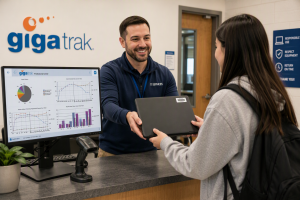
GigaTrak education asset tracking software protecting student laptops and school equipment.

IT directors in K-12 school districts and higher education operations teams face a recurring challenge every academic year: thousands of devices are deployed to students, but hundreds fail to return. Missing Chromebooks, unreturned tablets, and lost media lab cameras quickly drain academic technology budgets.

Relying on manual spreadsheets, paper checkout sheets, or generic ticketing software creates ghost inventory and leaves school systems vulnerable during state compliance audits. Implementing dedicated education asset tracking software delivers simple, barcode-based visibility that prevents equipment loss and establishes strict institutional accountability.

For over 30 years, GigaTrak has provided specialized education asset tracking software solutions built to solve these deployment bottlenecks. Organizations ranging from public school systems to government agencies and emergency services rely on our platform to secure critical gear. Available as a cloud-based or on-premise deployment, every system is fully supported by our dedicated US-based customer support team.


In This Article

  • The Operational Cost of Missing School Assets
  • Managing K-12 1:1 Laptop Deployments and Returns
  • AV Equipment Checkout Systems for Universities
  • Damage Tracking and Audit Compliance
  • Core Features of GigaTrak Software
  • Why Educational Institutions Rely on GigaTrak
  • Frequently Asked Questions (FAQs)

The Operational Cost of Missing School Assets

When academic institutions lack purpose-built education asset tracking software, three primary operational issues develop:

  • Ghost Inventory: School districts frequently purchase unnecessary replacement hardware while missing equipment sits misplaced in storage closets, empty classrooms, or off-site locations.
  • Audit Failures: Federal Title I grants and state technology funds strictly mandate verified audit trails detailing physical locations, student assignments, and item conditions. Basic spreadsheets routinely fail formal compliance reviews.
  • Unfunded Inventory Shrinkage: Schools absorb tens of thousands of dollars in annual equipment write-offs simply because checkout logs lack clear personal accountability and return tracking.

Structured barcode asset management creates an automated audit history, ensuring administrators know who holds every device, where it is located, and exactly when it is due back.


Managing K-12 1:1 Laptop Deployments and Returns

Large-scale 1:1 Chromebook rollouts require rapid checkout procedures and organized end-of-year return workflows.

Fall Deployment Workflow

Distributing thousands of mobile devices across a student body can create massive administrative bottlenecks. By using GigaTrak software paired with handheld barcode scanners or mobile devices, IT staff can quickly streamline intake and issuance:

  1. Pre-Tag Hardware: Affix durable, tamper-evident barcode asset tags to each device and register them within the central database.
  2. Scan and Assign: Scan the student ID card, scan the device barcode tag, and confirm the transaction.
  3. Record Custody: The software automatically links the student profile, serial number, checkout timestamp, and initial hardware condition in real time.

Spring Return Workflow

When the school year concludes, intake stations need to process thousands of hardware returns without queue delays:

  • Instant Check-In: Scanning the asset barcode clears custody from the student record in one second.
  • Condition Logging: Input standard notes for cracked screens, missing power adapters, or casing damage.
  • Maintenance Routing: Fully operational units are instantly cleared for summer storage, while damaged units automatically route to the IT repair queue.

AV Equipment Checkout Systems for Universities

Higher education environments introduce complex asset management needs. University libraries, journalism departments, and media research labs manage high-value equipment kits issued for short loan durations.

Tracking Multi-Piece AV Kits

A typical media lab inventory includes complex, multi-component equipment packages:

  • 4K cinema cameras, specialized lenses, and rig mounts
  • Wireless microphone receivers and lavalier audio sets
  • Portable LED lighting panels, stands, and battery banks

GigaTrak utilizes specialized kit tracking to link individual accessories to a primary parent container tag. Scanning the master container barcode instantly verifies every lens, cable, and battery during issue and check-in.

Enforcing Loan Durations

  • Customizable Loan Terms: Define hourly, daily, or semester-based return windows based on class requirements.
  • Automated Notifications: Send automated return reminders and overdue alerts to student email accounts.
  • Prevent Asset Hoarding: Maintain accurate inventory counts so equipment remains available for all enrolled students.

Damage Tracking and Audit Compliance

Hardware wear and accidental damage are inevitable. How your institution records and tracks these maintenance events directly impacts cost recovery and budget management.

Logging Maintenance & Repairs

When hardware is returned damaged, IT staff can immediately:

  • Attach high-resolution damage photos directly to the asset history record.
  • Log repair expenses, replacement part costs, and third-party vendor receipts.
  • Assign the hardware item to specific internal maintenance queues for technician review.

Financial Accountability and Compliance Reporting

When equipment goes unreturned or requires replacement, robust modern education asset tracking software enables IT administrators to collaborate directly with department heads:

  • Pull comprehensive user audit trails to verify historical custody.
  • Calculate item age and depreciation rates to settle replacement fees accurately.
  • Generate detailed compliance reports for grant providers, school boards, and state auditors.

Core Features of GigaTrak Education Asset Tracking Software

  • Unlimited Asset Capacity: Scale your database from 500 devices to over 50,000 without incurring penalty fees per tagged item.
  • Cloud or On-Premise Deployment: Select secure cloud hosting for cross-campus access, or host on local school servers for complete offline network control.
  • Mobile Barcode Applications: Turn standard iOS and Android smartphones or tablets into dedicated barcode scanners.
  • Kit and Container Tracking: Group individual accessories under a single master barcode to ensure complete set returns.
  • Built-In Audit Engine: Conduct rapid physical inventory counts and instantly generate discrepancy reports to locate missing hardware.

Why Educational Institutions Rely on GigaTrak

GigaTrak designs practical barcode tracking systems engineered to streamline asset management without requiring weeks of complex staff training. We deliver complete, turnkey packages—including rugged barcode labels, commercial handheld scanners, and intuitive software—backed by direct access to our full-time US customer support team.

Stop relying on manual spreadsheets to manage hundreds of thousands of dollars in school technology. Reclaim complete oversight of your laptops, tablets, and media lab gear with software built specifically for modern academic operations.

Take control of your school’s technology investment. Book a Free Demo today, or Contact a GigaTrak Specialist directly at +1 (262) 657-5500.


Frequently Asked Questions (FAQs)

Q1: What is education asset tracking software?

Education asset tracking software is a specialized management database that uses barcode tags, mobile handhelds, or smartphone apps to track the location, custody, assignment history, and physical condition of school-owned technology assets.

Q2: How does GigaTrak assist with state and federal grant audits?

GigaTrak tracks device funding sources, historical assignment records, serial numbers, and physical locations. The software generates single-click compliance and audit reports that satisfy strict state and federal grant requirements (such as Title I funding).

Q3: Can GigaTrak be installed on local school district servers?

Yes. GigaTrak provides both cloud-hosted subscription options and self-hosted on-premise installations for districts requiring direct database ownership and local network security.

Q4: Can we use mobile phones to scan school equipment during deployment?

Yes. GigaTrak offers dedicated mobile applications for iOS and Android devices, allowing IT staff and volunteers to scan asset tags, verify student IDs, and assign devices anywhere on campus.

Pages

  • About TTS
  • About Us
  • About Us Old
  • Account Administration
  • Accounts adding or editing
  • Add New Tool Basic & Advanced
  • Add New Tool No Master
  • Add Photo & Doc
  • Aerospace
  • Asset and Inventory Tracking Software
  • Asset Button
  • Asset Control Systems
  • Asset Database Solutions
  • Asset Inventory Management
  • Asset Inventory System
  • Asset Management
  • Asset Management Barcode Software
  • Asset Management Companies
  • Asset Management Inventory Software
  • Asset Management Programs
  • Asset Management Software
  • Asset Management Software and Barcode
  • Asset Management Software with Barcode Scanner
  • Asset Management Systems
  • Asset Management Tracking
  • Asset Scanner Software
  • Asset Software for Schools
  • Asset Software Management
  • Asset Software Management for Schools
  • Asset Tagging Software
  • Asset Tagging System
  • Asset Tracker Software
  • Asset Tracking
  • Asset Tracking and Management Solution
  • Asset Tracking Barcode Solutions
  • Asset Tracking Contact Us LP 2026
  • Asset Tracking for Hospitals
  • Asset Tracking for Laptops
  • Asset Tracking for Universities
  • Asset Tracking Free Demo Of Software LP 2026
  • Asset Tracking Paid Ad LP 2026
  • Asset Tracking Software
  • Asset Tracking Software
  • Asset Tracking Software for Schools
  • Asset Tracking Software for Schools
  • Asset Tracking Software With Barcode
  • Asset Tracking System
  • Asset Tracking System
  • Asset Tracking System
  • Asset Tracking System
  • Asset Tracking System
  • Asset Tracking System Capterra LP
  • Asset Tracking System Contact Us LP
  • Asset Tracking System Contact Us LP 2024
  • Asset Tracking System Free Demo Of Software LP
  • Asset Tracking System Free Demo Of Software LP 2024
  • Asset Tracking System LP
  • Asset Tracking System LP 2023 Old
  • Asset Tracking System LP 2024
  • Asset Tracking System paid ad LP 2024
  • Asset Tracking System Test Drive It Now LP
  • Asset Tracking System Test Drive It Now LP 2024
  • Asset Tracking System Watch Our Product Video LP
  • Asset Tracking System Watch Our Product Video LP 2024
  • Asset Tracking Test Drive It Now LP 2026
  • Asset Tracking Watch Our Product Video LP 2026
  • ATS Access DB Back Up
  • ATS App Features and Batch Syncing
  • ATS Device Application Video
  • ATS Full Instructional Video
  • ATS HH Configurations
  • ATS Install and Batch Setup
  • ATS Live Quick Review
  • ATS Mobile Handheld Application Tutorial
  • ATS Mobile Handheld Batch Download
  • ATS Mobile Terminal Application Videos
  • ATS Promo
  • ATS Promo Labels
  • ATS Quick Help
  • ATS Recorded Training Video
  • ATS Setup Options
  • ATS Training Library
  • ATS Training Videos
  • Audit Bin Count
  • Automated Physical Asset Management
  • Available Packages
  • Back-Up Compact Database
  • BagCheck Software System
  • Barcode Check In Check Out
  • Barcode Inventory Tracking
  • Barcode Inventory Tracking
  • Barcode labels design
  • Barcode Management
  • Barcode Scanner For Tools
  • Barcode Software for Schools
  • Barcode Solutions for Document Tracking
  • Barcode Solutions for Tool Tracking
  • Barcode Solutions for Tool Tracking
  • Barcode Tools
  • Barcode Tools
  • Barcode Tracking Software
  • Barcodes
  • Barcoding Equipment Software
  • Basic Tool Management Software
  • Best Asset Management Software
  • Blog
  • Book Demo
  • Business
  • Business Asset Control Software
  • Business Asset Management Software
  • Cart
  • Change Password
  • Check in a tool employee location or container
  • Check In By
  • Check in tools using a computer
  • Check In/Check Out
  • Check In/Check Out Inventory Software
  • Check Out By
  • Check out tools on a computer
  • Checkout
  • Checkout to Checkout
  • CIO Review Construction Tool Tracking Provider
  • Class type setup user defined fields used to categorize tools
  • Client Center
  • Client Center
  • Cloud Based Software
  • Company Asset Management Software
  • Condition Administration
  • Construction Inventory Tool Control Program
  • Construction Tool Tracking
  • Contact Training
  • Contact Us Sales Request
  • Container
  • Container with Audit
  • Contractors
  • Customer Testimonials
  • Customers By Industry
  • Dap MT1010
  • Database compact
  • Datalogic Memor Cold Boot
  • Datalogic Memor Warm Boot
  • Datalogic QD2590
  • Datalogic Skorpio Cold Boot
  • Datalogic Skorpio Warm Boot
  • Document Tracking Software
  • Document Tracking System
  • Document Tracking System
  • Document Tracking System Free Demo Of Software LP
  • Document Tracking System LP
  • Document Tracking System Manage Files By Location LP
  • Document Tracking System Record When Folders Move LP
  • Document Tracking System Test Drive It Now LP
  • Draft Request Information
  • DTS App
  • DTS Custom Fields
  • DTS Demo Video
  • DTS Employee Import
  • DTS Filter Search
  • DTS Initial System Setup
  • DTS Items Icon
  • DTS Items Import
  • DTS Label Designer
  • DTS Location Import
  • DTS Overview and Setup
  • DTS Training Library
  • DTS Training Videos
  • DTS Transfer
  • Education
  • Education Asset Tracking System
  • Email Promo
  • Employee Access Levels
  • Employee Administration
  • Employee Administration – Add New Employee
  • Employee Delete
  • Employee list export or print
  • Employee view setting up buttons they see
  • Employees, Locations and Tools – importing
  • Equipment and Tools Management for Construction
  • Equipment Check In Check Out Software
  • Equipment Check Out Software
  • Equipment Check Out Systems
  • Equipment Inventory Asset Manager
  • Equipment Inventory Barcode Scanner
  • Equipment Inventory Management Software
  • Equipment Inventory Software
  • Equipment Rental Inventory Management
  • Equipment Rental Tracking Software
  • Equipment Rental Tracking System
  • Equipment Tracking Software
  • Export Tools
  • Facilities tools are stored in – Create or edit
  • Facility Administration
  • FAQ
  • File Tab
  • File Tab Menu
  • File Tab Overview
  • Find Tool (F1)
  • Find Tools
  • Fixed Asset Barcode Scanner
  • Fixed Asset Inventory
  • Fixed Asset Management
  • Fixed Asset Software
  • Fixed Asset System
  • Fixed Asset Tagging System
  • Frequently Asked Questions
  • Funding Source Administration
  • Furniture Asset Management Software
  • GigaTrak 1.5
  • GigaTrak Tool Tracking Mobile Application video
  • GigaTrak Virtual Brochure
  • Global User Admin – Change Password
  • Godex 4 Thermal Transfer Printer
  • Government
  • GTS Training Library
  • Guard Tour System
  • Handheld Configuration
  • Handheld Docking & Syncing
  • Handheld options
  • Handheld terminal – downloading transactions
  • Handheld terminal – synchronize data
  • Handheld Terminal Functions
  • Hardware
  • Hardware Comparison
  • Hardware Training Library
  • Healthcare
  • Help Tab
  • Help Tab Menu
  • Home
  • Home screen navigation
  • Home Screen Navigation
  • Home-2
  • Honeywell 60s
  • Honeywell 6100
  • Honeywell 6100 Cold Boot
  • Honeywell 6100 Warm Boot
  • Honeywell CT45
  • Honeywell Dolphin 70e
  • Honeywell Dolphin CT60 Handheld Computer
  • Honeywell Voyager 1452g Wireless Upgradeable Area-Imaging Scanner
  • Hospital Equipment Tracking Systems
  • Hotel Asset Management Tracker
  • How To Barcode Inventory
  • Identify
  • IMS Training Library
  • In and Out Software
  • Industrial Tool Barcoding
  • Industries
  • Information fields – Create or edit the by using the support tab
  • Institutional Asset Tracking
  • Intermec CK3
  • Intermec CN51
  • Intermec CN70
  • Intermec CS40
  • Intermec PB22
  • Intermec PF8
  • Intermec SG20
  • Introduction
  • Inventory Assets
  • Inventory Barcode Scanner System
  • Inventory Control
  • Inventory Control
  • Inventory Control Software
  • Inventory Control Tools
  • Inventory Management
  • Inventory Management Software
  • Inventory Management Software for Equipment
  • Inventory Management System
  • Inventory Management System
  • Inventory Management With Scanner
  • Inventory Software
  • Inventory Software Solutions
  • Inventory Solutions
  • Inventory System Software
  • Inventory Tools
  • Inventory Tracking
  • Inventory Tracking System
  • Join Us
  • Join Us
  • Keep Track of Assets
  • Keep Track of Building Equipment with Barcode
  • Keep Track of Inventory with Barcode
  • Keep Track of School Equipment with Barcode
  • Keep Track of Your Company’s Assets
  • Keeping your handheld mobile devices disinfected and ready for safe use
  • Label Printer and Designer
  • Label Tab Menu
  • Latest Technology
  • License and version information
  • Location Administration
  • Locations – Create and edit storage, transfer and check out
  • Log In
  • Log in over an existing user
  • Log in Temporarily
  • Login
  • Logon
  • Logon and Maintenance Alert
  • LXE MX8
  • Machine Shop Tool Crib Software
  • Main setup screen: Rename categories, set maintenance reminders, add your own company logo to reports, and setup the auto email function
  • Maintenance
  • Maintenance Due Alert
  • Maintenance Repair Provider Administration
  • Manage Assets
  • Manage Building Equipment with Barcode
  • Manage Business Assets with Asset Management Software
  • Manage Inventory
  • Manage Physical Assets
  • Manage Sales Orders
  • Managing Your Tools Through Barcoding
  • Manufacturer Administration
  • Manufacturing
  • Master Catalog
  • Master Catalog
  • Medical Equipment Tracking Software
  • Member Login
  • Member Tab Overview
  • Members
  • Members Import
  • Members Import
  • Members Setup In Gigatrak Contractor Edition
  • Memor 10
  • Memor 11
  • Memor X3
  • Mobile App Transition Guide
  • Mobile Device Application Data Safety
  • Mobile Terminals – Batch Download
  • Nautiz X2
  • Nautiz X4
  • Nautiz X9
  • New User
  • Newsletter 2019
  • Newsletter Own or rent On-Premise vs. Cloud solutions
  • Occupancy Monitoring Control System
  • Package Management System
  • Package Tracking System
  • Package Tracking System for School’s and Universities
  • Panasonic Toughpad FZ
  • Password – change the “global” password
  • Password Reset
  • Password Reset
  • Physical Asset Management
  • Physical Count
  • Physical Inventory Management
  • Physical Inventory Software
  • Preprinted Barcode Labels
  • Printer Assignment
  • Printer Setup
  • Printers
  • Privacy Policy
  • Privacy Statement
  • Process Tracking Software
  • Profile
  • Profile
  • Promo Contact Form
  • PTS Container
  • PTS Delivery
  • PTS Label Designer
  • PTS Mobile App
  • PTS Receive
  • PTS Training Library
  • PTS Training Videos
  • PTS Transfer
  • Purchase Process
  • Purge History
  • Quick Check In
  • Record Maintenance
  • Record Maintenance in Miles Hours
  • Register My Software
  • Register My Software
  • Registration
  • Registration
  • Registration
  • Remote Support Tool
  • Remote Warehouse Inventory Software
  • Rental Tracking Software
  • Reports
  • Reports Accessing
  • Request Information
  • Request Information
  • Request Information
  • Request Information
  • Request Information ATS Trial
  • Request Information Capterra
  • Request Information Labels
  • Request Information LP
  • Request Information LP Cloud
  • Request Information LP Premise
  • Request Information Mobile App
  • Request Information TTS Cloud
  • Request Information TTS Cloud Capterra
  • Request Information TTS Premise Capterra
  • Request Information TTS Trial
  • Request Quote
  • Reseller
  • Reservations
  • Reservations
  • Reservations
  • Reservations Overview
  • Returning Consumables
  • RFID
  • RFID Asset Management
  • RFID Tool Tracking System
  • Sales Request Quote
  • Scanners
  • Schedule Training
  • Search Solutions
  • Search Solutions 2
  • Search Solutions LP
  • Security Access User Setup
  • Self Hosted Mobile App Transition Guide
  • SEO golden page
  • Service Request Customer Login
  • Setup Options
  • Simple Inventory Software
  • Sitemap
  • Skorpio X3
  • Skorpio X4
  • Small Business Inventory Control Software
  • Small Tool Tracking
  • Software
  • Software for Asset Management
  • Software for Inventory Control
  • Software Inventory Tool
  • Software to Track Assets
  • Software to Track Tools
  • Software Updates
  • Specialty Software
  • Stores Tracking System
  • STS Checkout Button
  • STS Download Button
  • STS File Tab Menu
  • STS Full Instructional Video
  • STS Handheld App
  • STS Help Tab Menu
  • STS Initial Screen
  • STS Introduction and Startup
  • STS Inventory Tab Menu
  • STS Label Example
  • STS Label Tab Menu
  • STS Logon
  • STS Mobile Terminal Application
  • STS Parts Button
  • STS PO Button
  • STS Receipts Button
  • STS Requisition Button
  • STS Support Tab Menu
  • STS Training Library
  • STS Training Videos
  • STS Transfer Button
  • Supplier Administration
  • Support Request
  • Support Tab Menu
  • Symbol LS2208
  • Tax Information
  • Technical Support
  • Term and Conditions
  • Thank You
  • Thank You Booking
  • Thank You Search Solutions
  • Thank You Technical Support
  • Thank You Training Request
  • Tool – add, maintain, view
  • Tool – Tracking Maintenance
  • Tool – Transfer to another storage location
  • Tool – Transfer, Detailed Instructions
  • Tool – view history
  • Tool – view maintenance history
  • Tool and Equipment Management
  • Tool Check In Check Out Software
  • Tool Check Out System
  • Tool condition – define
  • Tool Control Software
  • Tool Crib Management
  • Tool Crib Management Software
  • Tool Crib Software
  • Tool Crib Software
  • Tool Crib Tracking
  • Tool Crib Tracking Software
  • Tool History (F3)
  • Tool Information (F2) – Add New Tool
  • Tool Inventory
  • Tool Inventory Control
  • Tool Inventory RFID
  • Tool Inventory Software
  • Tool Inventory System
  • Tool Maintenance Repair Providers – Adding
  • Tool Management System
  • Tool Manufacturer Administration
  • Tool Rental Software
  • Tool Reporting Systems
  • Tool reservation – create
  • Tool reservation – find a
  • Tool Room Inventory Software
  • Tool Room Management System
  • Tool Screen Color Selector
  • Tool Support Admin – Class – Type Setup
  • Tool Tracker Software for Contractors
  • Tool Tracking
  • Tool Tracking Contact Us LP 2026
  • Tool Tracking Free Demo Of Software LP 2026
  • Tool Tracking Inventory
  • Tool Tracking LP New
  • Tool Tracking Paid Ad LP 2026
  • Tool Tracking Software
  • Tool Tracking Software
  • Tool Tracking System
  • Tool Tracking System
  • Tool Tracking System
  • Tool Tracking System App
  • Tool Tracking System App
  • Tool Tracking System App Email
  • Tool Tracking System Capterra
  • Tool Tracking System Contact Us LP
  • Tool Tracking System Contact Us LP 2024
  • Tool Tracking System Free Demo Of Software LP
  • Tool Tracking System Free Demo Of Software LP 2024
  • Tool Tracking System LP
  • Tool Tracking System LP 2
  • Tool Tracking System LP 2023
  • Tool Tracking System LP 2024
  • Tool Tracking System new copy template
  • Tool Tracking System Test Drive It Now LP
  • Tool Tracking System Test Drive It Now LP 2024
  • Tool Tracking System Watch Our Product Video LP
  • Tool Tracking System Watch Our Product Video LP 2024
  • Tool Tracking Systems
  • Tool Tracking Test Drive It Now LP 2026
  • Tool Tracking Watch Our Product Video LP 2026
  • Toolroom Inventory Control
  • Toolroom Inventory Management System
  • Tools, – find, view history and maintenance
  • Toolwatch – importing information from
  • Track Anything with Barcode
  • Track Assets with Barcode
  • Track Cleaning Supplies
  • Track Construction Tools with Barcode
  • Track Contractor Tools with Barcode
  • Track Educational Assets
  • Track Fixed Assets with Barcode
  • Track Institutional Assets
  • Track Inventory
  • Track Inventory with Barcode
  • Track Janitorial Supplies
  • Track Office Furniture
  • Track Physical Assets
  • Track Physical Assets with Software
  • Track Physical Inventory with Barcode
  • Track Production Orders
  • Track Rental Tools with Barcode
  • Track Repair Parts with Barcode
  • Track School Assets with Barcode
  • Track Tools
  • Track Tools with Bar Code
  • Track Tools with Barcode
  • Track Work Orders
  • Tracking Software
  • Training Request
  • Transfer
  • TTS Batch Sync and Function
  • TTS Binned Consumables
  • TTS Binned Non Consumables
  • TTS Cloud Mobile App Setup
  • TTS Device Application Videos
  • TTS Full Application Training
  • TTS Full Instructional Video
  • TTS Handheld Application
  • TTS Handheld SD Synch Option
  • TTS Handheld Standard Synch
  • TTS Handheld Terminal Mobile Application Videos
  • TTS Handheld USB Synch Option
  • TTS Handheld Virtual Synch Option
  • TTS Kiosk
  • TTS Limited Batch
  • TTS Manual Batch
  • TTS Pro Icon Buttons
  • TTS Pro Menu Tabs
  • TTS Promo
  • TTS QR Code Generator
  • TTS Quick Start Video
  • TTS Recorded Training Videos
  • TTS Training Library
  • TTS Training Video
  • TTS Web Portal Overview
  • TTS Web Portal Training Video
  • TTS Web Portal Videos
  • TTS Wireless Batch
  • Unitech MS912
  • Update Tool Data Export Import
  • Use Barcode to Keep Track of Assets and Inventory
  • User Defined Fields
  • User manual – find
  • User Rights – Accessing
  • Videos
  • View Tab
  • Warehouse Barcode Scanning System for Tools
  • Warehouse Inventory Control
  • Warehouse Inventory Management System
  • Warehouse Management
  • Warehouse Management
  • Warehouse Management Software
  • What is Specialty Software
  • WIN-RPD
  • Zebra DS2278
  • Zebra ET40 10 tablet
  • Zebra GC420
  • Zebra LP 2844
  • Zebra TLP 2824 Plus
  • Zebra ZD220

Categories

  • Blog
  • Client Center
  • Export
  • Hardware
  • LP
  • Software

Archive

  • August 2026
  • July 2026
  • June 2026
  • December 2023
blank

Products

  • Tool Tracking System
  • Asset Tracking System
  • Package Tracking System
  • Document Tracking System

Hardware

  • Scanners
  • Printers
  • Labels

About Us

  • Blog
  • Videos
  • Testimonials
  • FAQ
  • Term and Conditions
  • Privacy Statement

Contact Us

  • Request Quote
  • Client Center
  • Technical Support
© Copyright 2026. GigaTrak. All Rights Reserved.
Scroll to top Scroll to top Scroll to top