
Aviation Tool Tracking Software & Systems | GigaTrak
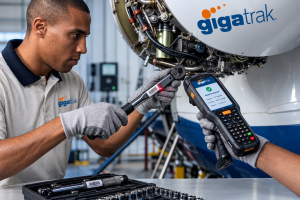
The Ultimate Guide to Aviation Tool Tracking Software: Eliminating FOD, Ensuring FAA Compliance, and Controlling Hangar Inventory
In aviation maintenance, repair, and overhaul (MRO), a single misplaced socket or wrench creates massive safety risks. Uncontrolled tools cause Foreign Object Debris (FOD), costing the global aerospace industry millions of dollars every year in damage, aircraft groundings, and lost operational time.
For over 30 years, GigaTrak has provided barcode tracking software to organizations that cannot afford tracking failures. Trusted by government agencies, military deployments, and industry leaders including Lockheed Martin, the US Army, and the FDNY, GigaTrak provides simple, reliable systems to maintain total tool control across your maintenance bays and tool cribs.
This comprehensive guide explains how dedicated aviation tool tracking software replaces manual guesswork, satisfies strict FAA regulations, and protects your fleet against tool-related FOD.
What Is Aviation Tool Tracking Software?
Definition: Aviation tool tracking software is a specialized inventory management process that logs the checkout, return, location, and maintenance status of physical tools and test equipment used in aircraft maintenance.
Unlike general warehouse inventory systems that track consumable goods, aviation tool tracking software manages rotational assets. These items leave the tool room, go to an active hangar bay, and must return before shift sign-off. The software maintains an unbroken chain of custody for every tool issued to a technician, linking items directly to specific work orders, technicians, and aircraft tail numbers.
1. The High Stakes of Aviation Tool Control
Losing a tool in standard manufacturing causes minor operational delays. Losing a tool inside an airframe or jet engine can cause catastrophic mechanical failure.
Foreign Object Debris (FOD) Prevention
Foreign Object Damage occurs when forgotten tools interfere with flight controls or enter jet engines during operation.
- Direct Overhaul Costs: Ingested equipment damages turbine blades, leading to sudden groundings and expensive engine teardowns.
- Aircraft on Ground (AOG) Expenses: Unscheduled downtime interrupts flight schedules, increases gate fees, and harms operational reliability.
- Human Safety: Unretrieved tools compromise structural safety, putting crew members and passengers at serious risk.
A barcode tracking system provides a strict gatekeeping process. It ensures every issued item is scanned back into storage before an aircraft is cleared for departure.
2. FAA Compliance and Mandatory Audit Trails
Aviation regulatory bodies enforce strict standards for tool accountability and calibration status. Maintenance facilities must prove continuous compliance during official inspections to retain certification.
Key Regulatory Frameworks
Whether operating under FAA Part 145 repair station regulations, EASA Part 145, or military guidelines like NAS 412 (Foreign Object Damage Prevention Guidance), hangar operations must maintain three core standards:
- Positive Tool Control: You must prove which technician checked out a tool and verify its return at shift change.
- Calibration Control: Precision instruments, such as torque wrenches and pressure gauges, must meet current calibration standards before use.
- Historical Audit Logs: You must provide clear records showing who handled a tool, when it was used, and on which aircraft tail number it was applied.
Digital tracking software generates instant compliance reports, eliminating paper logbooks and manual search efforts during unexpected audits.
3. How Tool Tracking Evolved in the Hangar
Tool management has progressed through distinct operational phases over the decades as MRO facilities scaled up operations:
- Phase 1: Paper Sign-Out Logs: Paper logs rely entirely on human memory and legibility. They offer zero real-time visibility and fail during rapid operational audits.
- Phase 2: Visual Shadow Boards: Cutout foam drawers show when an item is missing from a toolbox. However, shadow boards do not reveal who took the tool, which aircraft it was used on, or whether its calibration expired.
- Phase 3: Barcode Tracking Systems: Modern tracking pairs durable barcode labels with centralized software. Technicians scan their ID badges and the tool barcode in seconds, establishing an undeniable chain of custody.
4. Key Capabilities of GigaTrak Tool Tracking Software
Off-the-shelf inventory software lacks the strict controls required for demanding MRO environments. GigaTrak builds software specifically designed for tool crib operations and hangar floor logistics.
Fast Check-In and Check-Out
Technicians scan their ID badge and the barcode label attached to the tool. The system records the transaction in under three seconds. This speed prevents long lines at the tool crib during shift changes and morning rollouts.
Location of Last Scan Tracking
GigaTrak tracks the location of the last transaction or scan. When a technician checks out a tool for a specific tail number or work bay, the software records that exact location update. Supervisors always know where the tool was last scanned and who accepted responsibility for it.
The GigaTrak Tool Workflow
The GigaTrak tool checkout process operates through a fast, automated sequence that establishes immediate accountability:
- Technician Badge Scan: The mechanic scans their employee ID badge at the tool crib to start the transaction.
- Tool Barcode Scan: The user scans the barcode label attached to the tool or toolkit, capturing the asset identity in less than three seconds.
- Central Database Verification: The software processes the transaction instantly by performing three core checks:
- Assigning the tool to the technician and the specific aircraft tail number or work bay.
- Verifying calibration status and automatically blocking checkout if the service window has expired.
- Recording the exact date, timestamp, and location of the last scan.
- Active Monitoring: The system updates live dashboards, enabling instant unreturned tool reports and automated safety controls.
Automatic Calibration Lockouts
Precision maintenance requires strict adherence to calibration dates. GigaTrak monitors service cycles and automatically locks out expired tools. If a torque wrench passes its inspection date, the system alerts the operator and blocks the checkout transaction immediately.
Container and Toolkit Tracking
Aviation mechanics often use standardized toolkits, such as avionics or sheet metal kits. GigaTrak allows supervisors to track full containers under a master barcode. You can issue an entire toolkit in one scan while maintaining individual accountability for every component inside the kit.
Flexible Hardware and Durable Barcode Tags
Hangar environments expose equipment to hydraulic fluids, fuel, and extreme temperatures. GigaTrak integrates with ruggedized handheld barcode readers, mobile devices, and durable asset tags built to withstand harsh chemical exposure.
Comparison: Cloud vs. On-Premises
| Operational Metric | Cloud-hosted Tool Tracking | On-Premises Tool Tracking |
|---|---|---|
| Financial Structuring | Operational Expense (OpEx): features recurring monthly or annual fees. | Capital Expenditure (CapEx): requires a one-time software license fee. Thus, it is cheaper long-term. |
| Deployment Speed | Fast; users can access the system via a browser within hours. | Slower; requires manual hardware procurement and local server setup. |
| IT Staff Allocation | Minimal; the software vendor completely maintains the infrastructure. | Heavy; the in-house team handles patches, backups, and firewalls. |
| Network Reliance | Requires a continuous, reliable internet connection at all times. | Operates fully offline via your internal local area networks. |
| Remote Access | Native; mobile apps provide global accessibility out-of-the-box. | Requires secondary configurations like secure, manual VPN networks. |
Comparison: Manual Logs vs. Shadow Boards vs. GigaTrak Barcode System
| Feature / Metric | Manual Paper Logs | Visual Shadow Boards | GigaTrak Barcode System |
|---|---|---|---|
| Checkout Speed | 2 to 5 minutes per item; creates long queues. | No checkout recording; items taken instantly. | Under 3 seconds per scan; automated logging. |
| User Accountability | Low; bad handwriting and missing signatures. | None; shows a tool is gone, not who took it. | High; requires employee badge scan. |
| Calibration Control | Manual spreadsheet reviews; prone to error. | Manual stickers; easily smudged or ignored. | Automated system lockout during checkout scan. |
| FOD Risk Reduction | Low; relies entirely on human memory. | Moderate; localized visual checks only. | High; automated unreturned tool exception reports. |
| Audit Readiness | Days of sorting paper filings. | Zero historical transaction records. | One-click instant digital compliance reports. |
Implementation Steps for MRO Hangars
Upgrading your hangar to digital tool tracking requires a structured rollout plan to avoid operational downtime.
- Audit Physical Tool Fleet: Gather all hand tools, serialized precision instruments, and specialized kits. Categorize them into clear asset groups in your database.
- Apply Industrial Barcode Labels: Attach durable, chemical-resistant barcode labels or metal asset tags to every tool body and storage case.
- Configure System Workflows: Set up user permissions, define hangar storage locations, and input required calibration intervals for precision gear.
- Train Hangar Staff: Show supervisors and mechanics how to scan badge IDs and tools during checkouts. Emphasize that fast scans keep mechanics working safely.
- Enforce Shift-End Protocols: Require shift leads to run GigaTrak unreturned tool reports 15 minutes before shift change to ensure every tool returns to its crib.
Frequently Asked Questions
How does barcode scanning help prevent FOD?
Barcode scanning creates an immediate digital record of every tool issued to a technician or work bay. Before an aircraft leaves the hangar, supervisors run an unreturned tool report. If a tool is missing, the system identifies the exact user and location of the last scan so your team can retrieve it immediately.
Can GigaTrak software block expired calibration tools?
Yes. GigaTrak tracks expiration dates and usage metrics for precision equipment. If a tool passes its service deadline, the system flags the barcode scan and physically blocks the checkout transaction until QA recertifies the item.
Does GigaTrak offer on-premise installation for high-security facilities?
Yes. GigaTrak provides both cloud deployment and self-hosted on-premise installations. On-premise deployment allows defense contractors, government facilities, and military units to run the software entirely within their internal network.
What happens if field technicians lose cellular or Wi-Fi connection?
GigaTrak mobile scanning terminals support offline data collection. The handheld terminal stores barcode transactions locally while offline and syncs automatically with the main database once network connectivity returns.
How long does it take to implement GigaTrak in a hangar?
Implementation timing depends on total inventory volume and facility size. Most organizations tag assets and train staff to begin scanning within a few days, backed by dedicated US-based support.
Take Control of Your Hangar Inventory Today
Unmanaged tools cause job delays, failed FAA audits, and severe FOD hazards. GigaTrak combines reliable barcode software, rugged hardware, and dedicated US-based support to eliminate tool loss across your operations.
Protect your fleet, safeguard your technicians, and ensure absolute compliance.
Request a Consultation with a GigaTrak tracking specialist today.
Contacting GigaTrak:
- 262-657-5500
- sales@gigatrak.com
Request Information
